205020 OTS Standalone Manual.pdf - 第26页
OVER THE TO P SNUGGER (OTS) SEQUENC ES 1.14 Over the Top Snuggers (OTS) Manual Chapt er Issue 3 A ug 14 5. S tate 4 The OTC plate is raised. 6. S tate 5 The OTC plate retrac ts unti l it is clear of the snugger . 7. S ta…
OVER THE TOP SNUGGER (OTS)
SEQUENCES
Chapter Issue 3 Aug 14 Over the Top Snuggers (OTS) Manual 1.13
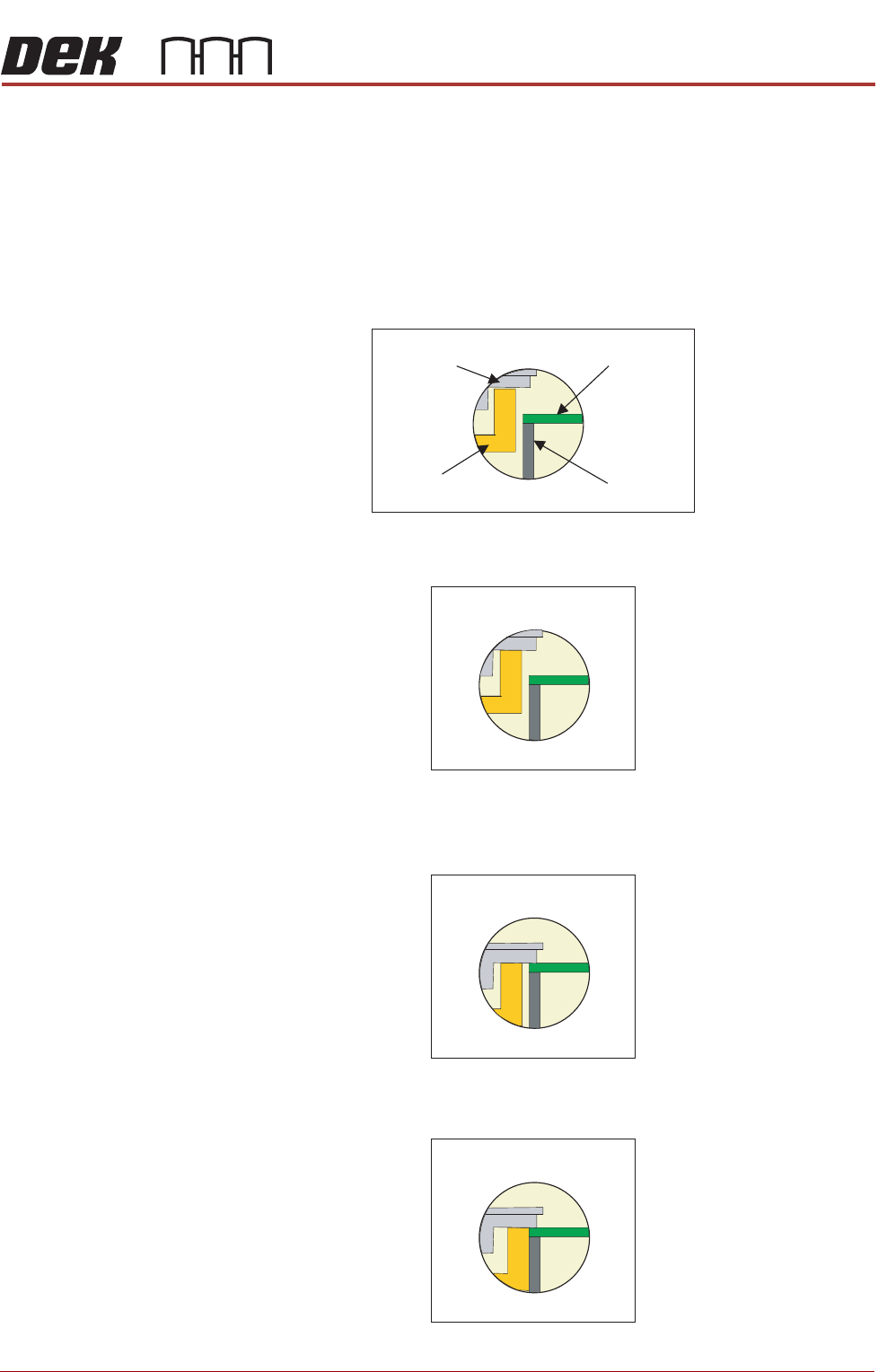
SEQUENCES In the sequence that follows the diagrams show the over the top clamp (OTC)
plate, the snugger, the board and the board support. The OTC is capable of
two independent actions: up/down movement and in/out movement. The snug
-
ger is part of the complete assembly that includes the mid plate and brakes.
Clamping 1. State 0 shows the product resting on the board support; the OTC plate is in
the up position it is not retracted, the mid plate and snugger are up and the
brakes and snugger are off. The rails are at transport height.
2. State 1 the same as state 0, however the OTC lowers onto the snugger and
the brake vacuum comes on.
3. State 2 the OTC plate and mid plate/snugger lower; the OTC plate holds the
product against the board support to prevent it from ‘flipping’ out when the
snugger actuates. The snugger height is level with the top of the board.
4. State 3 The snugger gap is closed. The brake vacuum switches off. The
brakes are applied; this locks the mid plate in position.
STATE 0
Board
OTC Plate
Snugger
Board Support
STATE 1
STATE 2
STATE 3
OVER THE TOP SNUGGER (OTS)
SEQUENCES
1.14 Over the Top Snuggers (OTS) Manual Chapter Issue 3 Aug 14
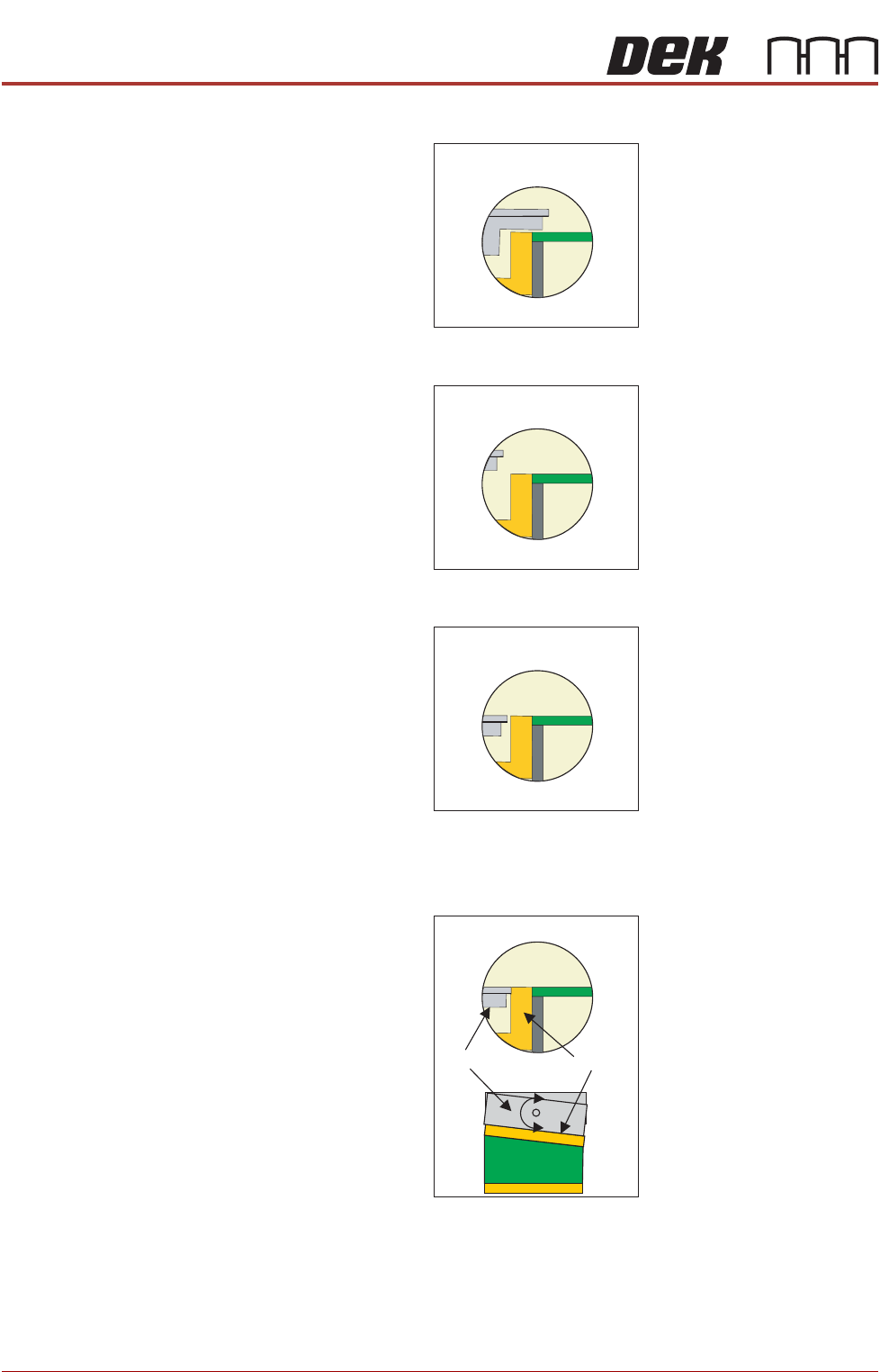
5. State 4 The OTC plate is raised.
6. State 5 The OTC plate retracts until it is clear of the snugger.
7. State 6 The OTC plate moves to the down position; behind the snugger.
8. State 7 The OTC plate moves in, flush with the snugger, to form a seamless
bridge ready for printing to take place. The print cycle commences; the rising
table moves the rails up to print height, printing takes place.
The top plate of the rear OTC can swivel to accommodate snugging of
boards that do not have parallel sides. In the plan view above, the board is
shown with the snugger clamp against its non parallel surface; when the
OTC moves in to position the swivel plate conforms to the snugger.
STATE 4
STATE 5
STATE 6
STATE 7
OTC plate
Snugger
OVER THE TOP SNUGGER (OTS)
SEQUENCES
Chapter Issue 3 Aug 14 Over the Top Snuggers (OTS) Manual 1.15
Unclamping There are two unclamping states, there is unclamping with the board retained
by the OTC plate and unclamping with the board released. The two modes of
operation are programmed via the software. The parameter, OTS Retain Mode,
if enabled, allows the board to be held during the unclamping phase of the cycle
If disabled, the clamp is retracted preventing the possibility of smudging the
print. This is the default setting.
Retain Mode
Enabled
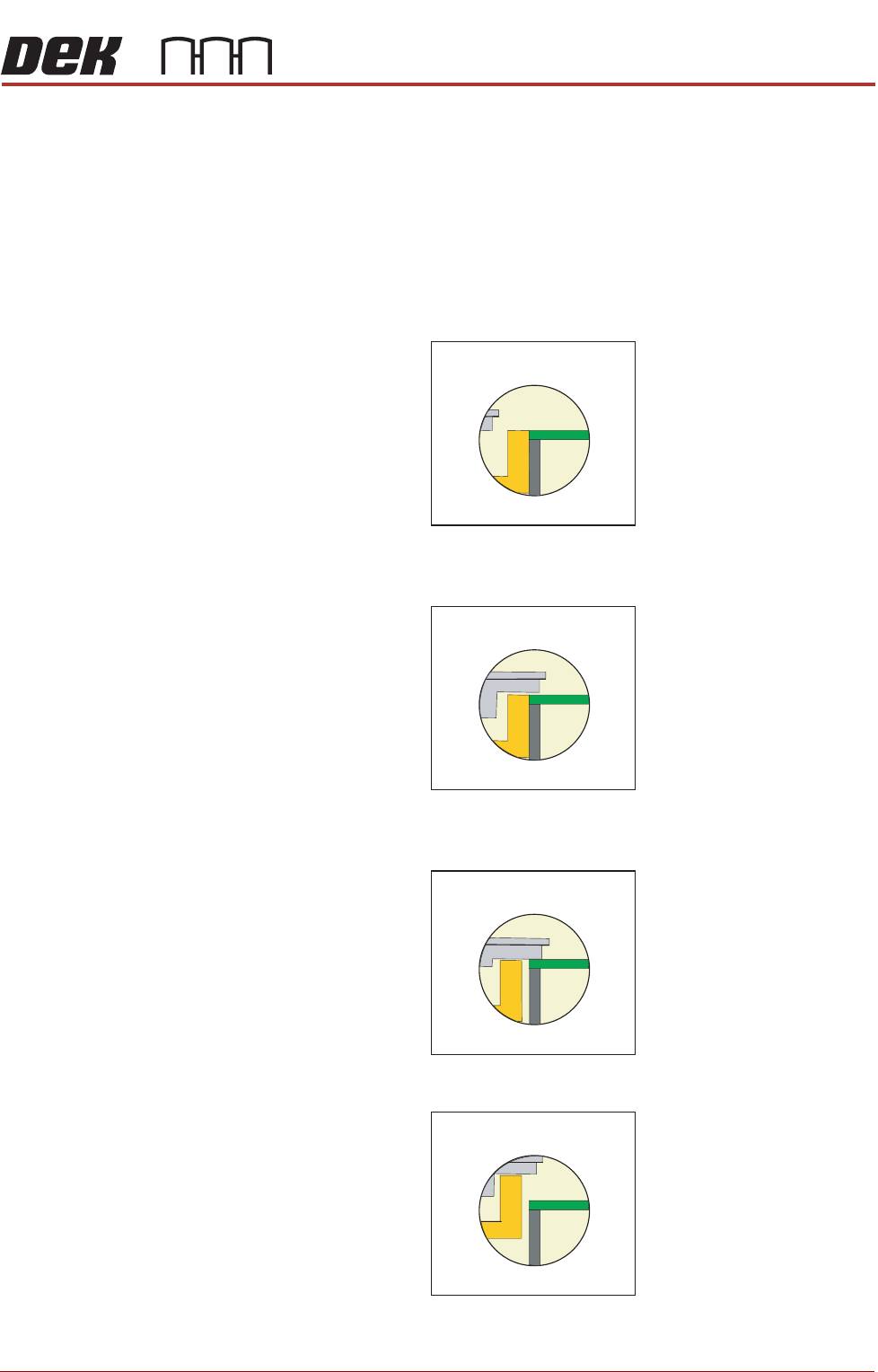
1. State 8 - post print, the rising table lowers, the OTC plate retracts away from
the snugger and lifts; ready to release the product.
2. State 9 The OTC plate moves into position, this prevents any movement of
the product that may occur as a result of the unclamping action.
3. State 10 The vacuum is on, releasing the brakes. The snugger moves away
from the product.
4. State 11 The mid plate/snugger lifts.
The status returns to State 0; the product is fed out of the printer and another
is fed in; the cycle continues until the complete batch of boards has printed
STATE 8
STATE 9
STATE 10
STATE 11