TK26620.Feeder Maintenance Notice.pdf - 第14页
SMT Software Engineering Group IM Operations Y AMAHA MOTOR CO., L TD MDOC-SOFT50282 14/17 Item Function Feeder MACS Correct Fe eder maintenance notice accor ding to Feeder MACS correction value. OFF … unavai…
SMT Software Engineering Group
IM Operations YAMAHA MOTOR CO., LTD
MDOC-SOFT50282
13/17
4.2 Machine Setting
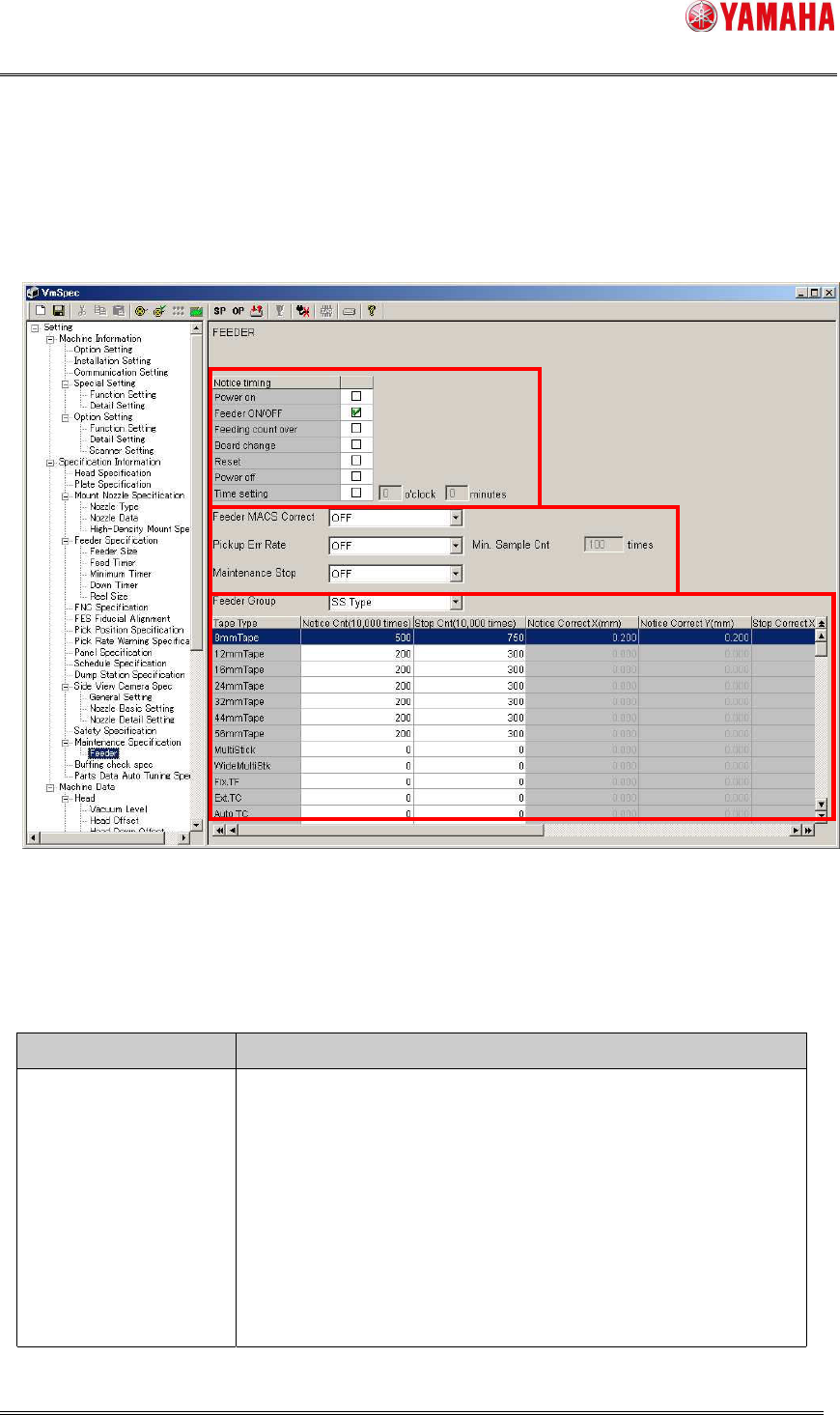
It is possible to change the timing to display the notification message on [Machine] –
[Specification Information] - [Maintenance Specification] – [Feeder].
Fig 4.3 the [Machine] – [Specification Setting] - [Maintenance Specification] – [Feeder]
screen
Table 4.1 items on [Machine]–[Specification Information]-[Maintenance
Specification]–[Feeder]
Item Function
Notice timing Timing to display the maintenance notice message or stop
error.
You can take multiple selections. For details of each item,
refer to Table 4.2.
When no item is selected, the message is not displayed.
By default, only “Feeder ON/OFF” is selected.
SMT Software Engineering Group
IM Operations YAMAHA MOTOR CO., LTD
MDOC-SOFT50282
14/17
Item Function
Feeder MACS Correct Feeder maintenance notice according to Feeder MACS
correction value.
OFF … unavailable
ON … available
It is set to “OFF” by default.
Pickup Err Rate Feeder maintenance notice according to pick up error rate.
OFF … unavailable
ON … available
It is set to “OFF” by default.
Min. Sample Cnt This item is available when Pickup Err Rate is ON. Pick up
error rate is calculated based on this count.
Allowable range is 10 to 10000 times.
It is set with “100” by default.
Maintenance Stop If you want to stop the machine when it reaches Stop Count,
select ON.
OFF … unavailable
ON … available
It is set to “OFF” by default.
Notice Cnt
(10,000times)
Stop Cnt
(10,000times)
Feeding count that is allowed before the next maintenance
notice or stop.
You can set different values for SS feeder and ZS feeder
separately, by switching [Feeder Group] to “SS Type” or “ZS
Type”.
A recommended value is set by default (Table 4.3), so that
usually you don’t need to change this value.
Allowable range is 0 to 65535 (10,000times). When “0” is set,
the maintenance notice and stop for the feeder is not
displayed.
SMT Software Engineering Group
IM Operations YAMAHA MOTOR CO., LTD
MDOC-SOFT50282
15/17
Item Function
Notice Correct X
(mm)
Notice Correct Y
(mm)
Stop Correct X(mm)
Stop Correct Y(mm)
For each tape type, set Feeder MACS correction value to
make maintenance notice or stop.
Only 8mm feeder and 4mm feeder are acceptable.
By switching [Feeder Group] (“SS Type” or “ZS Type”), it is
possible to set different values for SS feeder and ZS feeder.
A recommended value is set by default(Table 4.3), so that
usually you don’t need to change the value.
The allowable range is 0.000 to 999.999 (mm).
When “0.000” is set, maintenance notice and stop is disabled
for the tape.
Notice Err Rate(%)
Stop Err Rate(%)
For each tape type, set pickup error rate to make maintenance
notice or stop.
By switching [Feeder Group] (“SS Type” or “ZS Type”), it is
possible to set different values for SS feeder and ZS feeder.
A recommended value is set by default(Table 4.3), so that
usually you don’t need to change the value.
The allowable range is 0.00 to 10.00 (%).
When “0.00” is set, maintenance notice and stop is disabled
for the tape.
Table 4.2 Notice timing
Notice timing Function
Power ON Displays the message when the first Return-to-Origin after
machine startup is completed.
* If feeders are on cart, the cart must be correctly set.
*When there is no correction value at the time of power on,
Feeder MACS correction value is excluded.
Feeder ON/OFF Displays the message when attaching or removing a feeder
that requires maintenance.
* Includes the following timing.
- The cart clamp switch is turned ON/OFF by hand.
- Cart clamp ON at machine startup.
- Cart clamp OFF at machine shutdown.
*When there is no correction value at the time of power on,
Feeder MACS correction value is excluded.