TK26620.Feeder Maintenance Notice.pdf - 第4页
SMT Software Engineering Group IM Operations Y AMAHA MOTOR CO., L TD MDOC-SOFT50282 4/17 2.2 Feeder MACS correction value If Feeder MACS correction value is too large, a pick up error may occur . Therefore, …
SMT Software Engineering Group
IM Operations YAMAHA MOTOR CO., LTD
MDOC-SOFT50282
3/17
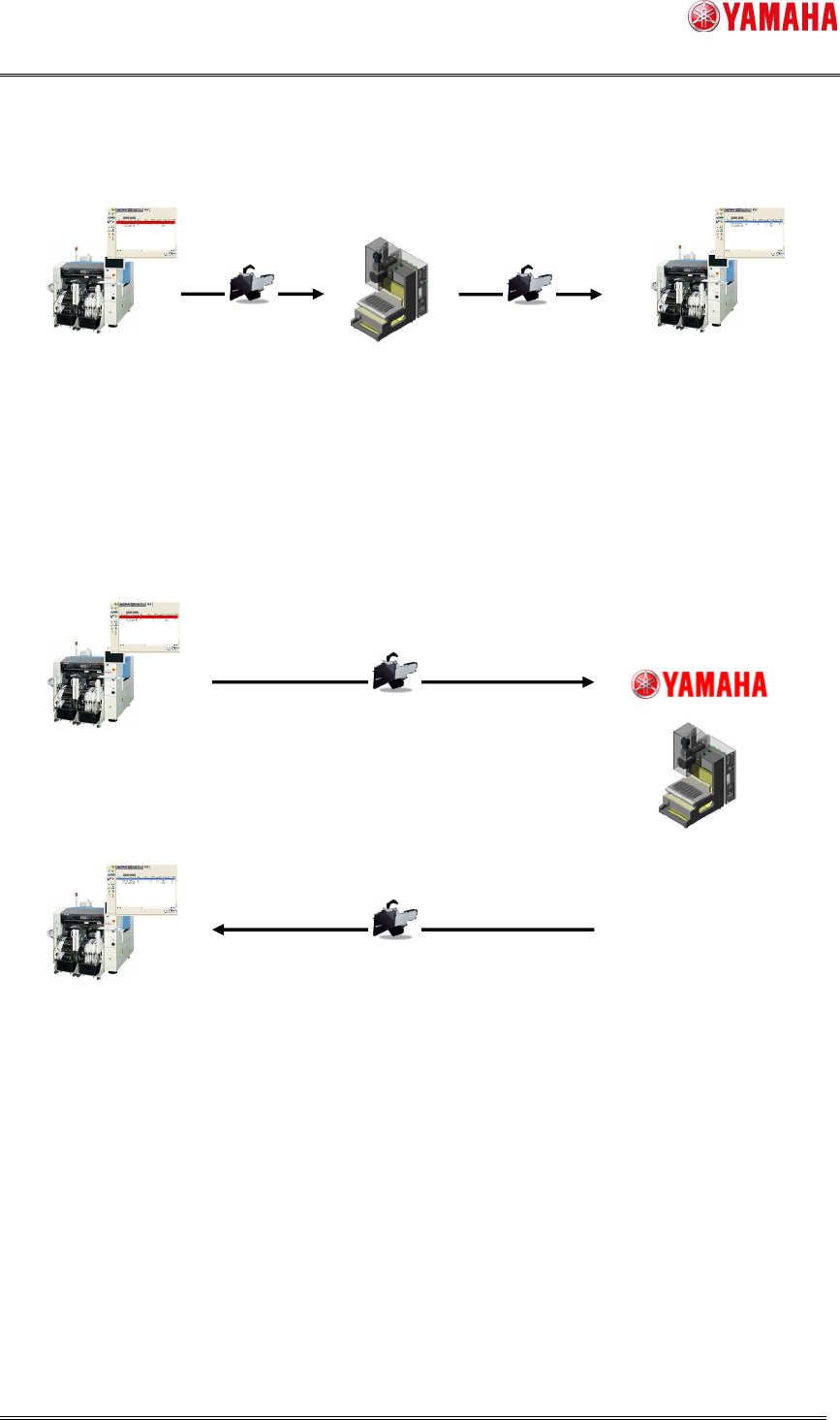
【with SS Tune-up Station】
【without SS Tune-up Station】
Fig 2.1 Maintenance work image
MaintainthefeederonSSTune-upStation
MaintenanceNoticeappears
Notice・ErrorOccurrence
Feeder
SSTune-upStation
MaintenanceNoticedisappears
Notice・ErrorResolution
Mounter
MaintenanceNoticeappears
Notice・ErrorOccurrence
Feeder
Mounter
SendthefeedertoYamahao/distributor
Yamahamaintainsthefeeder
MaintenanceNoticedisappears
Notice・ErrorResolution
SSTune
-
upStation
Yamaha/distributorsendsthefeederback
SMT Software Engineering Group
IM Operations YAMAHA MOTOR CO., LTD
MDOC-SOFT50282
4/17
2.2 Feeder MACS correction value
If Feeder MACS correction value is too large, a pick up error may occur.
Therefore, a message is displayed to notify that it is the time of maintenance, when there
is a feeder with Feeder MACS correction value comes to a specific value.
At maintenance, adjust the feeder on SS Tune-up Station, or clean around the pickup
position.
When the feeder is removed, the maintenance message disappears. The message is
displayed again when the Feeder MACS correction value comes to the specific value.
Checking of Feeder MACS correction value can be enabled on the machine setting (Refer to
4.2 Machine setting). It is disabled by default.
2.3 Pickup error rate
If there is a feeder with pickup error rate over the specified rate on Maintenance Log of
Feeder ID log, a message is displayed to notify that it is the time to maintain the feeder.
Feeders to be maintained are those which have been driven as many as Min. Sample Cnt.
At maintenance, adjust the feeder on SS Tune-up Station, and clean around the pickup
position.
When the feeder maintained on SS Tune-up Station is attached, feeder ID log is cleared
and the message is no longer displayed.
The message is displayed when pick up rate reaches the specific rate again.
If you need to keep using the unmaintained feeder, reset the count of its feeder ID log, so
that the maintenance message is no longer displayed.
Checking of pick up error rate can be enabled on the machine setting. (Refer to 4.2
Machine Setting). It is disabled by default.
- Pick up error rate is based on Maintenance Log of Feeder ID Log. Therefore, it is
recommended to set server path for Feeder ID Log.
- If no server path is specified, it is not possible to take over the information at power
ON/OFF, or to share information with other machines.
SMT Software Engineering Group
IM Operations YAMAHA MOTOR CO., LTD
MDOC-SOFT50282
5/17
3. Details of function
This function notifies that feeder maintenance is required in the following three ways,
when feeding times reaches the notice count、or stop count(4.2 Machine setting).
(1) Message, Error indication
(2) Feeder ID Log screen indication (only feeders attached on machine)
(3) Production Monitor indication(only feeders use to production)
- Or when Feeder MACS correction value reaches “Notice Correct X” and “Notice
Correct Y”, or “Stop Correct X” and “Stop Correct Y”(Refer to 4.2 Machine Setting).
- Or when pick up error rate reaches “Notice Err Rate” or “Stop Err Rate” (Refer to 4.2
Machine Setting).
3.1 Message
When feeder conditions satisfy the notice level, the feeder maintenance notification is
displayed. When the message is displayed during auto-running, auto-running is continued.
When feeder conditions satisfy the stop level, the feeder maintenance stop error is
displayed. When the error is displayed during auto-running, auto-running is continued. The
function of maintenance stop is disabled by default, but can be enabled on the machine
setting(4.2 machine setting).
On the machine setting, you can change the timing to display the message or error
(4.2Machine setting). It is initially set to display at the timing of “Feeder ON/OFF”.
If more than one feeder satisfies the maintenance level at the same time, only the one
with the smallest feeder setting number is displayed. For the other feeders, see the
[Feeder ID Log] screen.