YSM20_YSM20W_Mainte_E.pdf - 第117页
3-59 3 Periodic maintenance items 7 Mo ve the con ve yor backw ard. e 1. Press the emergency stop button and then open the machine safety cover . Attach the carriage if the machine is the carriage type. 2. Press the [Wid…
3-58
3
Periodic maintenance items
e
4
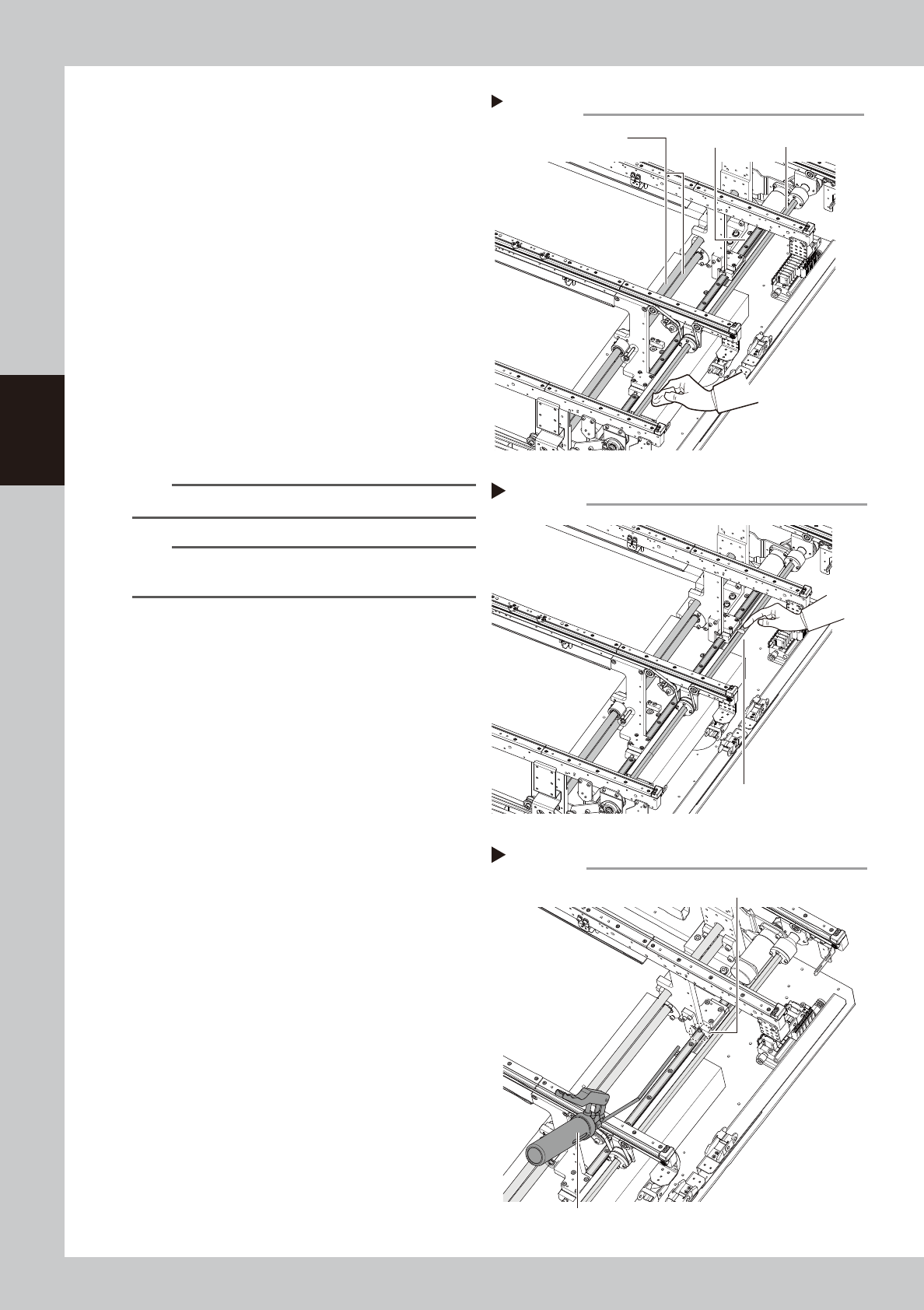
Wipe off remaining grease.
1. Press the emergency stop button and
then open the machine safety cover.
2. If the machine is carriage type, detach
carriage to access to the W-axis.
3. Wipe off remaining grease in Step 2 with
lint-free cloth.
5
Apply grease to ball screw and
hexagon spline.
Apply the specified grease (NSL) with finger
uniformly over the hexagon spline shaft
surface and ball screw surface and groove.
6
Apply grease to the guide.
Apply grease to the guide with grease gun.
Inject the specified grease (NSL) to 4 grease
nipples of the guide with a grease gun (bent
type nozzle).
n
NOTE
Apply grease until the new grease oozes from the gap.
n
NOTE
See "Chapter 5 Lubrication points" for the positions and
quantity of the guide grease nipple.
Cleaning W-axis 1
Step 4
Ball screw
Guide Hexagon spline
533B7-N2-00
Applying grease to W-axis
Step 5
Grease (Apply uniformly.)
533B8-N2-00
Applying grease to guide 2
Step 6
Grease nipple
Grease gun (30°-bent type)
533B9-N2-00
3-59
3
Periodic maintenance items
7
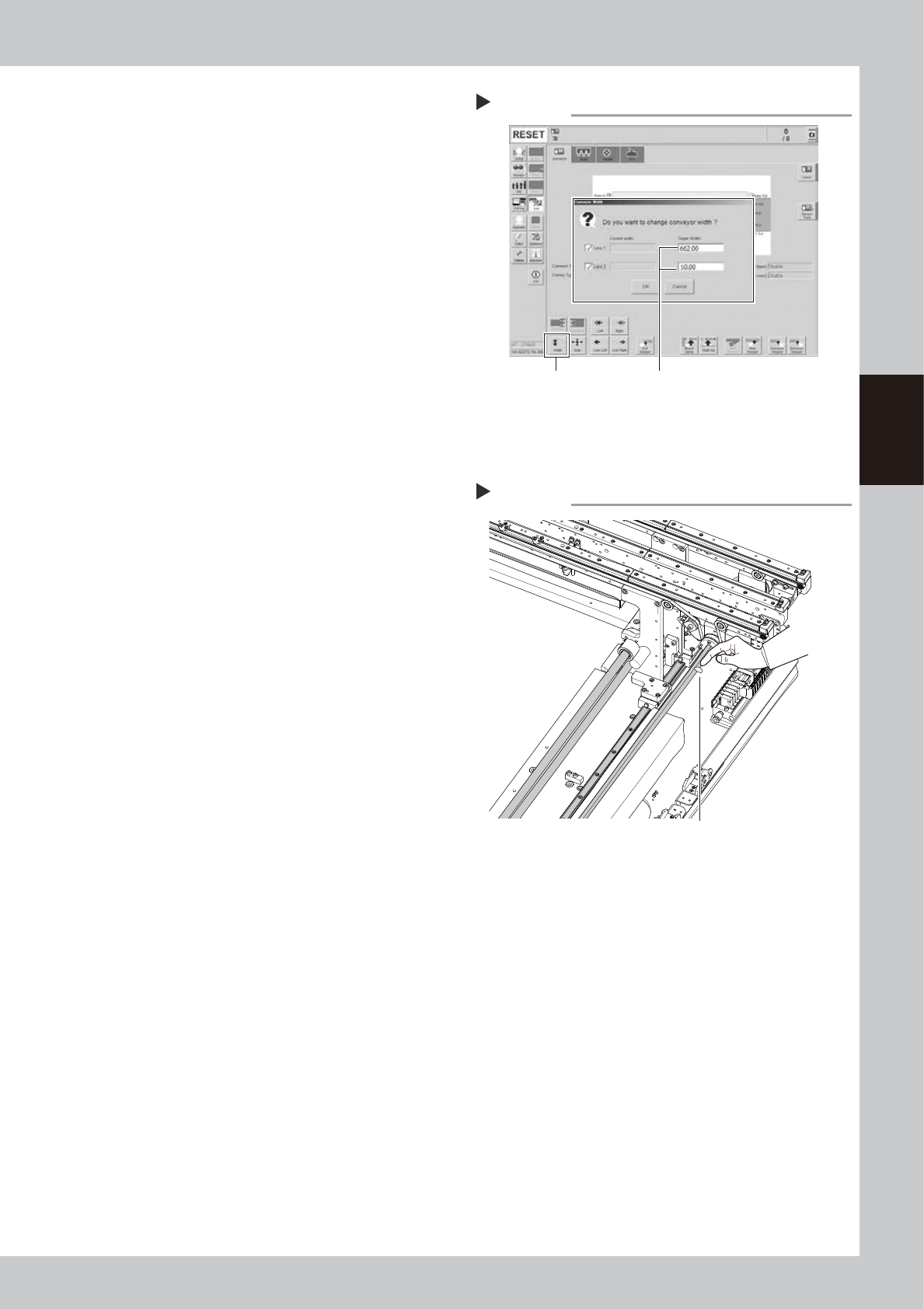
Move the conveyor backward.
e
1. Press the emergency stop button and
then open the machine safety cover.
Attach the carriage if the machine is the
carriage type.
2. Press the [Width] button to display the
"Conveyor Width" screen.
3. In the "Target Width" box of "Lane 1",
enter "410 mm" for YSM20 and enter "662
mm" for YSM20W. Enter "50 mm" in the
"Target Width" box of "Lane 1". Pressing
the [OK] button changes the conveyor
width to the specified width.
e
8
Apply grease to rest of ball screw
and hexagon spline.
1. Press the emergency stop button and
then open the machine safety cover.
2. If the machine is carriage type, detach
carriage to access to the conveyor.
3. Apply the specified grease (NSL) with
finger uniformly over the hexagon spline
shaft surface and ball screw surface and
groove where grease could not be
applied in Step 5.
9
Spread the grease.
1. Close the machine safety cover and
cancel the emergency stop.
2. Change the conveyor width to maximum
and minimum several times referring to
Step 1 and Step 7.
e
0
Wipe away excess grease.
1. Press the emergency stop button and
then open the machine safety cover.
2. If the machine is carriage type, detach
carriage to access to the conveyor.
3. Wipe away excess grease on the edge
of ball screw, guide, and hexagon spline
shaft with lint-free cloth.
Moving conveyor backward
Step 7
[Width] button Enter following values.
Lane 1 : “410 m” (YSM20)
“662 mm” (YSM20W)
Lane 2 : “50 mm”
54323-N2-00
Applying grease to W-axis 2
Step 8
Apply grease to remaining area.
533C0-N2-00
3-60
3
Periodic maintenance items
5.3.3 YSM20/20W Single-lane: Cleaning and lubricating W-axis
The following describes the cleaning and lubrication procedure of W-axis of YSM20/YSM20W single-lane type.
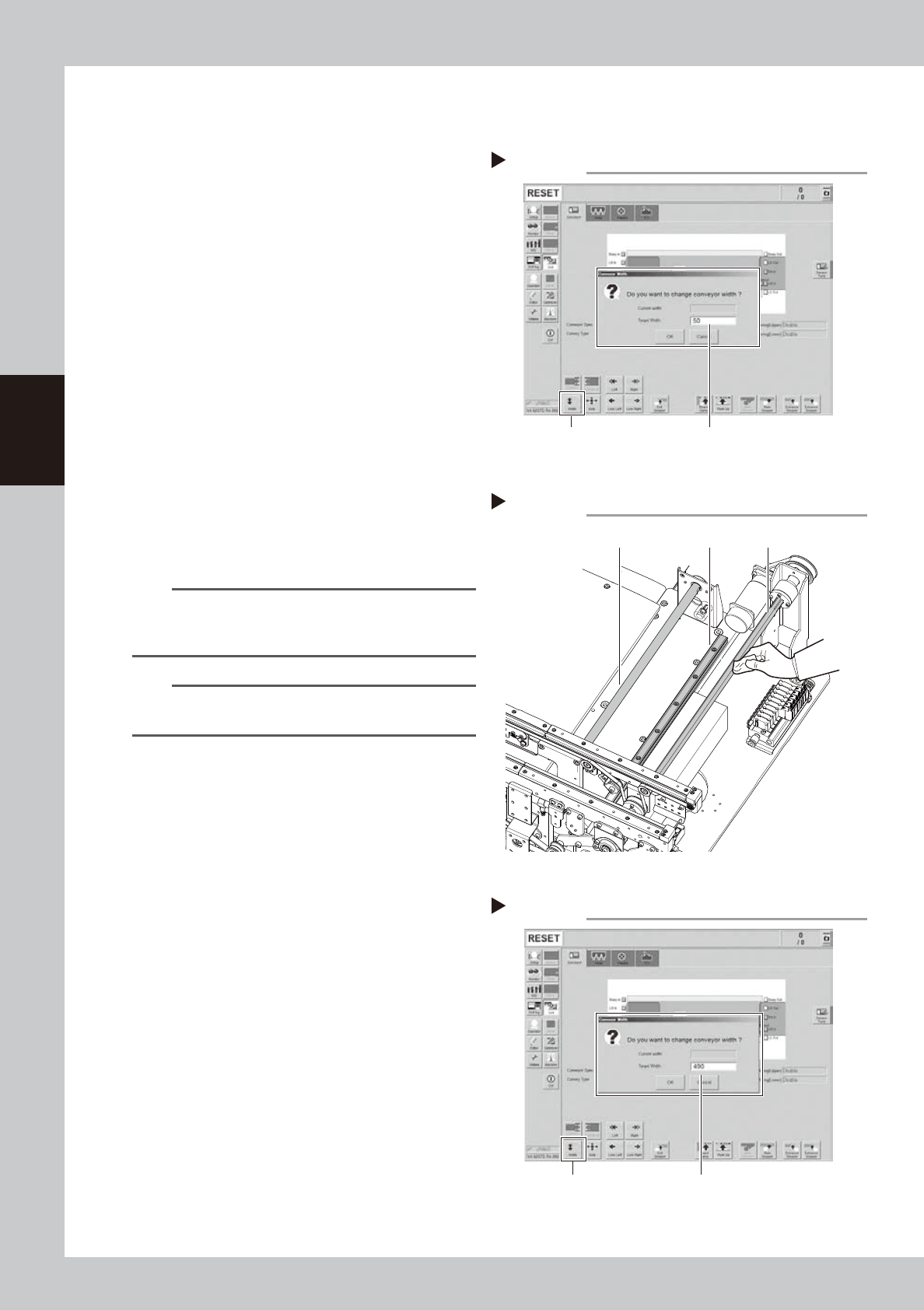
1
Change the conveyor width to the
minimum width.
1. Press the [Width] button on the [Unit]
- [Conveyor] screen to display the
"Conveyor Width" screen.
2. Enter "50 mm" in the "Target Width" box
and press the [OK] button. The conveyor
width is changed to the specified width.
e
2
Clean each part of W-axis.
1. Press the emergency stop button and
then open the machine safety cover.
2. If the machine is carriage type, detach
carriage to access to the conveyor.
3. Take off all accessories susceptible to the
magnetic fields, such as a wristwatch
and/or magnetic ID card.
4. Wipe the old grease and soiling on entire
areas of 2 ball screws, 2 guides , and 1
hexagon spline of the W-axis with lint-free
cloth.
n
NOTE
Carefully wipe the lead grooves of the ball screw and
guide rail during the cleaning. Additionally, make sure
that any dirt is not produced after wiping.
n
NOTE
See "Chapter 5 Lubrication points" for the positions and
quantities of ball screw, guide, and hexagon spline.
3
Change the conveyor width to the
maximum width.
1. Close the machine safety cover and
cancel the emergency stop. Attach the
carriage if the machine is the carriage
type.
2. Press the [Width] button to display the
"Conveyor Width" screen.
3. Enter "490 mm" in the "Target Width" box
for YSM20. Enter "742 mm" in the "Target
Width" box for YSM20W. Pressing the [OK]
button changes the conveyor width to
the specified width.
Changing conveyor width to minimum
Step 1
[Width] button Enter “50 mm”.
54324-N2-00
Cleaning W-axis
Step 2
Ball screw Guide Hexagon spline
533C1-N2-00
Changing conveyor width to maximum
Step 3
[Width] button YSM20: Enter “490 mm”.
YSM20W: Enter “742 mm”.
54325-N2-00