00196500-03_IM_SSW_703_DE EN.pdf - 第29页
Installation Manual, Station Software Version 703.02 12/2009 Edition 5.3 Prep arations for installing the sof tware 5.3.1 Requirements Requirements for installing the SIPLACE software and the Vision computer software: - …
Installation Manual, Station Software Version 703.02 12/2009 Edition
28 of 58
5.2 Performing automatic BIOS update/settings on the machine computer
and Vision computer
The image files for the automatic BIOS update/BIOS settings and the corresponding installation instruction
(readme file) are available on the V1.0 BIOS CD, that can be ordered for download via the service
technician or SecuFEx.
Installation Manual, Station Software Version 703.02 12/2009 Edition
5.3 Preparations for installing the software
5.3.1 Requirements
Requirements for installing the SIPLACE software and the Vision computer software:
- The Windows XP Professional operating system with Service Pack 3 and all current hotfixes
(SIPLACE Hotfix CD) must be installed on the machine computer and in two-computer operation on the
Vision computer (see the Installation Manual for the Windows XP operating system, item number
00196151-xx).
The default Windows display settings must be changed and the touchscreen must be calibrated. You
must be logged on as the Administrator
in order to be able to carry out this work.
5.3.2 Changing the display settings
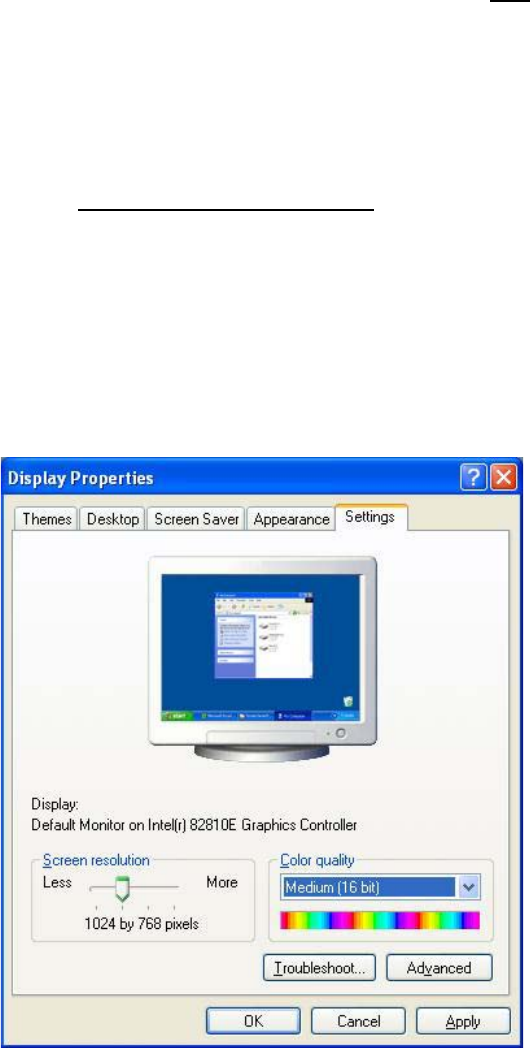
→ Choose Start Æ Settings Æ Control Panel Æ Display.
→ Click the Settings tab.
→ Set the "Screen resolution" slider to "1024 by 768 pixels".
Fig. 5-1: Screen settings
→ Confirm the settings by clicking OK.
29 of 58
Installation Manual, Station Software Version 703.02 12/2009 Edition
5.3.3 Calibrating the touchscreen
5.3.3.1 Calibrating the touchscreen for the X-Series
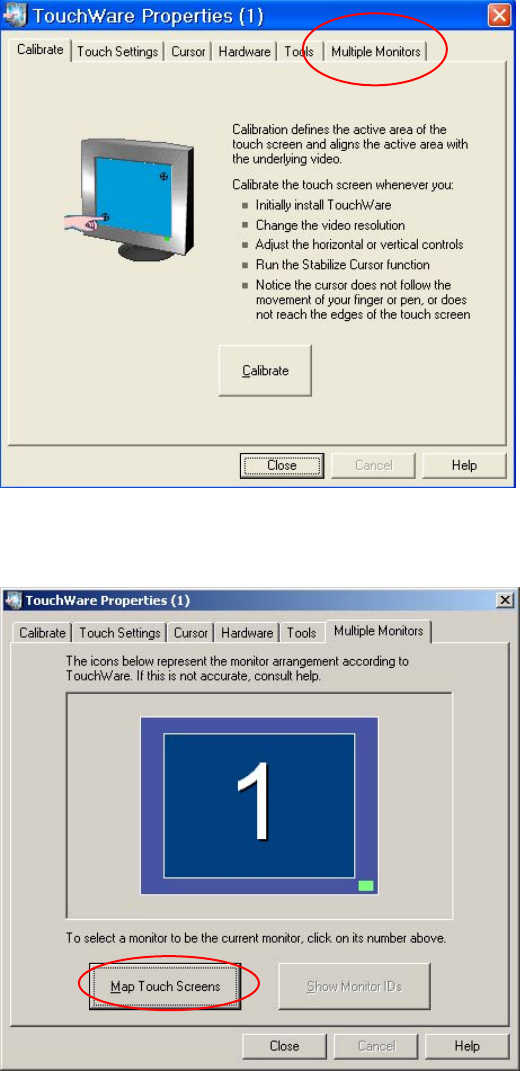
→ Choose Start Æ Settings Æ TouchWare to start the TouchWare Properties program.
Fig. 5-2: TouchWare Properties
→ Open the Multiple Monitors tab.
Fig. 5-3: TouchWare Properties – Multiple Monitors tab
→ Click the Map Touch Screens button.
The "Multiple Monitor Layout" dialog box appears.
30 of 58