00195487_Install_SQL2005Server_manual.pdf - 第23页
Installation of SQL Server 2005 Edition 02/2011 US The following dialog is disp layed: 23 / 48 Fig. 3-22: Ready to install → Click the Install button. The following three dialogs may appea r during installation when file…
Installation of SQL Server 2005 Edition 02/2011 US
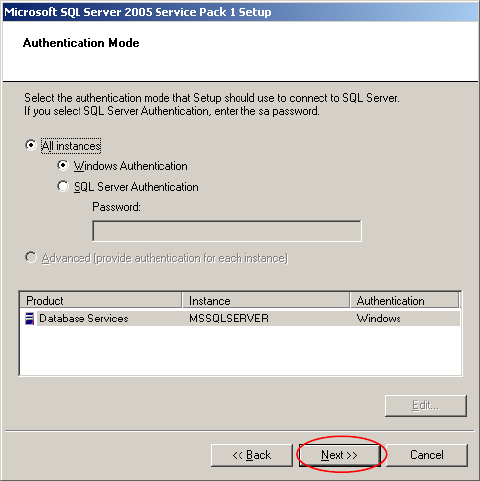
Fig. 3-21: Authentication Mode
→ Leave the default settings (The selected Authentication will not modify your database logon
possibilities – it is only used to connect to the database in this case)
→ Click the Next >> button.
22 / 48
Installation of SQL Server 2005 Edition 02/2011 US
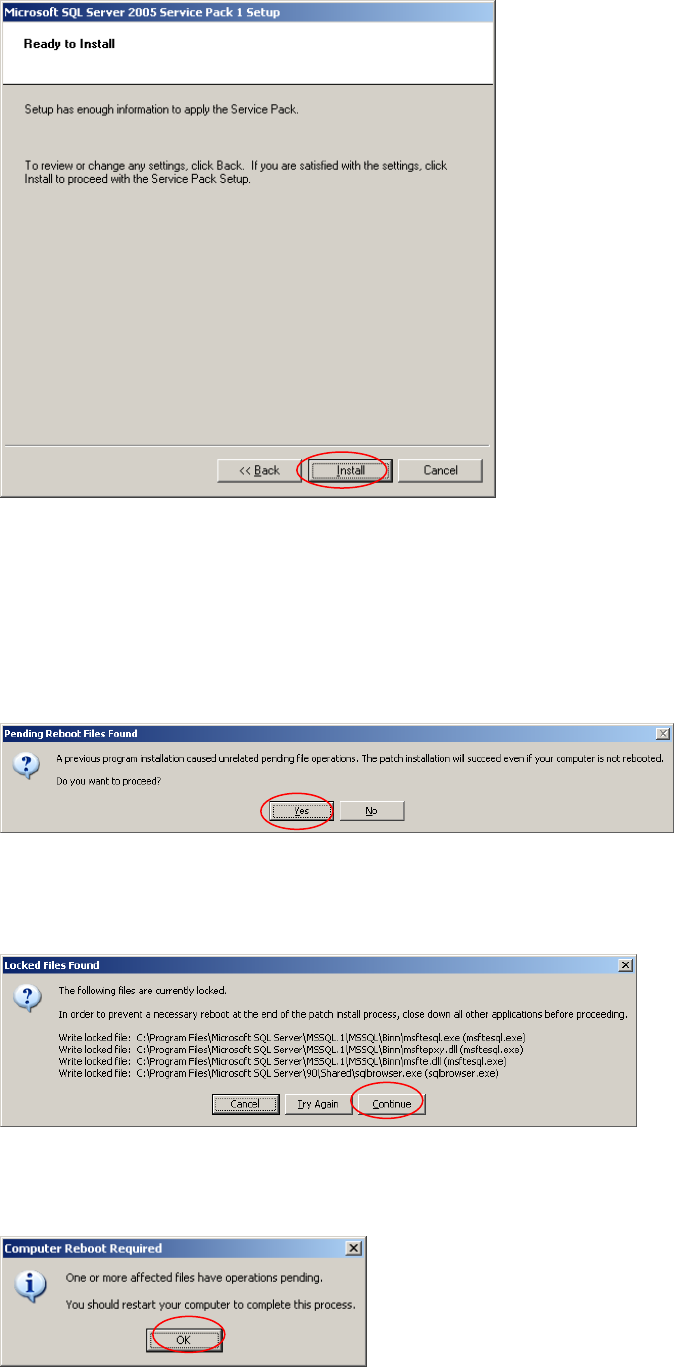
The following dialog is displayed:
23 / 48
Fig. 3-22: Ready to install
→ Click the Install button.
The following three dialogs may appear during installation when files are locked by other installation
processes:
Fig. 3-23: Pending Reboot files found
→ Click the Yes button.
Fig. 3-24:: Locked files found
→ Click the Continue button.
Installation of SQL Server 2005 Edition 02/2011 US
24 / 48
Fig. 3-25: Computer Reboot required
→ Click the OK button.