00195487_Install_SQL2005Server_manual.pdf - 第5页
Installation of SQL Server 2005 Edition 02/2011 US 5 / 48 1 Introduction SIPLACE software systems make use of a database to store data on the hard d rive. For scalable solutions SIPLACE recommend s SQL Server 2005 St and…
Installation of SQL Server 2005 Edition 02/2011 US
4 / 48
Installation of SQL Server 2005 Edition 02/2011 US
5 / 48
1 Introduction
SIPLACE software systems make use of a database to store data on the hard drive. For scalable
solutions SIPLACE recommends SQL Server 2005 Standard which operates on Windows Server 2003
operating system versions. Both used components – database and operating system – are 32 Bit (x86)
versions.
2 Scope of delivery
This document describes the manual procedure to install SQL Server 2005 including SP1 and SP2 with
default settings for usage of SIPLACE software products for SIPLACE computer systems.
Further customization settings (e.g. modification of database settings) will be done by the specific
product installation setups.
Subject of this document is a first- time installation on fresh systems (no upgrade).
Installation of SQL Server 2005 Edition 02/2011 US
3 Installation
3.1 Installation of SQL Server 2005
Please follow the instructions below for the manual installation of SQL Server 2005.
→ SQL Server 2005 requires Microsoft Windows Installer 3.1 or later.
You have to install this package manually if it is missing before you start with the SQL Server
installation. It is provided on the SIPLACE Net Support Media in the directory
<DVD-Drive>\Updates\Windows Installer\3.1.
Note:
Close all other applications before you start with the installation of SQL Server
2005.
You also need to have administrative privileges to proceed.
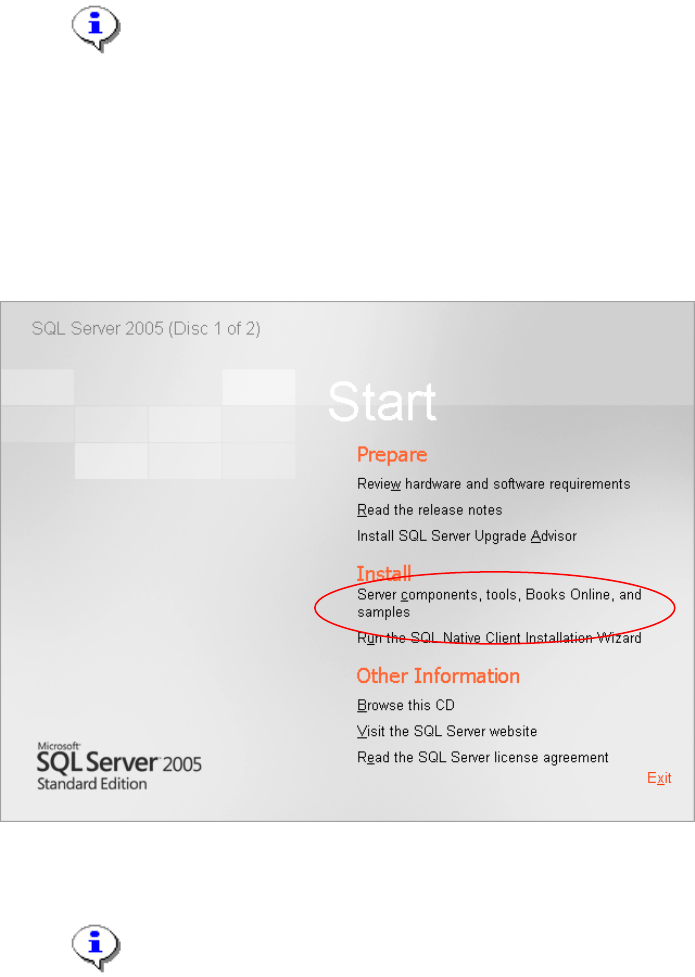
→ Insert the first installation CD into your drive.
The following dialog is displayed:
Fig. 3-1: SQL Server 2005
Note:
If the dialog does not appear start your Windows Explorer, browse to the file
splash.hta on the SQL Server 2005 installation CD and double-click it .
6 / 48