00197214_IM_SupportMediaV1.14_EN.pdf - 第25页
Support M edia V1. 14 11/2012 Edit ion 25 Figure 3- 12 : Folder Select ion dialog window ► In the ne w folder se lect ion dialog window, s elect or create the Down load fol der. ► Click O K to accept the cho ice The Supp…
Support Media V1.14 11/2012 Edition
24
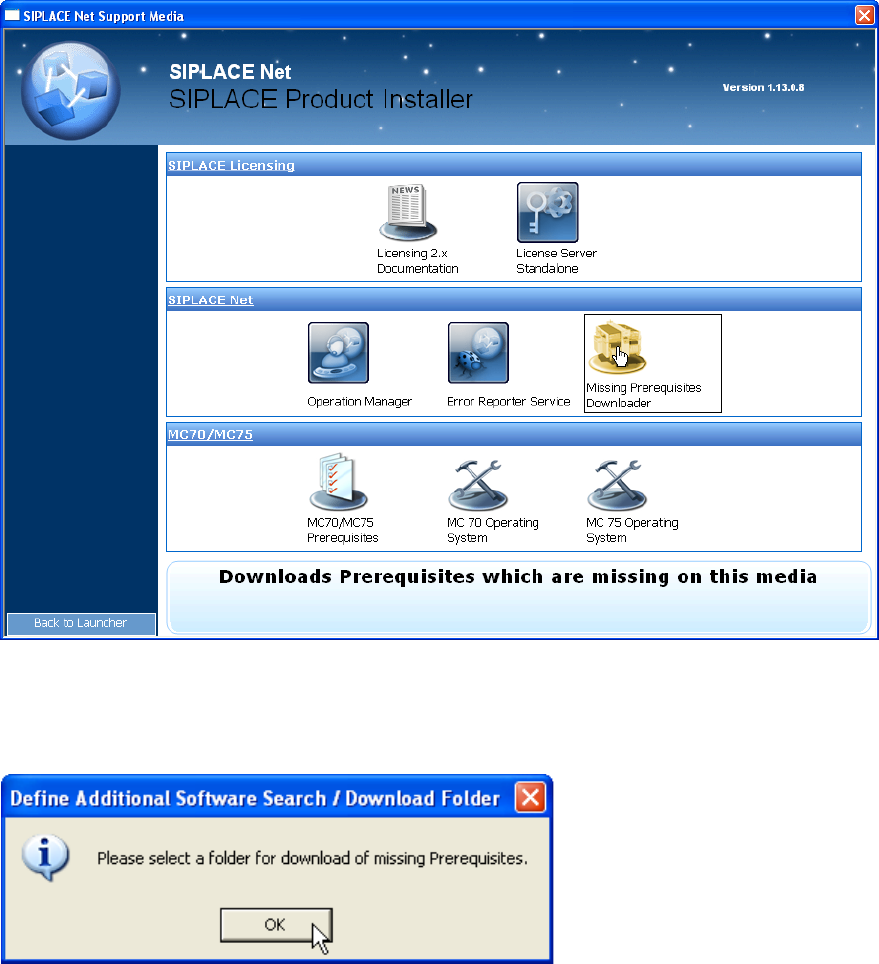
Figure 3-10: Selecting Missing Prerequisites Downloader in SIPLACE Installer application
► Select the option “Missing Prerequisites Downloader”
Figure 3-11: Hint message
► Click OK.
Support Media V1.14 11/2012 Edition
25
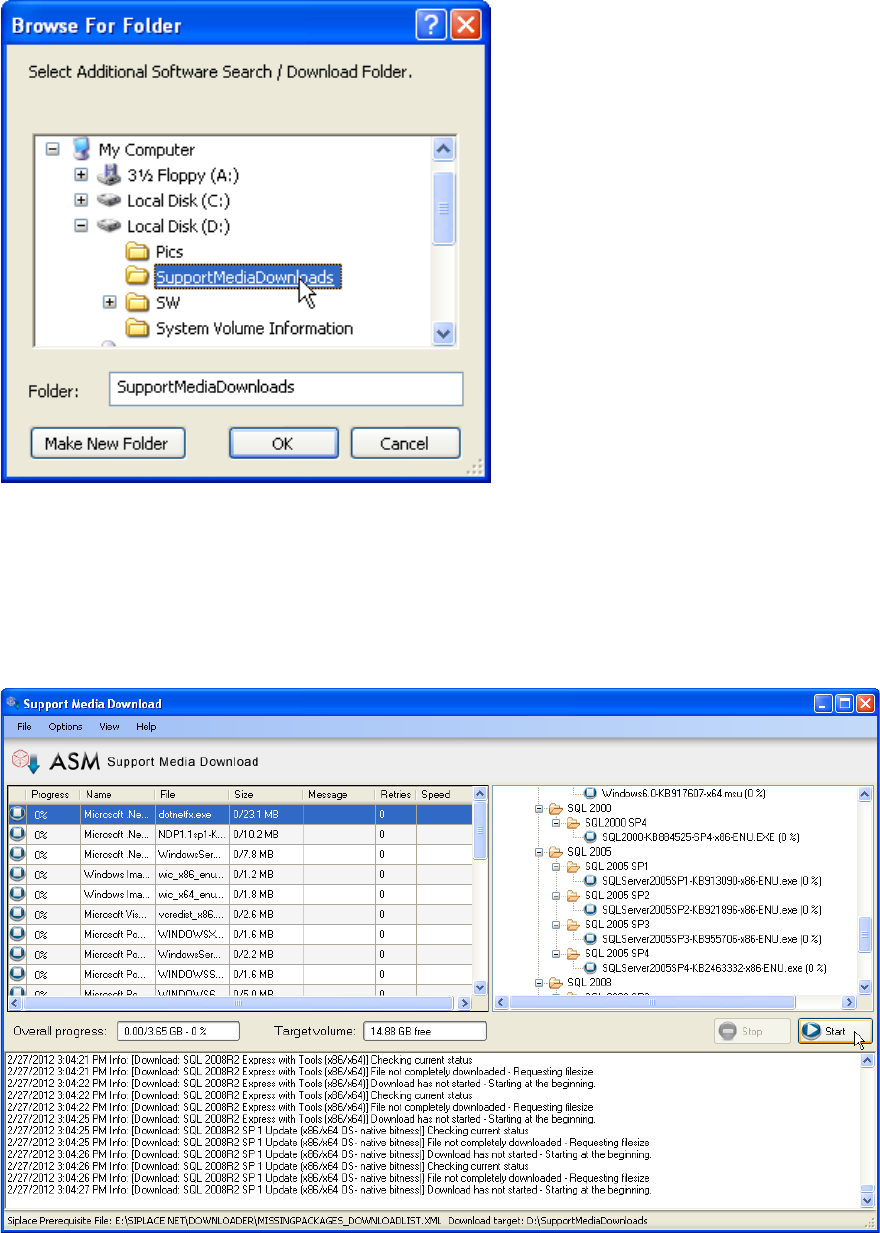
Figure 3-12: Folder Selection dialog window
► In the new folder selection dialog window, select or create the Download folder.
► Click OK to accept the choice
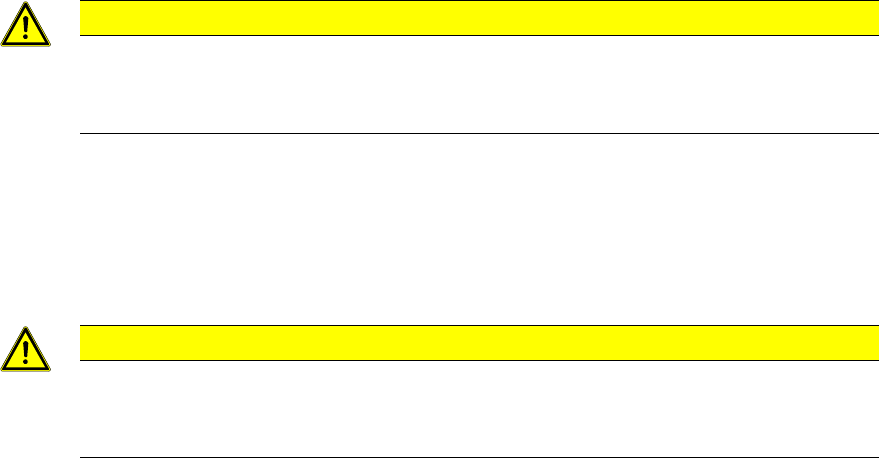
The Support Media Download Tool will be started.
Figure 3-13: Support Media Download Tool
► Click the Start button to start the download.
► After the download completed, click the “Done” button to close the Download Tool.
► In Prerequisite Analyzer, select this new directory structure as Additional Software Search
Folder, as described in the chapters above.
Support Media V1.14 11/2012 Edition
26
3.5 Support for Firewall
The Sup50 Release Products will support the firewall configuration.
• The Products will create a set of Windows Firewall Rules for the supported Operating
systems so that the communication for the SIPLACE Product only will be enabled.
• The Support Media will disable the Windows Firewall for all SIPLACE Line software
versions before Release Sup 50.
• The Support Media will maintain in the prerequisites profile the information, if the SIPLACE
Line Product will support the configuration of the Windows Firewall
• The Support Media will not disable the Windows Firewall for all SIPLACE Line software
versions from Release Sup 50 and higher, when all products will support Windows
Firewall. When one SIPLACE Product will be installed, which does not support the
Windows Firewall it will be disabled.
• The Support Media will create Firewall Rules for the basic OS feature like SQL Server; Net
Bios name resolution, MSMQ and others. It is required to run the Support Media to create
a complete required set of firewall rules for a computer system. Only OS features will be
configured which are installed with the Support Media. When OS Features like IIS are been
installed manually the firewall rules will not be activated.
• The Support Media will create a required set of firewall rules for a preinstalled SQL Server
2008 R2 and higher to allow remote access.
• The Support Media will not actively activate the Firewall.
• The firewall rules will only configure the inbound network traffic.
• The firewall rules will be activated for all network location awareness profiles in Windows
Vista and above.
• Configuration is only supported for Windows Firewall. Other Firewalls have to be configured
manually.
• Please see the Appendix for the documentation of the firewall rules. All documented rules
are listing the ports for informational purpose. These are not part of the firewall rules which
will be created, except the rules which are marked with “Port” in the first column.
CAUTION
Firewall rules installed by SIPLACE can be overridden in customer domain
• The customer group policies in the Windows domain can influence the by
SIPLACE installed firewall rules.
3.6 Critical Usage Notes
CAUTION
Installing Support Media from a network drive/local folder
Do not use Support Media from a network drive/local folder, as this causes
following problems: