TS555R-UserGuide.pdf - 第17页
17 3. To uch the Check Mark icon to confirm 4. To uch the X icon to exit 5.5 To Change Password Note: The defau lt password is “0000” . To change the password, follow the instructions below. 1. To uch the Login icon to e…
16
5.3.4 To run in Continuous Sequence Mode
1. Follow steps 1 to 2 above and enter the waiting time “delay time” between
each activation.
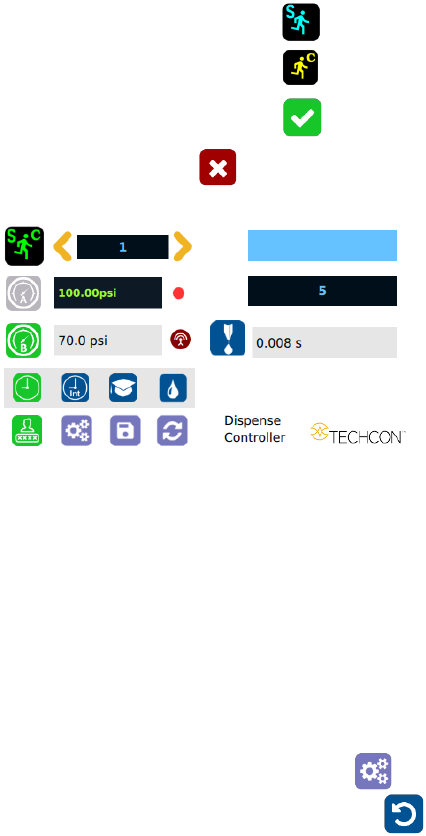
2. Touch the “Sequence Mode” icon
3. Touch the “Continuous Mode” icon
4. Touch the Check Mark icon to save
5. Touch the X icon to exit
The screen will look similarly to the screen below:
Note: If the sequence mode is set to activate memory cells 1 – 3 and the
delay time is set at 5000 ms, the controller will activate memory 1 to 3
continuously with 5000 ms delay between each activation. The delay time
must be at least 15 ms.
5.4 Cycle Counter
The cycle counter records the numbers of automatic dispense cycle being
activated. Up to 999,999 cycles can be recorded. To reset the counter, follow
steps below:
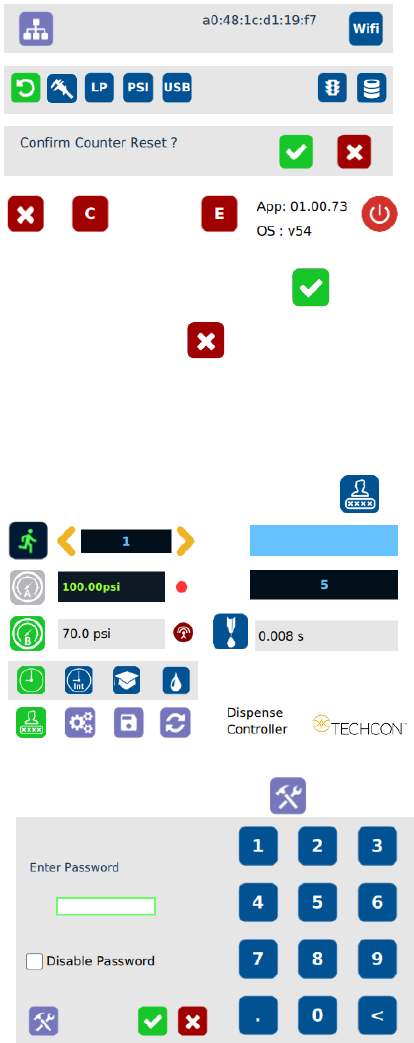
1. Touch the Setup icon to enter the setup screen
2. Touch the Counter Reset icon to reset the counter
17
3. Touch the Check Mark icon to confirm
4. Touch the X icon to exit
5.5 To Change Password
Note: The default password is “0000”. To change the password, follow the
instructions below.
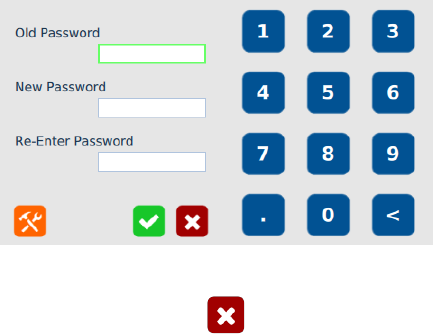
1. Touch the Login icon to enter the login screen
2. Touch the change “Password” icon
18
3. Enter the old password, then enter the new password
4. Touch the Check Mark icon to save
5. Touch the X icon to exit
Note:
1. The password can be disable by check box next to “Disable Password”
2. The master password is: 6663