00193908-02.pdf - 第26页
在线预览 00193908-02.pdf PDF 文档。
Installation Manual for Windows 2000 Professional (manual setup) Edition 10/2005 US
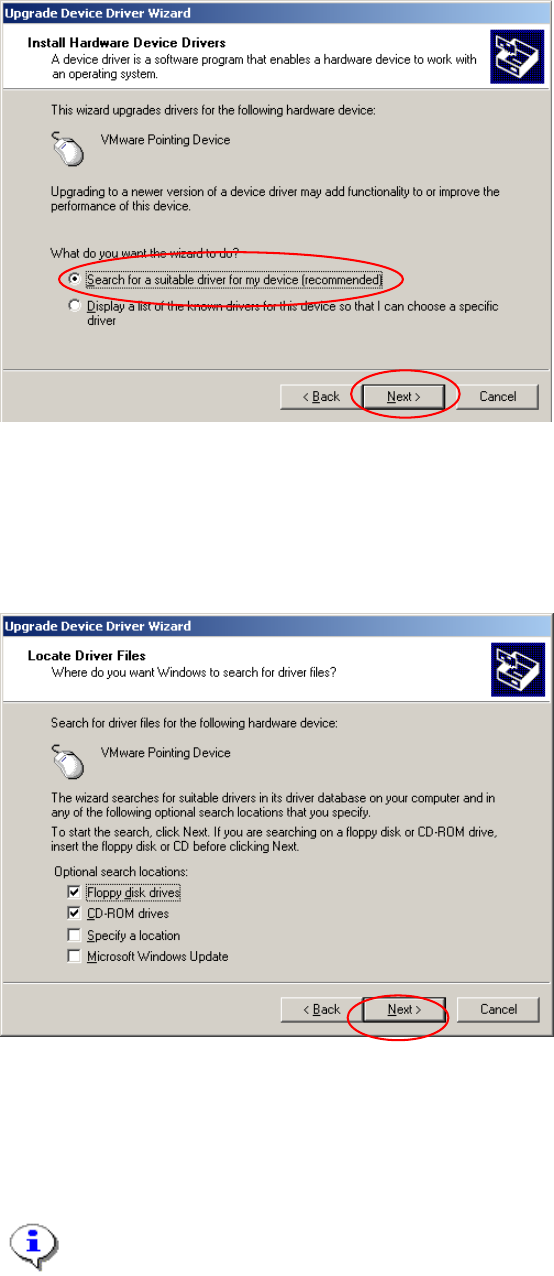
Fig. 2-33: Hardware update wizard
→ Select the option “Search for a suitable driver for my device (recommended)”.
→ Select the button Next>.
In the next dialog, you can define where new software should be searched for. Now you should use a
floppy or CD from you hardware vendor.
Fig. 2-34: Specify location for driver software
→ Insert floppy or CD with driver software
→ Select the button Next>.
→ Accept changes in the last dialog and finish procedure.
Note:
You will be informed if Windows could find new driver software or if it will use the previous
software versions.
25

Installation Manual for Windows 2000 Professional (manual setup) Edition 10/2005 US
Siemens AG 2005 All ri
g
hts reserved Sub
j
ect to chan
g
e without
p
rior notice
Order No.: 00193908-02 Siemens AG
To be ordered from:
Siemens AG, Automation and Drives
Electronic Assembly Systems
Rupert-Mayer-Strasse 44
D-81359 Munich / Germany
Printed in the Federal Republic of Germany
27