TM5650.Production Lot Operations for APCO.pdf - 第20页
Y AMAHA MOTOR CO. , L TD. IM Business Unit SMT Softw are Engi neering Group 4.1.2.3 BOARD ID The machine performs program change automatically by readin g the P roduction Lot o n the arriving board by fixed scanner (1D o…
YAMAHA MOTOR CO., LTD.
IM Business Unit
SMT Software Engineering Group
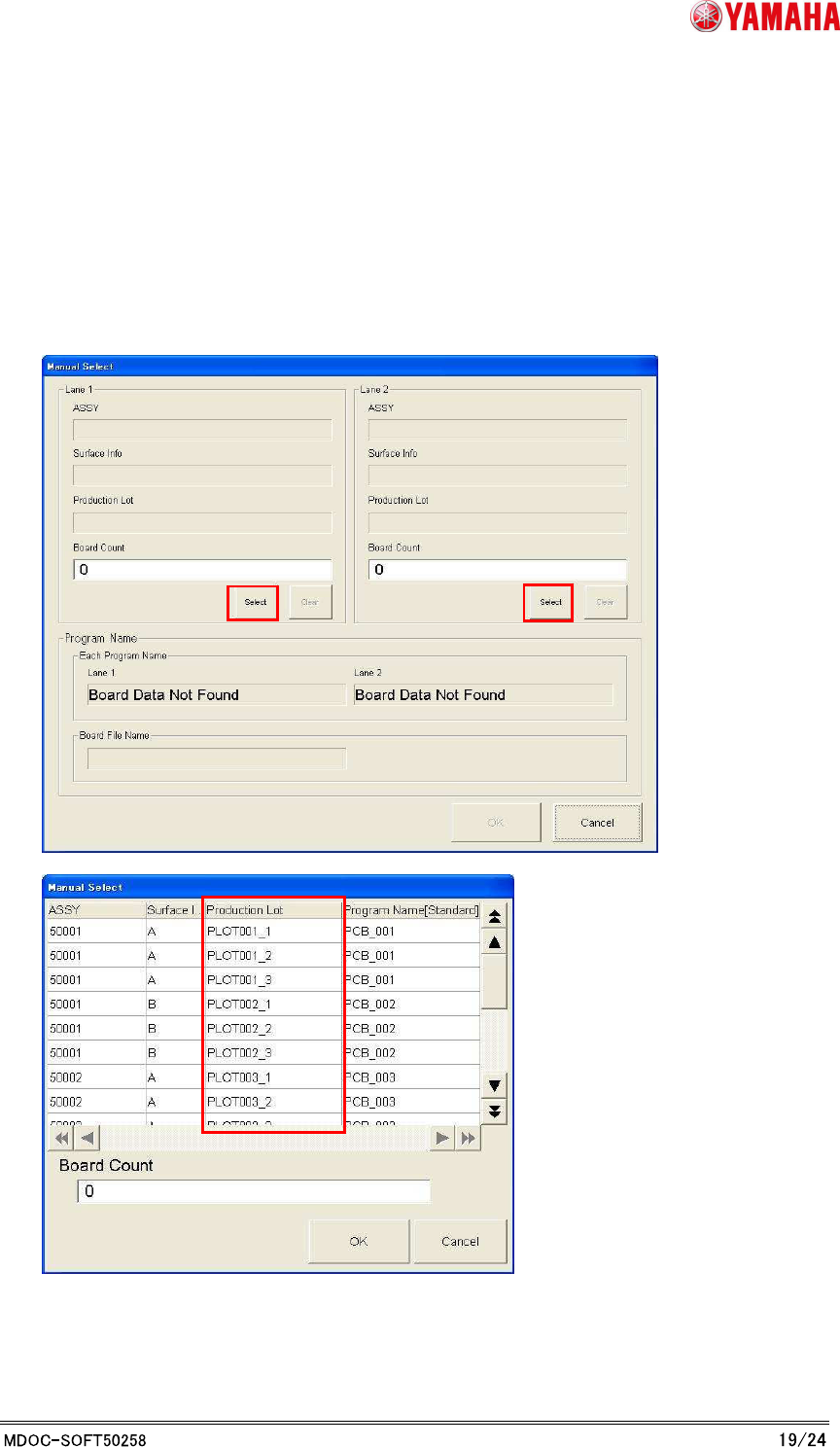
4.1.2.2 MANUAL SELECT
At front machine of the line, you can change the program by choosing the Production Lot
manually. When downstream machine's APCO are in the “TAKE OVER” mode, those machines
perform program change automatically by taking over the Production Lot.
Production Lot is indicated on the [Manual Select] dialog.
YAMAHA MOTOR CO., LTD.
IM Business Unit
SMT Software Engineering Group
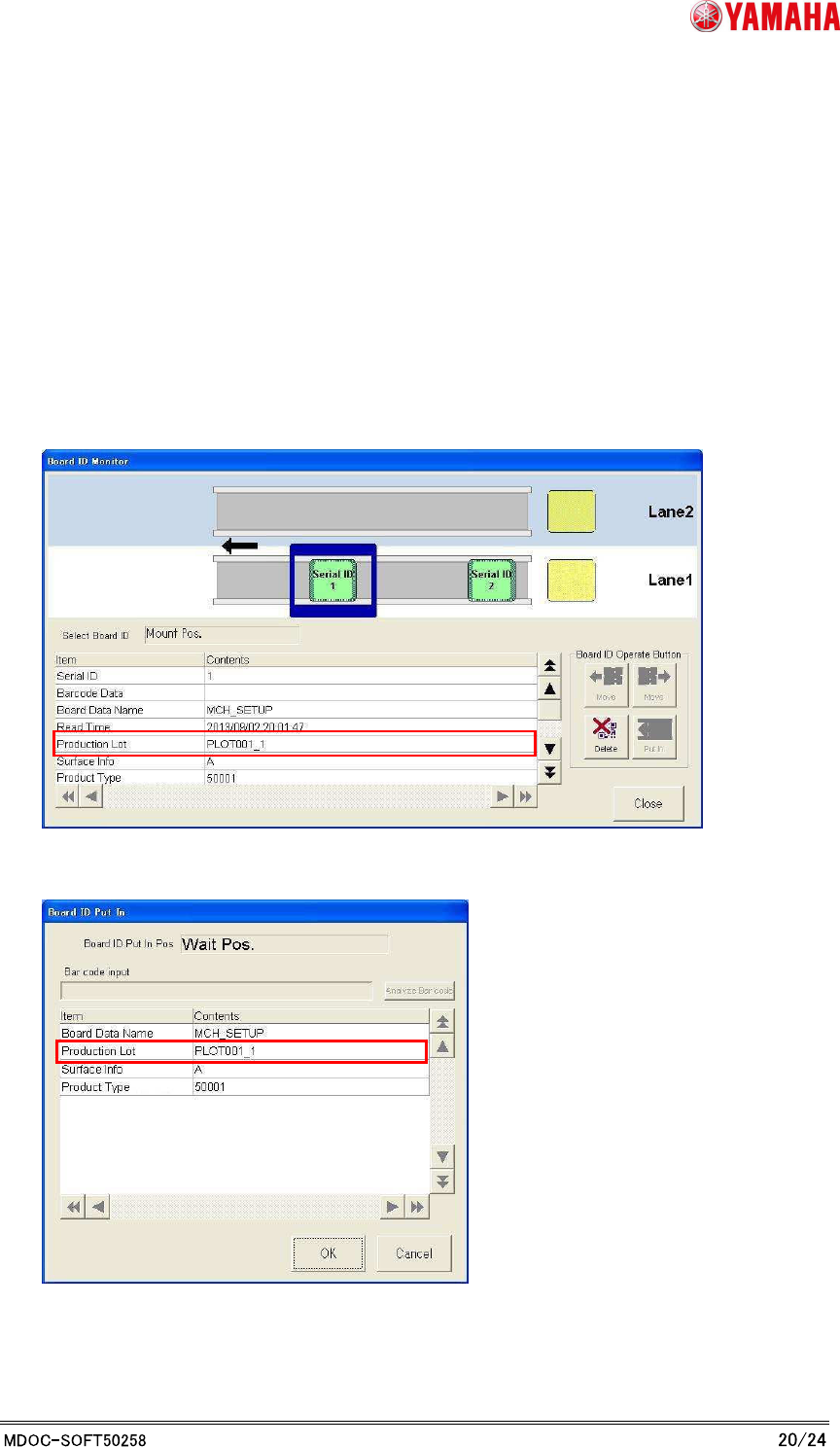
4.1.2.3 BOARD ID
The machine performs program change automatically by reading the Production Lot on the
arriving board by fixed scanner (1D or 2D) on upstream exit position. When downstream
machine's APCO are in the “TAKE OVER” mode, those machines perform program change
automatically by taking over the Production Lot.
The read information of Production Lot is indicated on a dialog.
* Index title was changed to “Production Lot” from “Lot ID”.
Board ID Monitor
Board ID Put In

YAMAHA MOTOR CO., LTD.
IM Business Unit
SMT Software Engineering Group
4.1.2.4 TAKE OVER
The machine performs program change automatically by taking over APCO information from
upstream machine. When downstream machine's APCO are in the “TAKE OVER” mode, those
machines perform program change automatically by taking over the Production Lot.
4.1.2.5 Log
The “Production Lot” information is recorded to the following Log.
“ASSY” and “Board face” are recorded to “ASSY & Surface”.
[HIS]-[Error Log] Tab
[HIS]-[Board Log] Tab
[HIS]-[Program Log] Tab
* It is indicated only if the [OP003: Auto Program Change Over] enabled.
Index title Note
ASSY & Surface This is information of “ASSY and surface” which linked to the
Production Lot that the machine chose.
Production Lot When Production Lot Operation is “ON”.
This is information of Production Lot that the machine chose.
When Production Lot did not direct. Or Production Lot Operation is
“OFF”.
Sing Board Setup
Scanned “Production Lot”
+ “Date of loading (Year Month Day Hour Minute Second)”
Manual Select
“Date of loading (Year Month Day Hour Minute Second)”
Board ID Setup
Scanned “Production Lot” on the board.
Takeover Setup
Took over Production Lot by the upstream machine.