00196798-06_VD_SIPLACE_Explorer2.11_DE_EN.pdf - 第18页
SIPLACE Explorer 2.11 Ausgabe 10/2013 Edition If you start an OIS query via SQL Que ry, for the time between T1 and T2, the result will show the total number of components wh ich were placed on all 8 boards minu s the nu…
SIPLACE Explorer 2.11 Ausgabe 10/2013 Edition
4.6 Possible Placement Data Deviations Between SIPLACE
Explorer and OIS
The number of consumed components, rejects and boards can differ between SIPLACE Explorer and
OIS.
In OIS, each data set has a time stamp (consumed components, rejected components and each board).
If you start an OIS query for the consumption within a specific time period, via SQL Query, OIS will issue
the number of data sets which have a time stamp within this period.
SIPLACE Explorer, on the other hand, assigns the components to the boards on which they are to be
placed. If you start a query for the consumption within a specific time period, SIPLACE Explorer will issue
the number of components which have been placed on the boards which were produced within the
defined period. This difference becomes clearer when we consider production in 2 placement areas.
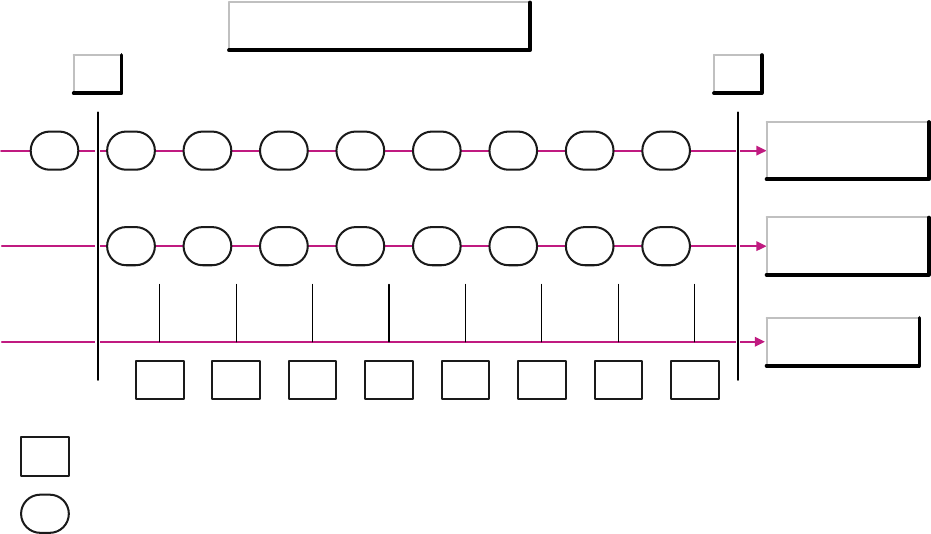
The following diagram illustrates the difference.
Example: 8 boards were placed on a machine with 2 placement areas. The diagram shows 3 timelines:
● Components for placement area 1
● Components for placement area 2
● Boards
The components X on the timeline for placement area 1 show the possible timestamps for those
components which were placed on board X.
Timestamp of the placement data
Components
Placement area 1
Components
Placement area 2
Boards
1 2 3 4 5 6 7 8
1 2 3 4 5 6 7 8
T1 T2
1 2 3 4 5 6 7 8 9
X
X
= Board
= Component record
17 of 48
SIPLACE Explorer 2.11 Ausgabe 10/2013 Edition
If you start an OIS query via SQL Que
ry, for the time between T1 and T2, the result will show the total
number of components which were placed on all 8 boards minus the number of components which were
placed on board 1 of placement area 1.
If you start the same query via SIPLACE Explorer, the result will show the total number of components
which were placed on all 8 boards.
In this example, the result in SIPLACE Explorer will be higher than the number shown in OIS.
However, this is not always the case. If board 9 is placed (in placement area 1 in the diagram), SIPLACE
Explorer will not count the components which were placed on this board and will therefore show fewer
components as the OIS.
For this reason, there will also be deviations between OIS and SIPLACE Explorer in the determination of
component reject numbers.
4.7 Status Display Deviations Between SIPLACE Explorer and OIS
There is a special OIS status module realized in SIPLACE OIS. This OIS status module is shown in the
SIPLACE Explorer status module which matches the SEMI E10 status module. This may lead to
deviations in the states and status times shown between OIS and SIPLACE Explorer. A direct
comparison is therefore not possible.
1. Differences in status models and their states:
OIS has a status model for each of the two processing areas but no status model for the entire
machine. SIPLACE Explorer, on the other hand, does have a status model for the whole machine
(E10).
OIS recognizes the following 5 states:
● Running
● Starved
● Blocked
● Interrupted, fault
There are no substates.
The E10 status model in SIPLACE Explorer recognizes the following 6 states:
● Productive
● Standby
● Engineering
● Scheduled Downtime
● Unscheduled Downtime
● Nonscheduled Time
● There is also a special status Unknown.
18 of 48
SIPLACE Explorer 2.11 Ausgabe 10/2013 Edition
Many of these states h
ave substates, such as:
● The status Productive has the following substates:
– Zone1Productive_Zone2Productive, Zone1Productive_Zone2Blocked
– Zone1Blocked_Zone2Productive, Zone1Productive_Zone2Starved
– Zone1Starved_Zone2Productive.
The OIS states can not be shown by the SIPLACE Explorer E10 status.
2. Differences between machines with two processing areas:
Since OIS does not have a status model for the entire machine (just one for each processing area),
although it should shown the times for each status (Running, Starved, Blocked, Interrupted and Fault)
for the whole machine, the times for both status models are only taken into account to 50% each by
the status display for the machine.
This means that, if an X4 machine places one board for one minute in processing area 1 and then
places for another minute in processing area 2, the machine should show 50% of the time in the
status Place and 50% in the status Starved, provided a board is placed into the machine every two
minutes.
In contrast, SIPLACE Explorer has a status model for the whole machine and determines at any one
time a status which relates to the entire machine. If only one processing area places at any one time,
while the other waits, this will be shown by the substate Zone1Productive_Zone2Starved and
Zone1Starved_Zone2Productive. These substates are shown in the status Productive. In the above
example for the X4 machine, SIPLACE Explorer will show the status Productive during board
placement. If the user wants to see whether a different processing area is waiting, he must switch
over to view the substate.
3. Taking into account stations which are switched off or not accessible via the network:
In OIS, stations which are switched off or not accessible via the network do not lead to a new status.
In SIPLACE Explorer, stations which are switched off or not accessible via the network are assigned
special substates (e.g. "Scheduled downtime – Other“, "Unscheduled downtime – Power down" or
"Nonscheduled time – Power down").
4. Status "Unknown" in SIPLACE Explorer:
If SIPLACE Explorer is unable to reach the OIS database via the network, SIPLACE Explorer will
show the status "Unknown". This status is not recognized by OIS.
5. Times taken into account during a period of observation:
OIS only takes into account those times during the period in which the station sends events.
The SIPLACE Explorer E10 status always considers all time in the set period.
Example: The shift begins at 6 a.m. and it is now 1 p.m. The station sent events during the period
6:30 to 12:30. The total time taken into account by OIS is 6 hours (e.g. 5 h Running, 40 min Starved
and 20 min Blocked). The SIPLACE Explorer E10 automatic status function also defines states for the
times in which the station did not send events (e.g. the status "Unscheduled Downtime – Power
Down" from 6:00 to 6:30 and from 12:30 to 13:00 hours). The total time considered by the SIPLACE
Explorer E10 status model is therefore 7 hours.
19 of 48