00196798-06_VD_SIPLACE_Explorer2.11_DE_EN.pdf - 第26页
在线预览 00196798-06_VD_SIPLACE_Explorer2.11_DE_EN.pdf PDF 文档。
SIPLACE Explorer 2.11 Ausgabe 10/2013 Edition
25 of 48
6.2 Tomcat 5.5x Log Files
All files with the ending “log” will be recorded, provided their time stamp is not older than one month and
their size is < 50 MB.
6.3 How to Start SIPLACE Error Reporting
► Start the SIPLACE Error Reporting from the Windows Start menu:
Start → Programs → SIPLACE Error Reporter.
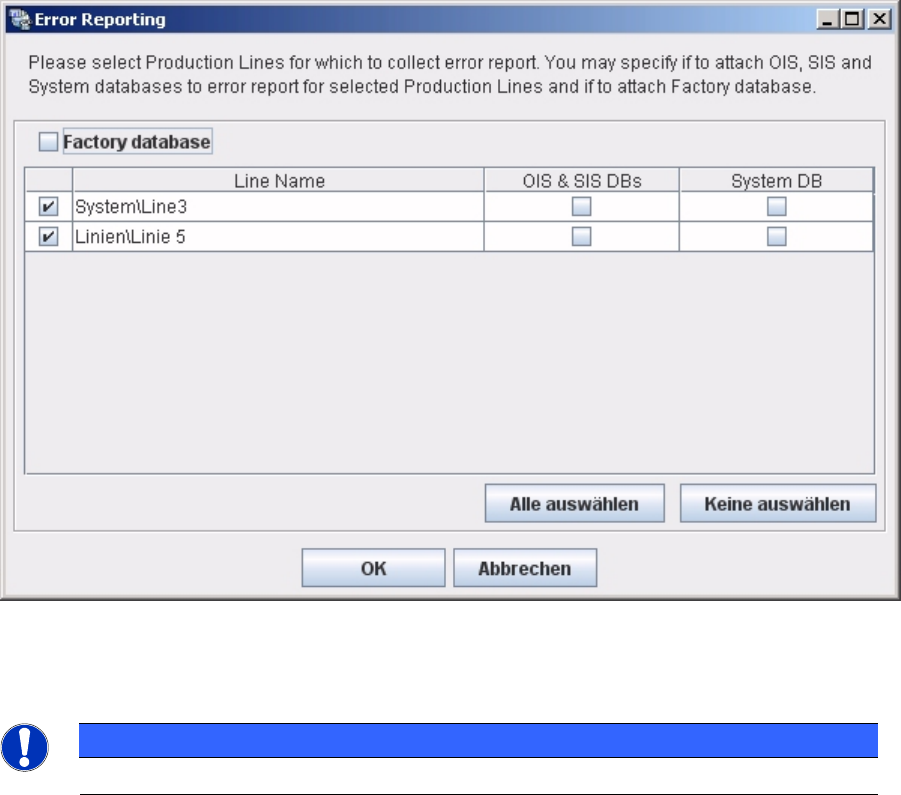
► SIPLACE Error Reporting will open:
► Select the production lines and databases for which you need error information.
NOTICE
Only select those production lines at which errors have occurred.
► Check your selection and confirm with OK. For further details of SIPLACE Error Reporting, see the
document “Navigation Guide for the Installation Procedure of SIPLACE Software Systems” (Item No.
00195050-xx

SIPLACE Explorer 2.11 Ausgabe 10/2013 Edition
1 Einleitung
In diesem Dokument wird SIPLACE Explorer Version 2.11 beschrieben.
Diese Anleitung richtet sich an Personen, die SIPLACE Explorer aufbauen, installieren und
betreiben.
In dieser Anleitung finden Sie folgende Informationen:
● "Einleitung" auf Seite 27
● "Lieferumfang" auf Seite 31
● "Systemkomponenten und -Konfigurationen" auf Seite 32
● "Systemanforderungen" auf Seite 35
● "Installation" auf Seite 44
● "SIPLACE Error Reporting" auf Seite 45
1.1 Was ist SIPLACE Explorer?
Über SIPLACE Explorer können Sie schnell und einfach Ihre Echtzeit-Daten und Ihre historischen
Daten in das World Wide Web bringen und vieles mehr. SIPLACE Explorer ist ein komponenten-
basiertes Softwareprodukt nach dem neuesten Stand der Technik für den Zugriff auf
Betriebsautomatisierungs-daten in der Halbleiter-, Leiterplatten- und SMD-Industrie.
Durch die OIS- und SIS-Unterstützung bietet SIPLACE Explorer den einfachsten Weg,
Echtzeitdaten und historische Daten aus einer Fertigungslinie in einer Datenbank und direkt im
Web bereitzustellen.
SIPLACE Explorer ist eine integrierte, visuelle Umgebung, die den ganzen Lebenszyklus von
schnell aufbauenden Echtzeit- und webbasierten Informationssystemen unterstützt.
SIPLACE Explorer bietet Ihnen viele Merkmale, die Ihnen die Arbeit mit Daten aus Ihrer
Fertigungslinie vereinfachen.
In SIPLACE Explorer V2.11 gibt es mehrere Installationsoptionen:
● Runtime Environment
● Werks-Konfigurations-Utility
● Development Environment
HINWEIS
Development Environment
Die Development Environment wird für den Normalbetrieb von SIPLACE Explorer nicht
benötigt. Diese ist ein Expertentool und wird z.B. für die Anpassungen der Websites
eingesetzt.
27 of 48