00196798-06_VD_SIPLACE_Explorer2.11_DE_EN.pdf - 第25页
SIPLACE Explorer 2.11 Ausgabe 10/2013 Edition 25 of 48 6.2 Tomcat 5.5x Log Files All files with the ending “log” will b e recorded, provided their time stamp is not olde r than one month and their size is < 50 MB. 6.3…
SIPLACE Explorer 2.11 Ausgabe 10/2013 Edition
6 SIPLACE Error Reporting
SIPLACE Explorer V 2.11 provides SIPLACE Error Reporting, which can be used to record production
line errors which occur in SIPLACE Explorer and Tomcat. The files recorded can then be sent for error
analysis to service department.
The following files are compiled by SIPLACE Error Reporting.
● OIS/SIS database configuration information, such as database version number, line and station
names.
● Information about the production lines configured in SIPLACE Explorer.
● Log files from SIPLACE Explorer
● Log files from Tomcat 5.5x
● OIS/SIS databases,
● SIPLACE Explorer line databases
● SIPLACE Explorer factory databases
● Log Files
6.1 SIPLACE Explorer Log Files
The following SIPLACE Explorer log files are recorded:
● config\version.cfg
● config\lines.xml
● Lines\Line1\SMA.gms
● Automatic Production Reporting Application.log
● FactoryConfigurationUtility.log
● logs\dev.log
● logs\dev_error.log
● logs\dev_process.log
● logs\FactoryConfigurationUtility.log
● logs\manager.log
● logs\runtime.log
● logs\runtime_error.log
● logs\runtime_process.log
● logs\ErrorReporting.log
24 of 48
SIPLACE Explorer 2.11 Ausgabe 10/2013 Edition
25 of 48
6.2 Tomcat 5.5x Log Files
All files with the ending “log” will be recorded, provided their time stamp is not older than one month and
their size is < 50 MB.
6.3 How to Start SIPLACE Error Reporting
► Start the SIPLACE Error Reporting from the Windows Start menu:
Start → Programs → SIPLACE Error Reporter.
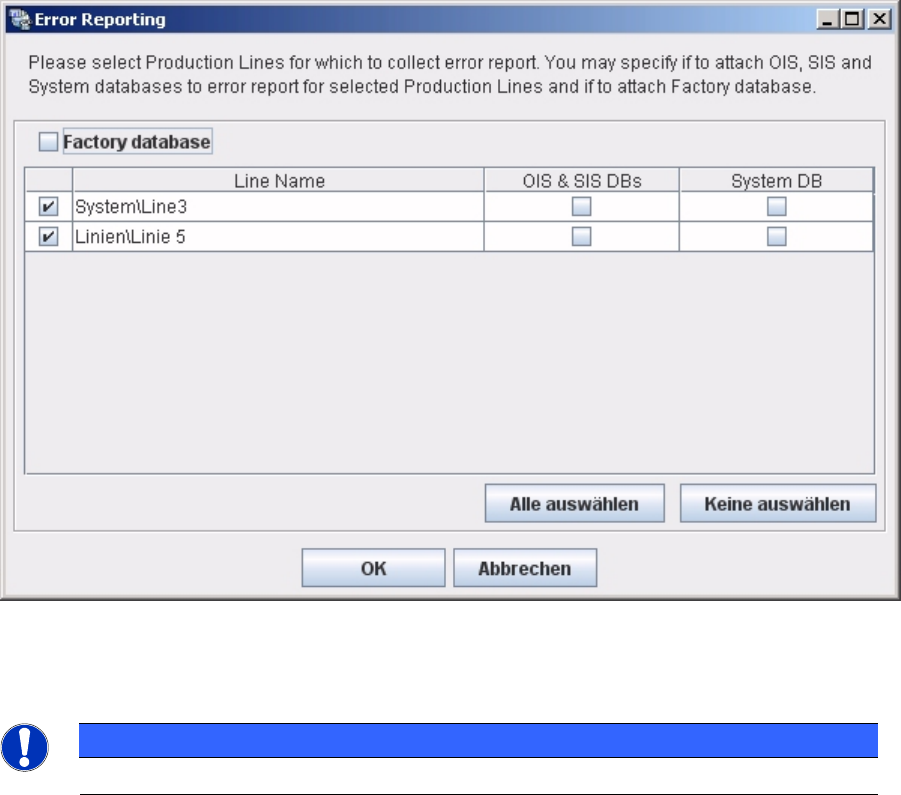
► SIPLACE Error Reporting will open:
► Select the production lines and databases for which you need error information.
NOTICE
Only select those production lines at which errors have occurred.
► Check your selection and confirm with OK. For further details of SIPLACE Error Reporting, see the
document “Navigation Guide for the Installation Procedure of SIPLACE Software Systems” (Item No.
00195050-xx