Vista Machine PC.pdf - 第7页
MACHINE PC PC ENCLOSURE Chapter Issue 1 Sep 02 Technical Reference Manual 5.7 Jumper Link Fun ction CAUTION JUMPER SETTINGS. Most settings ar e sof tware s elected, all jumpers are factory s et and should not be dis turb…
MACHINE PC
PC ENCLOSURE
5.6 Technical Reference Manual Chapter Issue 1 Sep 02
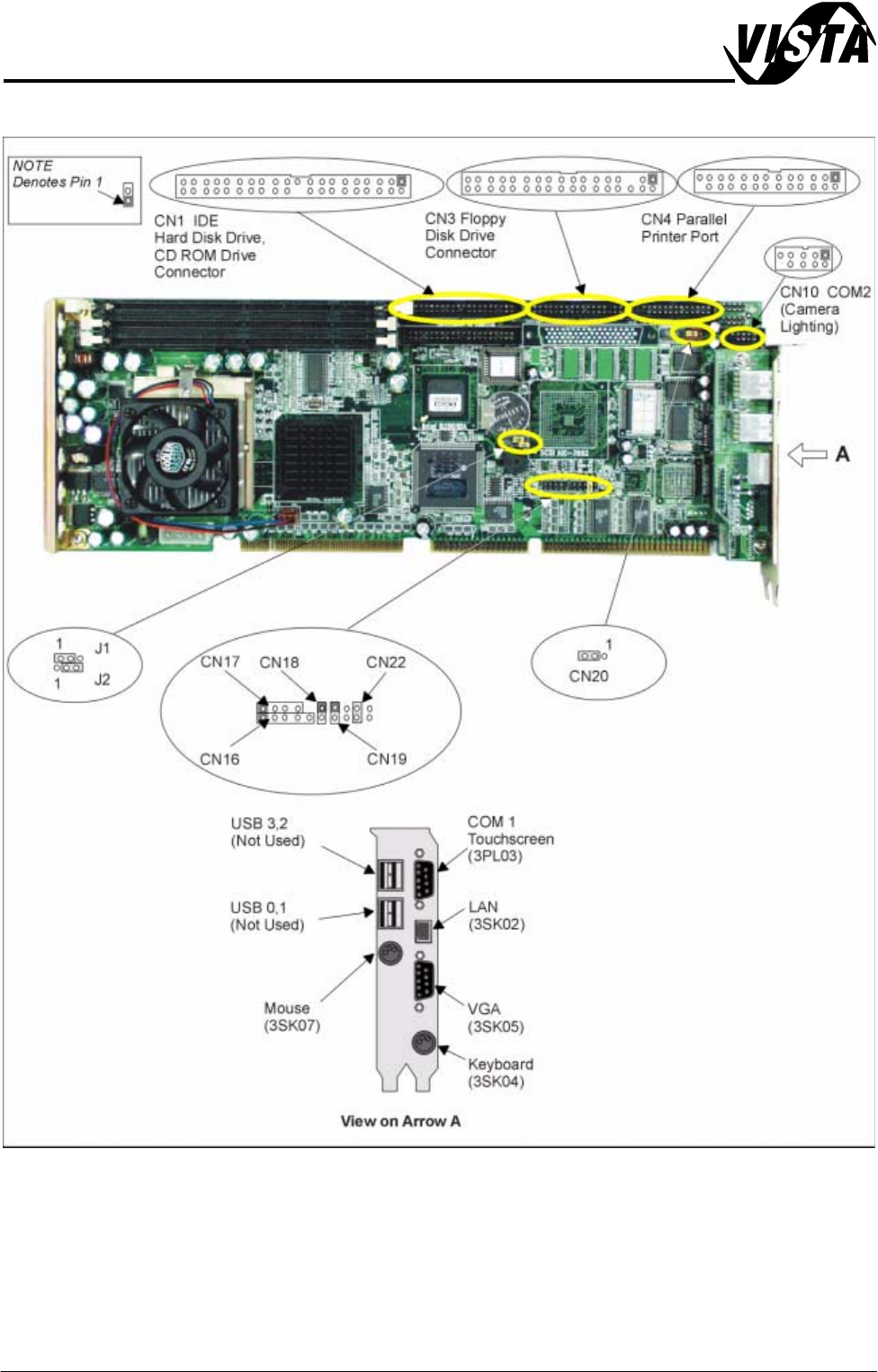
Figure 5-4 Processor Board
MACHINE PC
PC ENCLOSURE
Chapter Issue 1 Sep 02 Technical Reference Manual 5.7
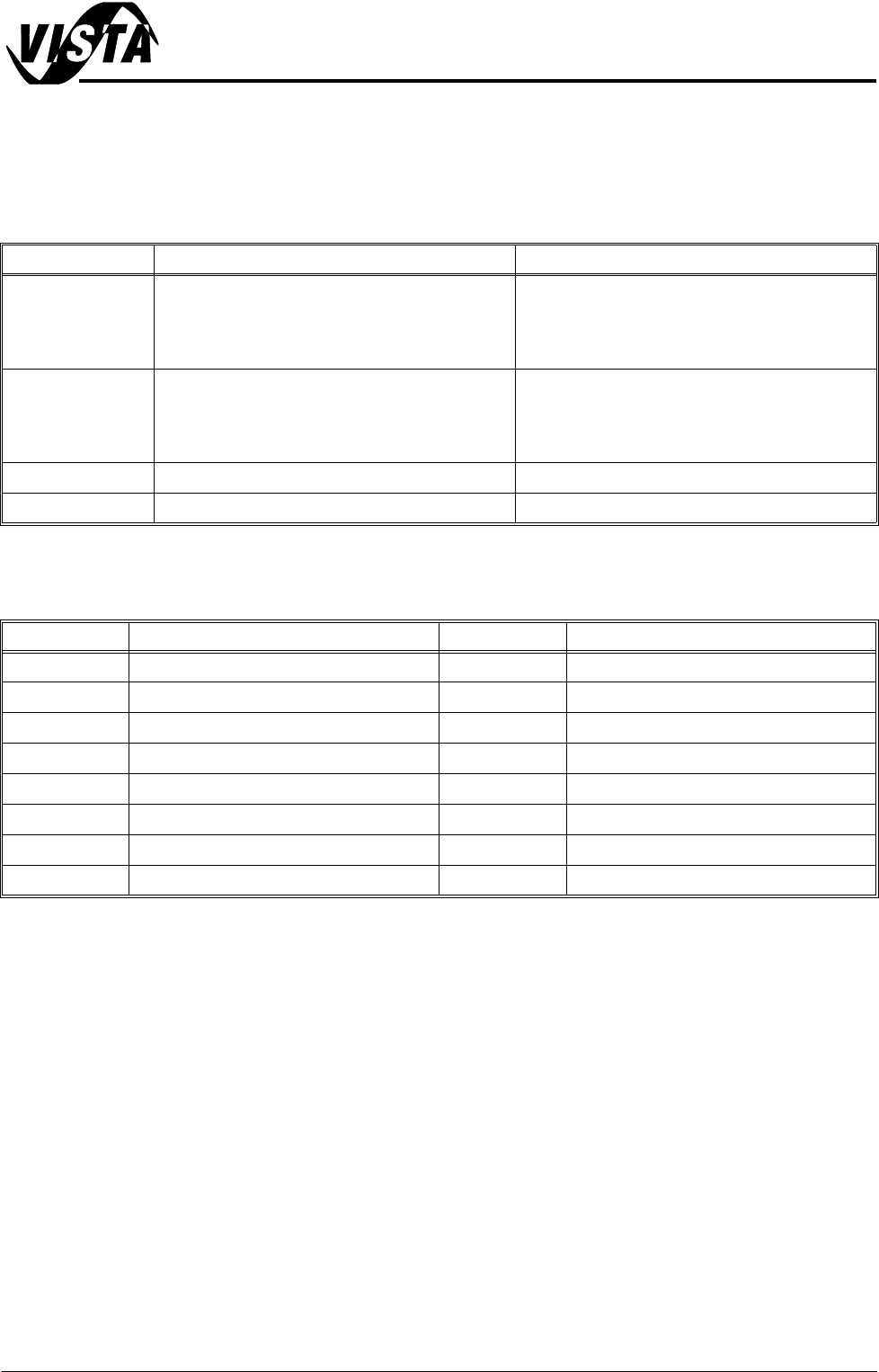
Jumper Link Function
CAUTION
JUMPER SETTINGS. Most settings are software selected, all jumpers are
factory set and should not be disturbed as board damage may occur.
Connector Function
Link Function Action / Set Position
J1 CMOS Clear Link can erase the CMOS data and reset the
system BIOS information:
Keep CMOS data - pins 1-2 linked together
Clear CMOS data - pins 2-3 linked together
J2 Watchdog Timer Output Resets the CPU or sends a signal to IRQ11 in the
event the CPU stops processing:
IRQ11 - pins 1-2 linked together
Reset - pins 2-3 linked together (default setting)
CN20 ATX Feature Connector Pins 2-3 linked together
CN22 H/W Monitor Alarm Pins 1-2 linked together enables OBS alarm
Connector Function Connector Function
3SK02 LAN Connector CN10 Serial Port COM 2 (Camera Lighting)
3SK04 P/S2 Keyboard CN16 Keyboard Lock and Power LED
3PL03 Serial Port: COM 1 (Touchscreen) CN17 External Speaker
3SK05 VGA Connector CN18 Reset Connector
3SK07 P/S2 Mouse CN19 HDD LED Connector
CN1 Primary IDE Connector CN20 ATX Feature Connector
CN3 Floppy Drive Connector CN22 H/W Monitor Alarm
CN4 Parallel Printer Port
MACHINE PC
PC ENCLOSURE
5.8 Technical Reference Manual Chapter Issue 1 Sep 02
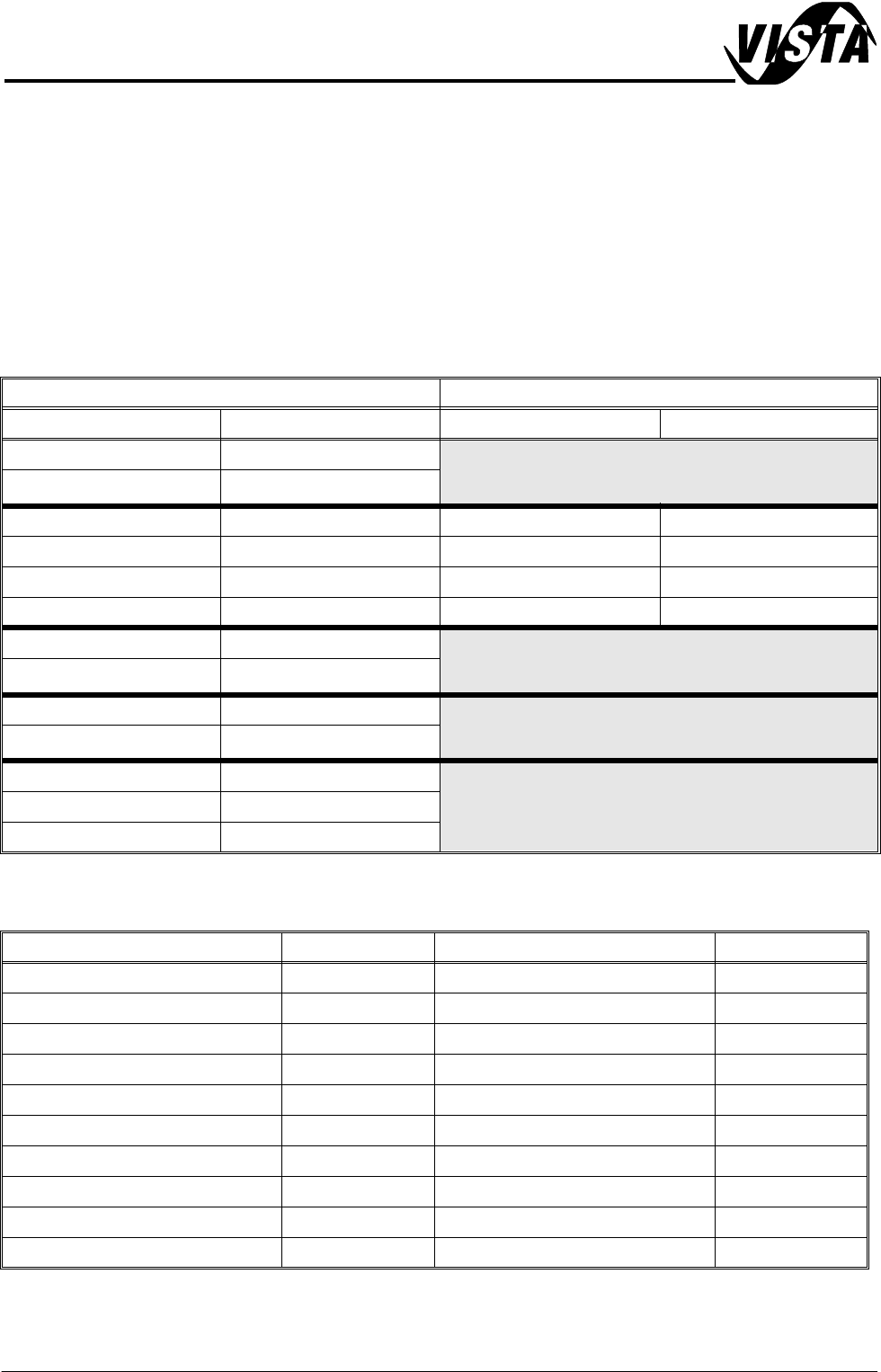
CMOS Settings The following tables list the CMOS settings for the machine. These settings are
based on AWARD BIOS Revision 1.11.
To enter the CMOS Setup Utility press Del when prompted during the initial
phase of the system PC bootup sequence. To navigate the menu pages use
the cursor keys, to change a setting use Page Up and Page Down keys. To
save settings press F10 and confirm.
NOTE
Settings marked with a * are hardware dependent and are subject to change.
Standard CMOS Setup
Advanced BIOS Features
Menu Sub Menu
Feature Setting Feature Setting
System Date Current Date (mm:dd:yy)
Time Current Time (hh:mm:ss)
Primary Master Auto IDE Primary Master Auto
Primary Slave Auto IDE Primary Slave Auto
Secondary Master None IDE Secondary Master None
Secondary Slave None IDE Secondary Slave None
Drive A 1.44M, 3.5″
Drive B None
Video EGA/VGA
Halt On All Errors
Base Memory 640K
Extended Memory 130048K
Total Memory 131072K
Parameter Setting Parameter Setting
Virus Warning Disabled Swap Floppy Drive Disabled
CPU Internal Cache Enabled Boot Up Floppy Seek Enabled
External Cache Enabled Boot Up NumLock Status On
CPU L2 Cache ECC Checking Enabled Gate A20 Option Fast
Processor Number Feature Enabled Typematic Rate Setting Disabled
Quick Power On Self Test Enabled Typematic Rate (Char/Sec) 6
First Boot Device Floppy Typematic Delay (Msec) 250
Second Boot Device CDROM Security Option Setup
Third Boot Device HDD-0 OS Select For DRAM>64MB Non-OS2
Boot Other Device Enabled Report NO FDD For Win 95 No