NPM-D3维修手册.pdf - 第50页
NPM-D3 SERVICE MANUAL 4.2 XY Drive Axes Page 4-12 EJM6D3-MB-04SM-02.DOC XY 4.2.2 Origin Adjustment 原点調整 原点调整 Unit No. N610052923AA N610052924AA 4.2.1 Linear Scale Adjustment リニアスケールの調整 线性刻度的调整 4.2.2 Origin Adjustment 原点調…
NPM-D3
SERVICE MANUAL
4.2 XY Drive Axes
EJM6D3-MB-04SM-02.DOC Page 4-11
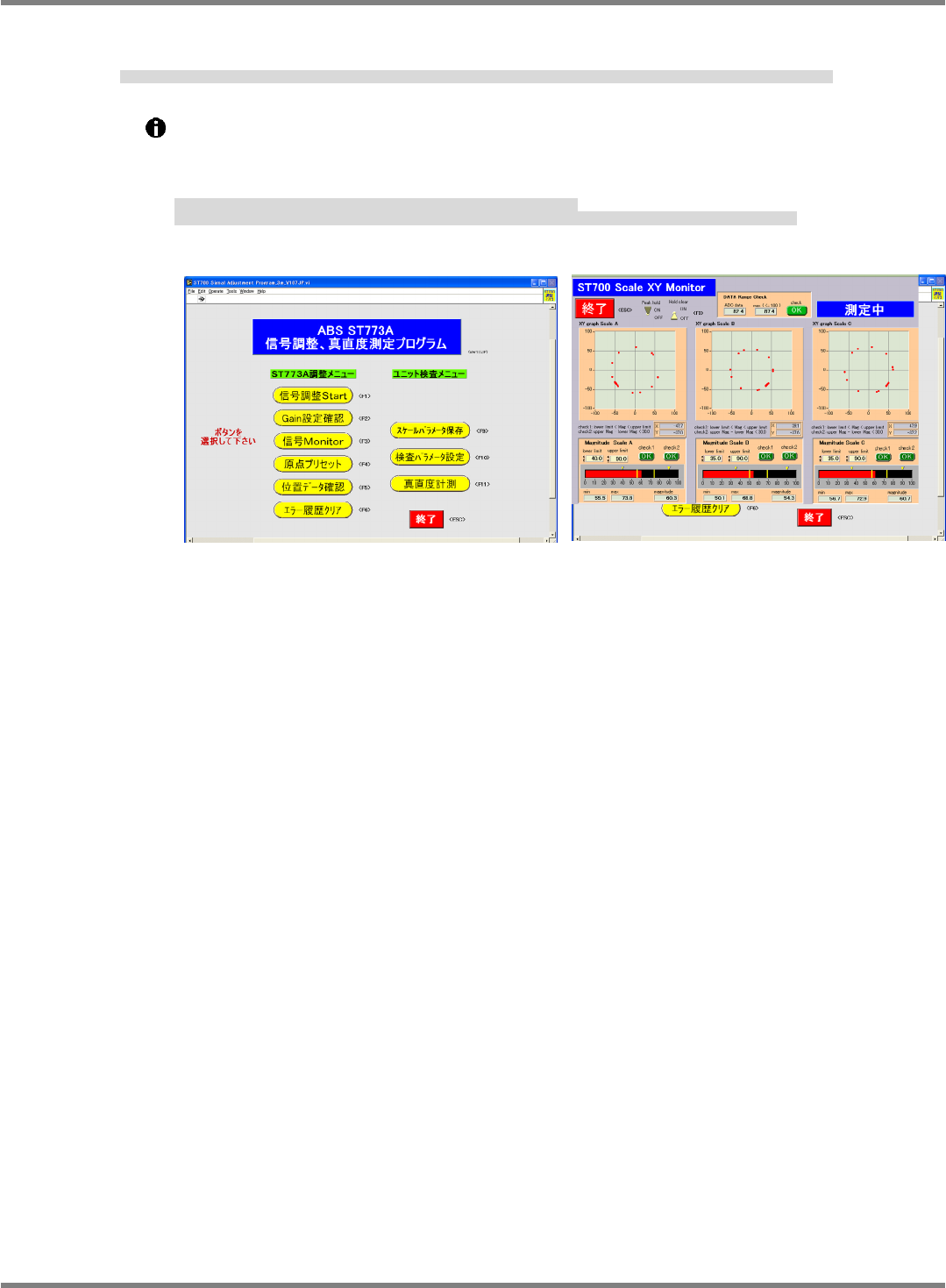
11. Click [Signal monitor]. When the display changes, move the axis concerned in the full range and make sure
that ‘OK’ is displayed under the check field. Then click [Finish].
[信号 Monitor] をクリックし、画面表示が変わったら、確認している軸を全域で動かし、Check 欄が OK であることを確認し、[終了] をクリックする。
单击 [信号 Monitor],等显示的画面变化后,使要确认的轴在全区域移动,确认 Check 栏中成为 OK 后,单击[结束]。
If ‘NG’ is displayed, move the axis near to the position where the highest scale value is displayed
and repeat from step 6.
When making readjustment, the check field on the signal monitor screen remains ‘NG’, click
[Hold clear] to clear it and then check again.
NG
の場合、
Scale
値が一番高く表示される付近に動かして、
6
番より再度確認する。
再調整の際、
‘
信号
Monitor’
画面の
Check
欄が
NG
のままなので、
[Hold clear]
をクリックし、
NG
を解除して再確認してください。
是
NG
时,移动到
Scale
值的最高显示值附近后,再次从
6
开始重新确认。
再调整时,因为
‘
信号
Monitor’
画面的
Check
栏还是
NG
,请单击
[Hold clear]
解除
NG
后再进行确认。
Fig. 16
Fig. 17
NPM-D3
SERVICE MANUAL
4.2 XY Drive Axes
Page 4-12 EJM6D3-MB-04SM-02.DOC
XY
4.2.2 Origin Adjustment
原点調整
原点调整
Unit No.
N610052923AA
N610052924AA
4.2.1 Linear Scale
Adjustment
リニアスケールの調整
线性刻度的调整
4.2.2 Origin Adjustment
原点調整
原点调整
PC (Signal adjustment program)
PC (
信号調整プログラム
)
PC (
信号调整程序
)
Origin Adjustment
原点調整
原点调整
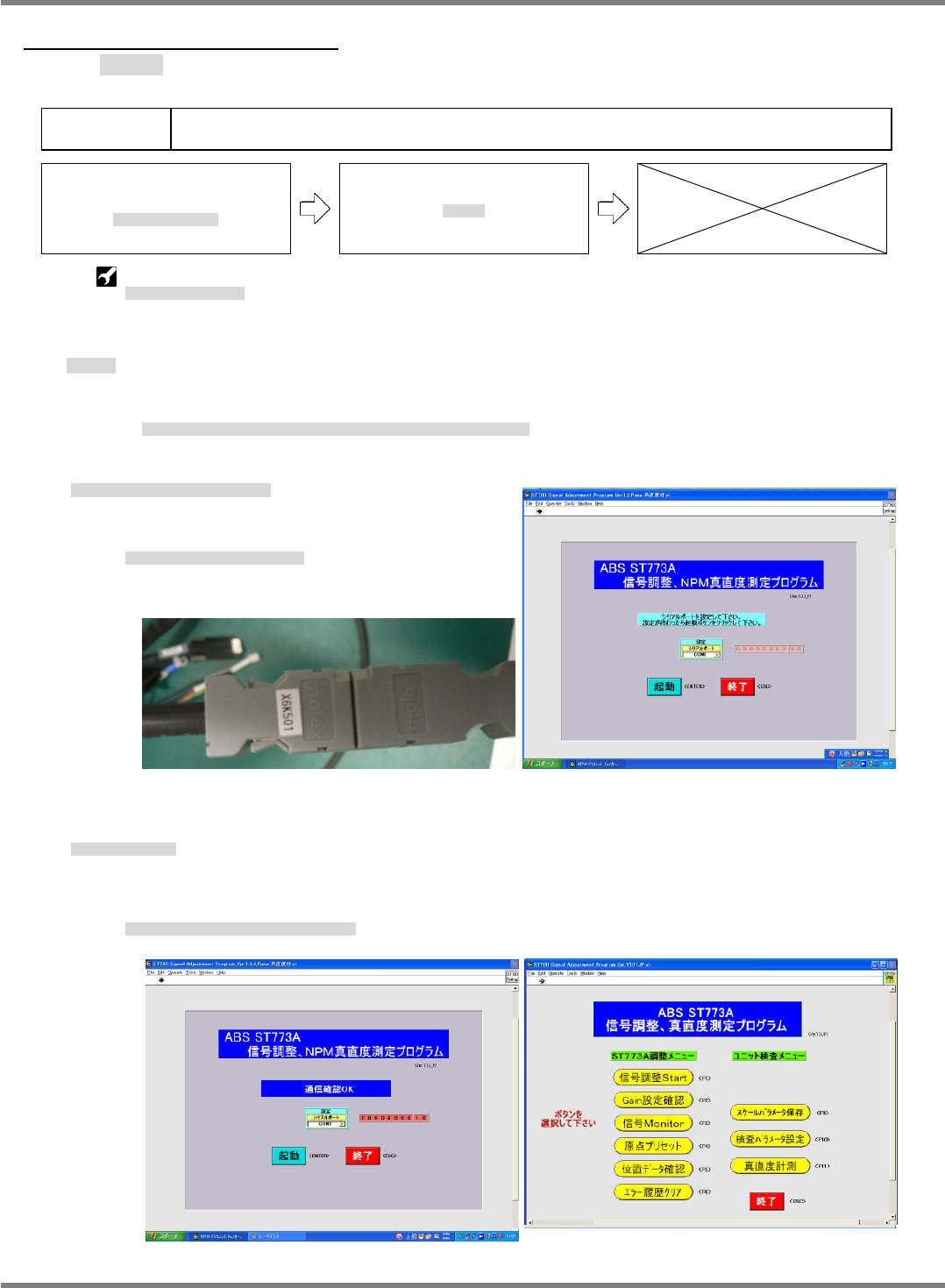
To adjust the origin after attaching the linear head, start from step 3.
リニアヘッド取り付け後、続けて原点調整を行う場合、3 番から行ってください。
如果在安装线性头之后,接下去就进行原点调整时,请从 3 开始实施。
2.
1. Launch the signal adjustment program and adjust the origin.
信号調整プログラムを立ち上げ調整する。
启动信号调整程序后进行调整。
Connect the encoder cable to the connector.
エンコーダ線コネクタに接続します。
将编码器线连接到连接器。
2. Click [Start].
起動をクリックする。
单击[启动]。
When the message indicating that the communication check is OK appears, the display changes
to the menu screen.
通信確認が
OK
になると画面が切り替わります。
通信确认成为
OK
后,画面会切换。
Fig. 2
Fig. 1
Fig. 3
Fig. 4
NPM-D3
SERVICE MANUAL
4.2 XY Drive Axes
EJM6D3-MB-04SM-02.DOC Page 4-13
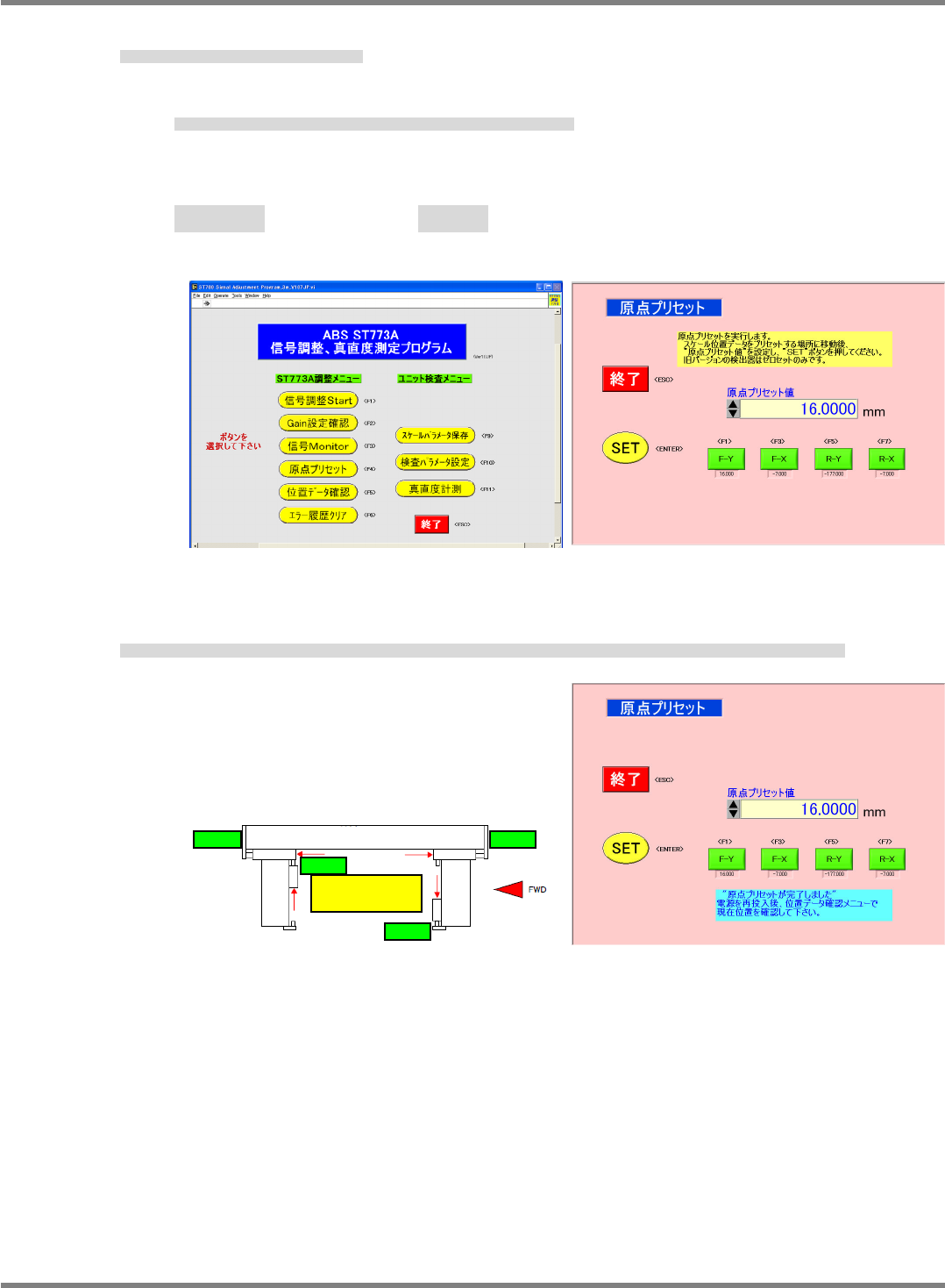
3. Click [Origin preset] and adjust the origin.
[原点プリセット] をクリックし、原点調整を行う。
单击 [原点预调整],进行原点调整。
Pressing an axis button inputs the offset value for the axis in the origin preset field.
軸のボタンを押すと、原点プリセット表示欄に各軸のオフセット値が入力されます。
单击轴的按钮后,在原点预调整显示栏内会输入各轴的偏移量。
Front Y axis F-Y: -25,000 Rear Y axis R-Y: 25,000
Front X axis F-X: -7,000 Rear X axis R-X : -7,000
フロント
Y
軸
F-Y
リア
Y
軸
R-Y
フロント
X
軸
F-X
リア
X
軸
R-X
前面
Y
轴
F-Y
后面
Y
轴
R-Y
前面
X
轴
F-X
后面
X
轴
R-X
4. With the beams flush against the origin stoppers of the target axes, click [SET], the message at right
appears and the menu screen returns.
調整している軸の原点ストッパにビームを押しあてた状態で、[SET] をクリックすると、‘原点プリセットが完了しました’ と表示され、メニューに戻る。
在将臂推靠到正在调整的轴的原点止动器上的状态下单击 [SET] 后,会显示‘原点预调整结束了’ ,并回到菜单画面。
Fig. 5
Fig. 6
Fig. 8 Fig. 7
Y axis
X axis
X axis
Y-R origin Y-F origin
X-F origin
Make sure each beam is
flush against the origin
sto
pp
er.
X-R origin