Micron Maintenance Manual.pdf - 第13页
1 PREVENTIVE MAINTENANCE 1.5 MONTHLY MAINTENANCE MAINTENANCE MANUAL MICRON 11/2017 13 1.5.1 SPC Alignment Check Follow details in the Accuracy Check section previously described in this chapter. Record details for each m…
1 PREVENTIVE MAINTENANCE
1.5 MONTHLY MAINTENANCE
12 MAINTENANCE MANUAL MICRON 11/2017
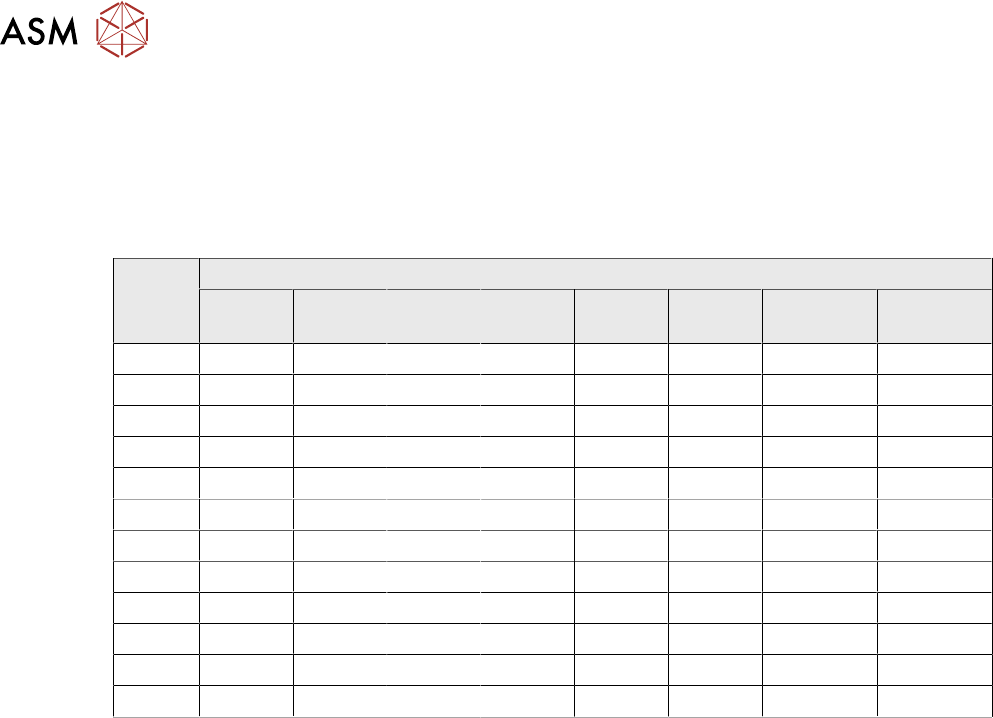
1.4.3 Accuracy Check
The accuracy check should be performed after doing 10 cycles unmeasured, allowing the machine
to settle. Month 1 and Month 7 are 100 cycles; all other months are 30 cycles as shown in the table
below.
Pre and Post print measurements are taken to record the accuracy of the alignment in CPK values
and the front and rear squeegee pressures.
Month No Of Cycles
Pre X Pre Y Pre
Theta
Post X Post Y Post
Theta
Front
Squeegee
Rear
Squeegee
1 100 100 100 100 100 100 100 100
2 30 30 30 30 30 30 30 30
3 30 30 30 30 30 30 30 30
4 30 30 30 30 30 30 30 30
5 30 30 30 30 30 30 30 30
6 30 30 30 30 30 30 30 30
7 100 100 100 100 100 100 100 100
8 30 30 30 30 30 30 30 30
9 30 30 30 30 30 30 30 30
10 30 30 30 30 30 30 30 30
11 30 30 30 30 30 30 30 30
12 30 30 30 30 30 30 30 30
1.4.4 SPC Results
Where the QC Calc for Windows program is installed, SPC data capture can graphically show crit-
ical alignment and squeegee pressure accuracy. The graphs in their visual form are often useful in
determining the optimum maintenance plan.
NOTE
Customers may opt to use the collected data in their own management system, ASM cannot
provide support for this.
1.4.4.1 Examining The Collected Data
In addition to examining the SPC data which is displayed graphically in the QC Calc for Windows
program, engineers can extract information about machine performance from other sources.
The SPC data collected on the machine is stored in E:\config\readings.dek. Information can be
displayed in a text editor and specific data can be examined eg, events between dates or a specific
word or phrase.
Each occurrence of an error for example, can be examined to see if the rate at which it has oc-
curred has increased (is it a random occurrence or an increasing trend?).
1.4.4.2 Authorization
At the end of each monthly task a Summary/Remarks form is provided to allow the engineer to
make comments or express observations. The engineer must sign off and date the form, if used, in
the 1.1.1 "Monthly Maintenance Completed" [}7] table so that there is a record that the schedule
has been completed.
1.5 MONTHLY MAINTENANCE
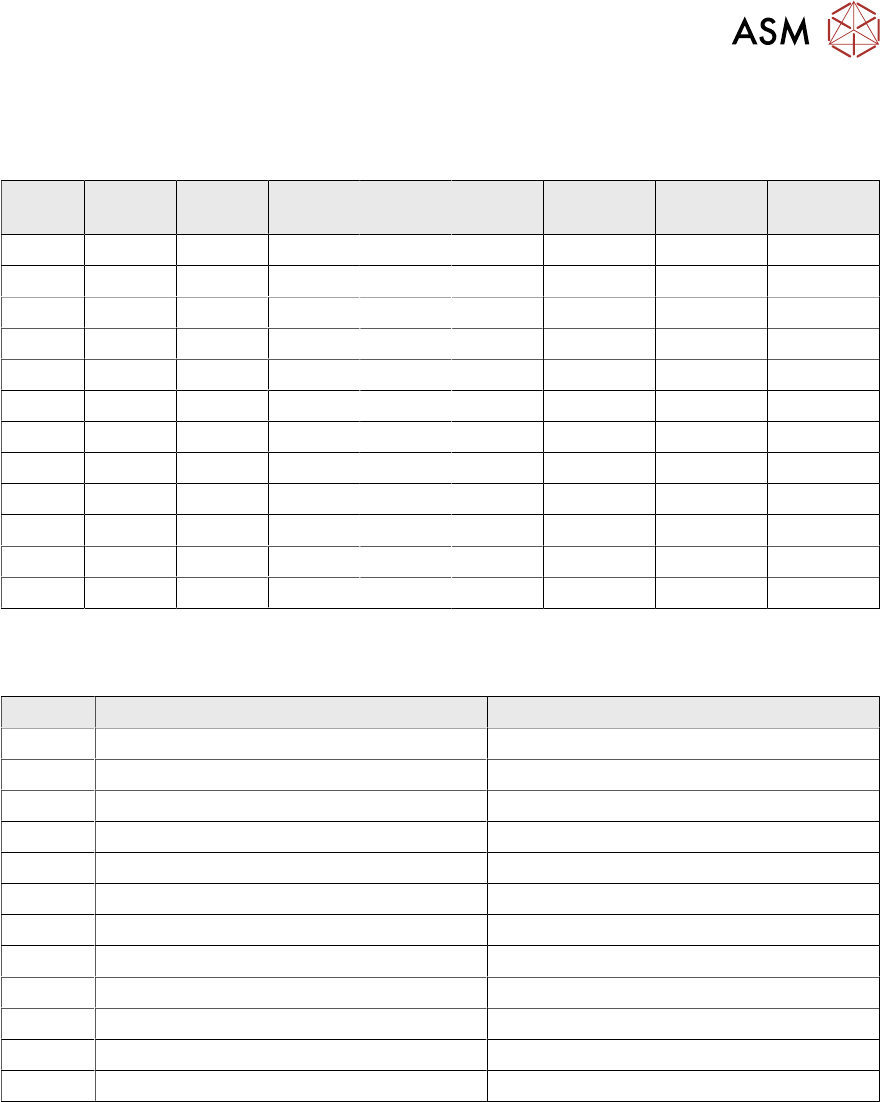
Each month the following tables are filled in prior to carrying out any equipment checks. Prior to
running the thirty test cycles required for the table below, run ten cycles to allow the machine to
settle.
1 PREVENTIVE MAINTENANCE
1.5 MONTHLY MAINTENANCE
MAINTENANCE MANUAL MICRON 11/2017 13
1.5.1 SPC Alignment Check
Follow details in the Accuracy Check section previously described in this chapter. Record details
for each month.
Month Pre X Pre Y Pre
Theta
Post X Post Y Post
Theta
Front
Squeegee
Rear
Squeegee
1
2
3
4
5
6
7
8
9
10
11
12
1.5.2 Machine Cycle Count
Record the printer cycle count for each month.
Month Insert the Cycle Count Number of cycles between the visits
1
2
3
4
5
6
7
8
9
10
11
12
1 PREVENTIVE MAINTENANCE
1.5 MONTHLY MAINTENANCE
14 MAINTENANCE MANUAL MICRON 11/2017
1.5.3 Maintenance Procedure For Month 1
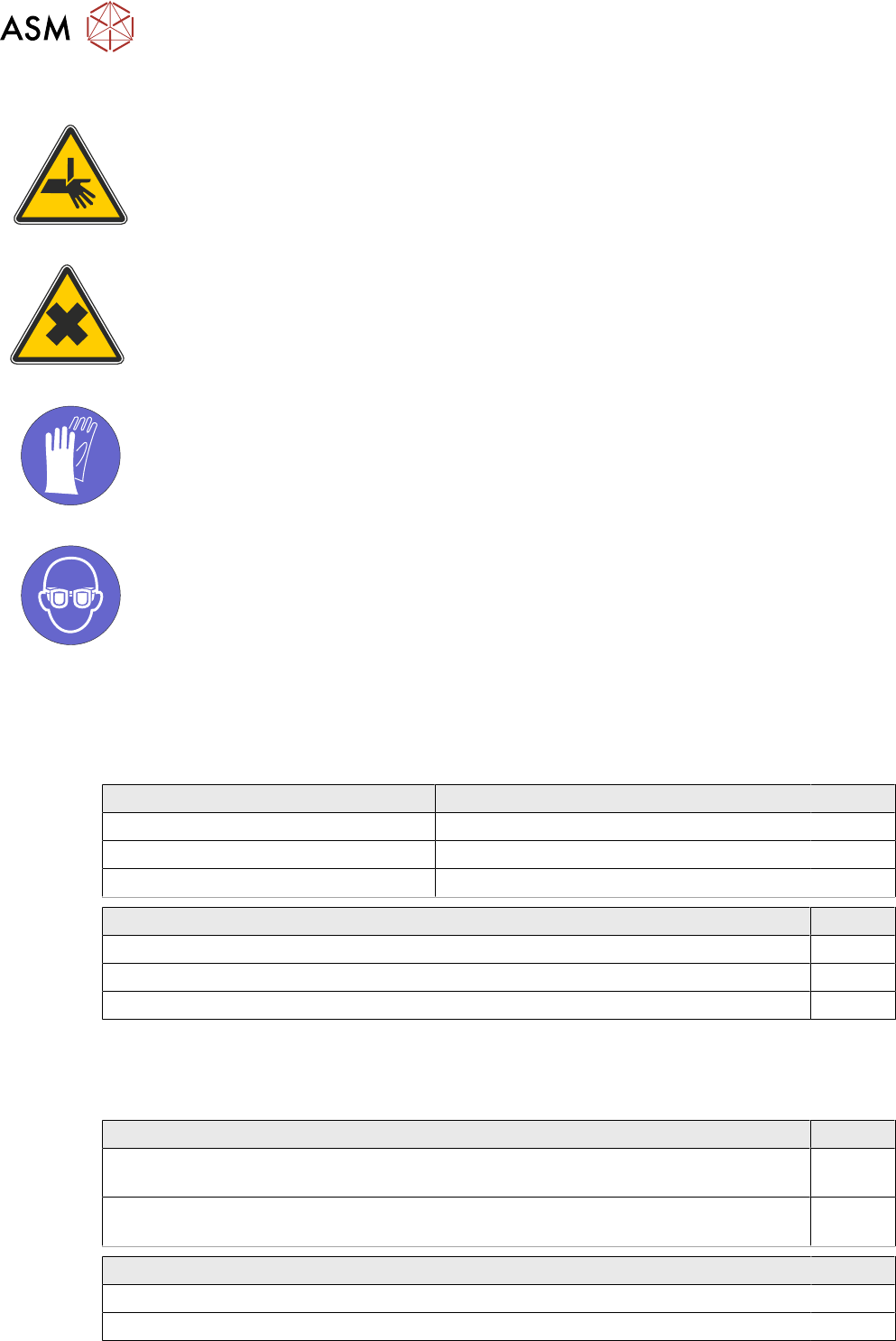
WARNING
BOARD CLAMPS. EXTREME CARE MUST BE EXERCISED WHEN WORKING IN
THE TOOLING AREA OF THE MACHINE TO AVOID INJURY. THE FOILS ON THE
FRONT AND REAR BOARD CLAMPS ARE VERY SHARP.
WARNING
HARMFUL SUBSTANCES. CLEANING WIPES AND CLEANING SOLUTIONS MAY
CONTAIN SUBSTANCES HAZARDOUS TO HEALTH. WHEN USING CLEANING
WIPES AND CLEANING SOLUTIONS THE MANUFACTURERS’ SAFETY DATA
SHEETS MUST BE STRICTLY ADHERED TO.
MANDATORY
TOXIC CHEMICALS MAY BE PRESENT. SAFETY GLOVES MUST BE WORN.
MANDATORY
TOXIC CHEMICALS MAY BE PRESENT. EYE PROTECTION MUST BE WORN.
1.5.3.1 SPC Alignment Check And Machine Cycle Count
Fill out details: 1.5.1 "SPC Alignment Check" [}13] and 1.5.2 "Machine Cycle Count" [}13].
1.5.3.2 Software
Software Check Record Tick
Check the date and time settings.
Check the software loaded options.
Check the software version is the latest.
View Event Log Tick
Check for initialization errors.
Check for stencil position errors (31210, 31211, 31212).
Check for camera errors (31207, 31208).
1.5.3.3 Monthly Maintenance
Before commencing with the Monthly Maintenance, ensure the Daily Maintenance has been com-
pleted.
Adjustable Stencil Mount (ASM) Tick
Remove any debris and clean the ASM assembly. See 2.10 "Adjustable Stencil Mount
(ASM)" [}66].
Remove any debris and clean the pulley assemblies. See 2.10 "Adjustable Stencil
Mount (ASM)" [}66].
Environmental Control Module Tick
Inspect the air filters clean/replace (as detailed in the equipment manual).
Check for leakage in the system.