TK33045_PickHeightTeaching.pdf - 第22页
2nd SMT En gineering Division So ftware Group IM Operations Y AMAHA MOTOR CO., L TD MD OC-SOFT50389 22/24 6. Suggestions at upgrading sof tware Please be advi s ed to r ead this s ection when the s oftware is …

2nd SMT Engineering Division Software Group
IM Operations
YAMAHA MOTOR CO., LTD
MDOC-SOFT50389
21/24
5.
Limitations
This function doesn’t work on a machine not supported for SS feeder and ZS feeder.
When carbon tape guides are used, nozzles of 3
03, 314, 603, 503, and 514 are not
available with 8mm feeders.
Flying Nozzle Change is not supported.
At measurement of 8mm feeders, Single Fiducial Camera may not recognize a guide in
some area.
Some size of 12mm feeder parts and tray feeder parts are not allowed for
measurement. (Smaller than 3.0×3.0×1.0 by default.)
Some nozzles with high open vacuum are not allowed for measurement of 12mm
feeders and tray feeder.
For hollow parts of 12mm feeders and tray feeder, it is necessary to set [Nozzle Touch
Point Offset (mm)] properly.
When the measurement point and nozzles are touched with nozzle tip open,
measured result may not be accurate.
2nd SMT Engineering Division Software Group
IM Operations
YAMAHA MOTOR CO., LTD
MDOC-SOFT50389
22/24
6.
Suggestions at upgrading software
Please be advised to read this section when the software is updated from an older version
without this function.
6.1. Mark data setting for guide recognition
As described at “3. Function Details”, at measurement of 8mm feeders guide recognition
requires a special mark data registered in database.
Please use board data that is included in the installation CD of V3.45STDR1.000 or later/ V4.44
STD R1.000 or later through the following procedure.
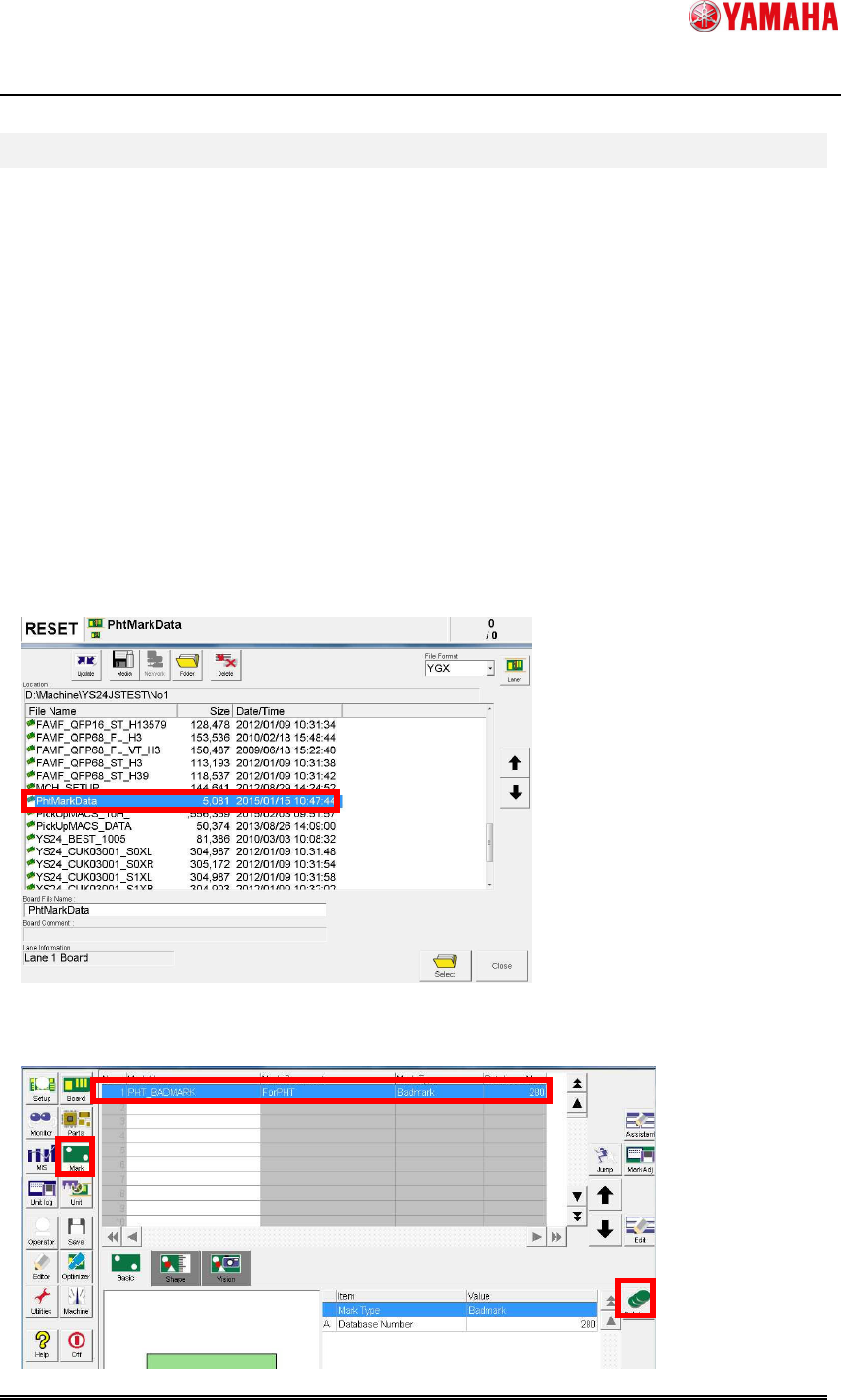
(1) Copy “PhtMarkData.ygx” from the installation CD to the “No1” folder in the target
machine.
(2) From the [Setup] screen, read the board data “PhtMarkData.ygx”. An error may occur,
but you can ignore it.
(3) Press the [Mark] button. Select mark data of “PHT_BADMARK”, then press the
[Database] button.
2nd SMT Engineering Division Software Group
IM Operations
YAMAHA MOTOR CO., LTD
MDOC-SOFT50389
23/24
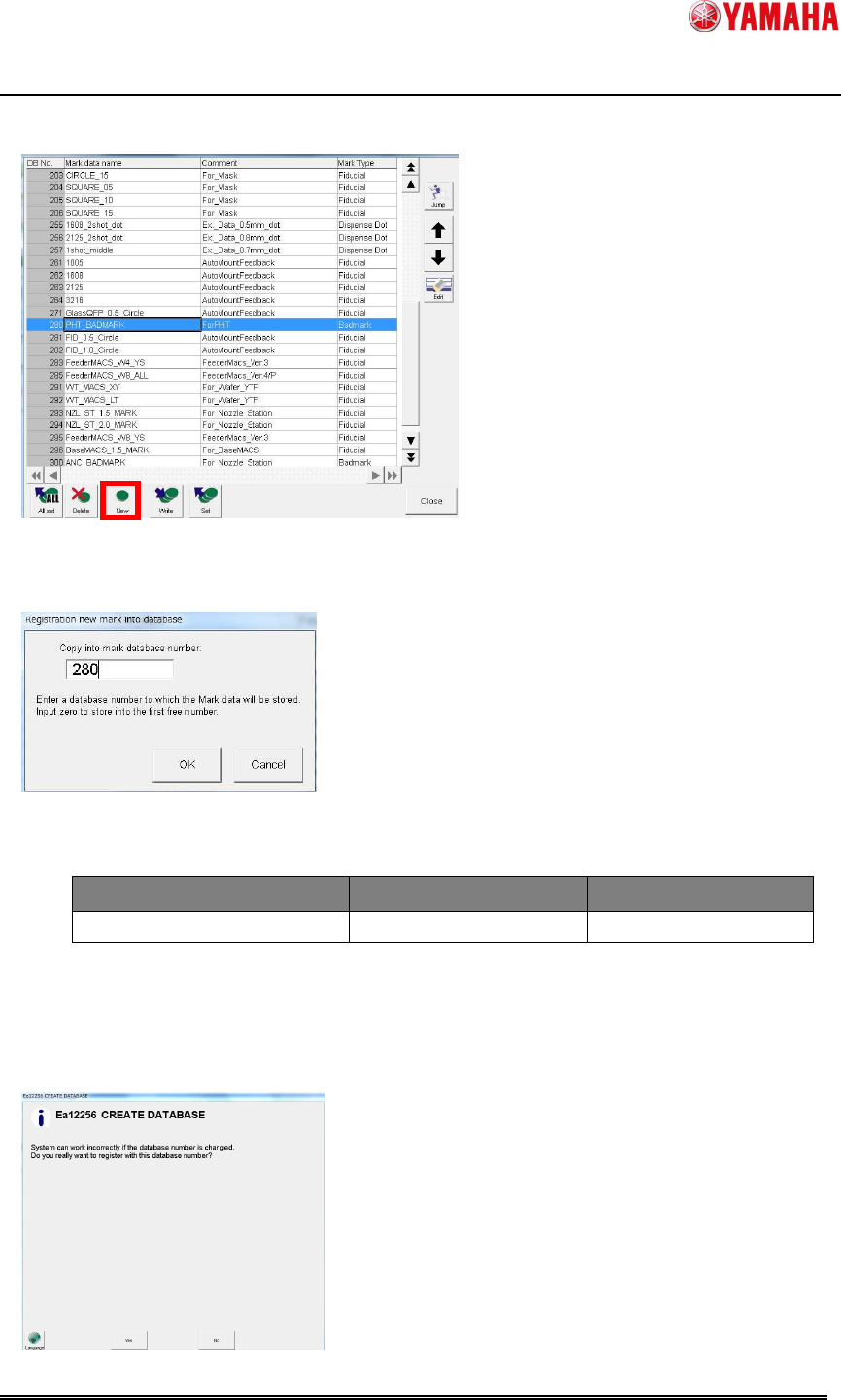
(4) The [Mark database overview] window appears. Press the [New] button.
(5) The [Registration new mark into database] window appears. Enter the mark database
number, and press the [OK] button.
Database number is as follows.
■ Common in all machines
Mark Name Comment Database Number
PHT_BADMARK ForPHT 280
(6) If the following message is displayed when you try to register parts data in the above
number, press [Yes]. If this message is displayed with other than 280, please change the
number.