TK33045_PickHeightTeaching.pdf - 第6页
2nd SMT En gineering Division So ftware Group IM Operations Y AMAHA MOTOR CO., L TD MD OC-SOFT50389 6/24 3.1 Using Method While this functio n is active, the [ Parts] - [T each] screen is displa yed as below .…

2nd SMT Engineering Division Software Group
IM Operations
YAMAHA MOTOR CO., LTD
MDOC-SOFT50389
5/24
3. Function Details
This function measures the height of a head above the target tape guide, and calculates its
appropriate pick height. The result can be applied to board data. Therefore, you don’t need
any special equipment such as a laser measuring instrument to measure the pick height.
When using an 8mm feeder, a head moves down to the feeder tape guide, and the height is
calculated based on its vacuum level. The result is translated to pick height and displayed
on the screen.
It is possible to apply the measured pick height to board data, and to use it in production.
There are two types of tape guide, iron and carbon. They have different measurement
positions, so that it is necessary to recognize a tape guide by the moving camera. However,
if you use only either type of tape guide feeders, you can skip the guide recognition. To
recognize a guide, the special mark data is necessary. For more details, please refer to
Chapter 4 or 6.
Teaching head is supposed to pick the first one of the target feeder parts. If the first head
can’t measure the height, the second head does. If no head can measure the height, a
measurement error occurs.
In V4.50STDR1.000 (V3.45 STDR1.000) or later, it is possible to measure the height without
mount data as long as fixed board data is read. In this case, mounting heads and nozzles
are automatically determined. Please note that the determined combination of heads and
nozzles will be different from that you want to set.
(▲1)
In V4.52STDR1.000(V3.47STDR1.000) or later, it is possible to measure pick height of large
parts with 12mm feeder or larger (hereafter “12mm feeder”). For more details, refer to 3.2.
(▲2)
In V4.52STDR1.000 (V3.47STDR1.000), it is possible to measure pick height of Auto Tray
parts and Fixed Tray parts. For more details, refer to 3.3.
(▲3)
2nd SMT Engineering Division Software Group
IM Operations
YAMAHA MOTOR CO., LTD
MDOC-SOFT50389
6/24
3.1 Using Method
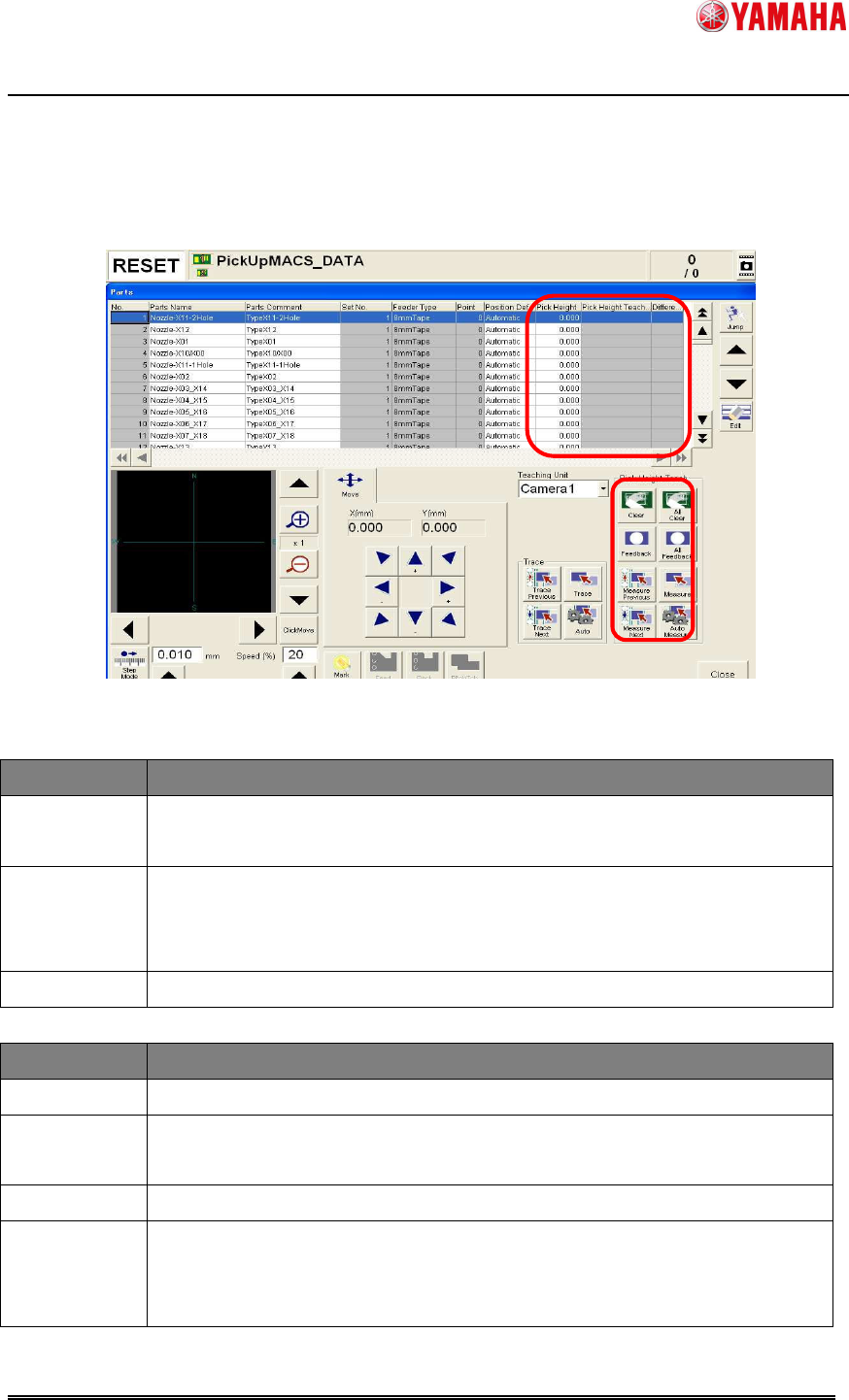
While this function is active, the [Parts] - [Teach] screen is displayed as below.
The contents marked in red are the added.
Fig 3.1 Teach screen with Pick Height Teaching
<Contents on the grid>
Item Description
Pick Height
Pick height currently specified. You can edit this item directly.
For tray parts, [Tray Height] is displayed.
(▲3)
Pick Height
Teach Result
Measured result of pick height. If measurement is failed or undone, this
item is shown with blank.
For tray parts, measured results of [Tray Height] are displayed.
(▲3)
Difference
Difference between the original pick height and teaching height.
<Buttons on the right bottom>
Item Description
Measure
Pick height is measured for the parts selected on the grid.
Measure
Previous
Pick height is measured for the one before the selected parts on the grid.
Measure Next
Pick height is measured for the one next to the selected parts on the grid.
Auto Measure
When the [Measure Previous] or [Measure Next] button is pressed with
this button, pick height is measured for the next or previous parts in order
continuously.(Continuous teaching)

2nd SMT Engineering Division Software Group
IM Operations
YAMAHA MOTOR CO., LTD
MDOC-SOFT50389
7/24
Feedback
When this button is pressed, teaching result is applied to pick height of the
selected parts.
All Feedback
All teaching results are applied to pick height of all parts.
Clear
Teaching result of selected parts is cleared.
All Clear
All teaching results are cleared.
< Caution >
- These items are grayed out when the feeder or nozzle of selected parts is unsupported.
At executing [Auto Measure], such feeders and nozzles are skipped.
- At executing [Auto Measure], tray parts are skipped.
(▲3)
- Teaching results are maintained until board data is read.
< Note >
- Pick height teaching is performed one by one.
- It takes about 5 to 6 seconds per point with 8mm feeder, and with 20-30 seconds per point
with 12mm feeder and tray feeder. (Depends on parts type.)
3.2 12mm or larger feeders are supported
(▲2)
By measuring pick height of upper surface of the parts directly, differently from 8mm feeders,
it allows measurement of large parts that usually have several shapes of tape guides. How
to use this function is the same as 8mm feeders. (Refer to 3.1)
While using 12mm feeders, please make sure the following contents.
< NOTE >
- Parts size is up to 3.0×3.0×1.0 or smaller by default.
- Basically all nozzles are supported, but some nozzles, such as 0402 nozzle with very
small tip that makes high open vacuum, may not be used.
- To perform [Inner Pickup] for connector parts, you need to set [Parts]-[Pick]-[Nozzle Touch
Point Offset (mm)] properly before executing height measurement. This function
calculates pick height considering the [Nozzle Touch Point Offset (mm)] value. If this item
is blank at measurement, it is not possible to calculate the applicable pick height.
- When the measurement point and nozzles are touched with nozzle tip open, measured
result may not be accurate.