cps編輯及應用手冊.pdf - 第6页
5 C P S E d i t & DA S P r o c e ss i n g O u t p u t C e l l Da t a S e p a r a t e ly 選 擇 Pa rt 資料: P a r t s E d it Pa n el 資料: I m p o rt 讀取 Pa n el 資 料: A l i gn m e nt 編輯 Pa n el 資料: B l o ck 編輯 Pa n el 資料: S i…
4
View
功能指令說明
指令
指令功能說明
Mount Side
切換至機種程式背面
Print Side
切換至機種程式正面
Clear Parts
清除背景影像上所有零件圖形
,
用游標點選座標時
,
零件再次顯現
Both
背影影像上所有零件圖形旁顯示
Part Number
及
Reference
資料
Part Number
背影影像上所有零件圖形旁顯示
Part Number
資料
Display With
Reference
背影影像上所有零件圖形旁顯示 Reference 資料
Verify Error
錯誤零件清單確認
Part Type
根據零件種類顏色定義顯示顏色
Display By
Polarity
有極性之零件顯示顏色
Black
零件整體顏色顯示黑色
Blue
零件整體顏色顯示藍色
Green
零件整體顏色顯示綠色
Cyan
零件整體顏色顯示藍綠色
Red
零件整體顏色顯示紅色
Yellow
零件整體顏色顯示黃色
Magenta
零件整體顏色顯示紫紅色
Color
White
零件整體顏色顯示白色
Program
功能指令說明
指令
指令功能說明
Tool
開啟工具
,
工具計有
SEQ
、
Check
、
Play
、
Read
、
Send
、
Print
SEQ
程式排序工具
Check
程式排序後排序、供料料站、吸嘴配置狀況確認工具
Play
程式排序後模擬吸裝著動作工具
Read
讀取已排序程式排序資料
Send
將已排序.DAT 檔案轉換成.PWB 機種程式輸出
Tool
Print
列印機種程式相關資料
Reset
重新排序
,
恢復至排序前狀況
Backup
功能指令說明
指令
指令功能說明
Backup
相關資料壓縮備份或解壓縮
Help
功能指令說明
指令
指令功能說明
Online Help
線上說明
Version
軟件版本
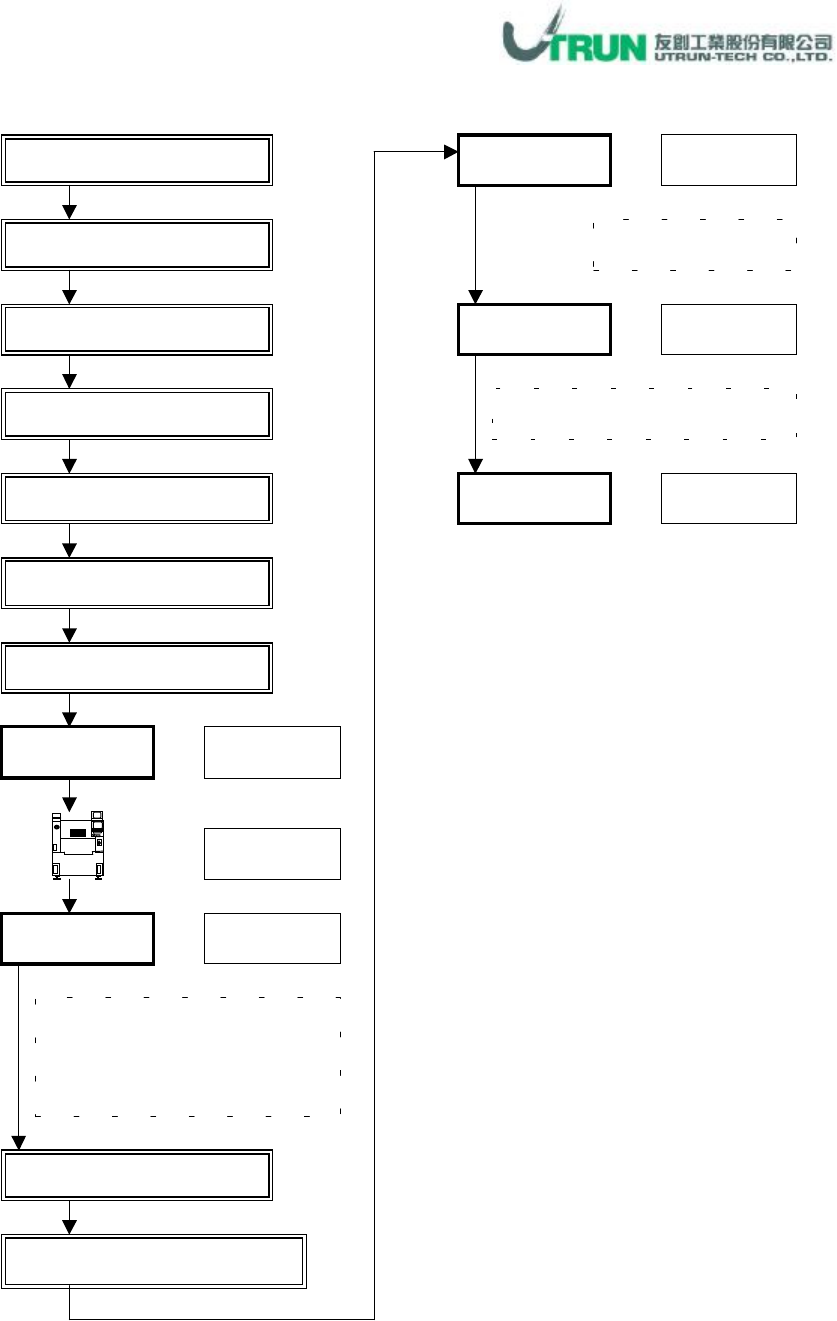
5
CPS Edit & DAS Processing
Output Cell Data Separately 選擇
Part 資料:Parts Edit
Panel 資料:Import 讀取
Panel 資料:Alignment
編輯
Panel 資料:Block 編輯
Panel 資料:Size 編輯
Panel
資料:
Bad Mark
編輯
Check
游標點選
游標點選
CPS DAS
:
DAS Process
OK
游標點選
確認
NCA
、供料配置及吸嘴配
置有無問題
,
若有問題
,
執行下
步驟,若無問題,跳至 Send 步驟
輸入機種檔名
存檔
Send
游標點選
▼
游標點選
CPS Tool
:
Check
Application
CPS Tool:
Fixed Opt Application (1)
游標點選
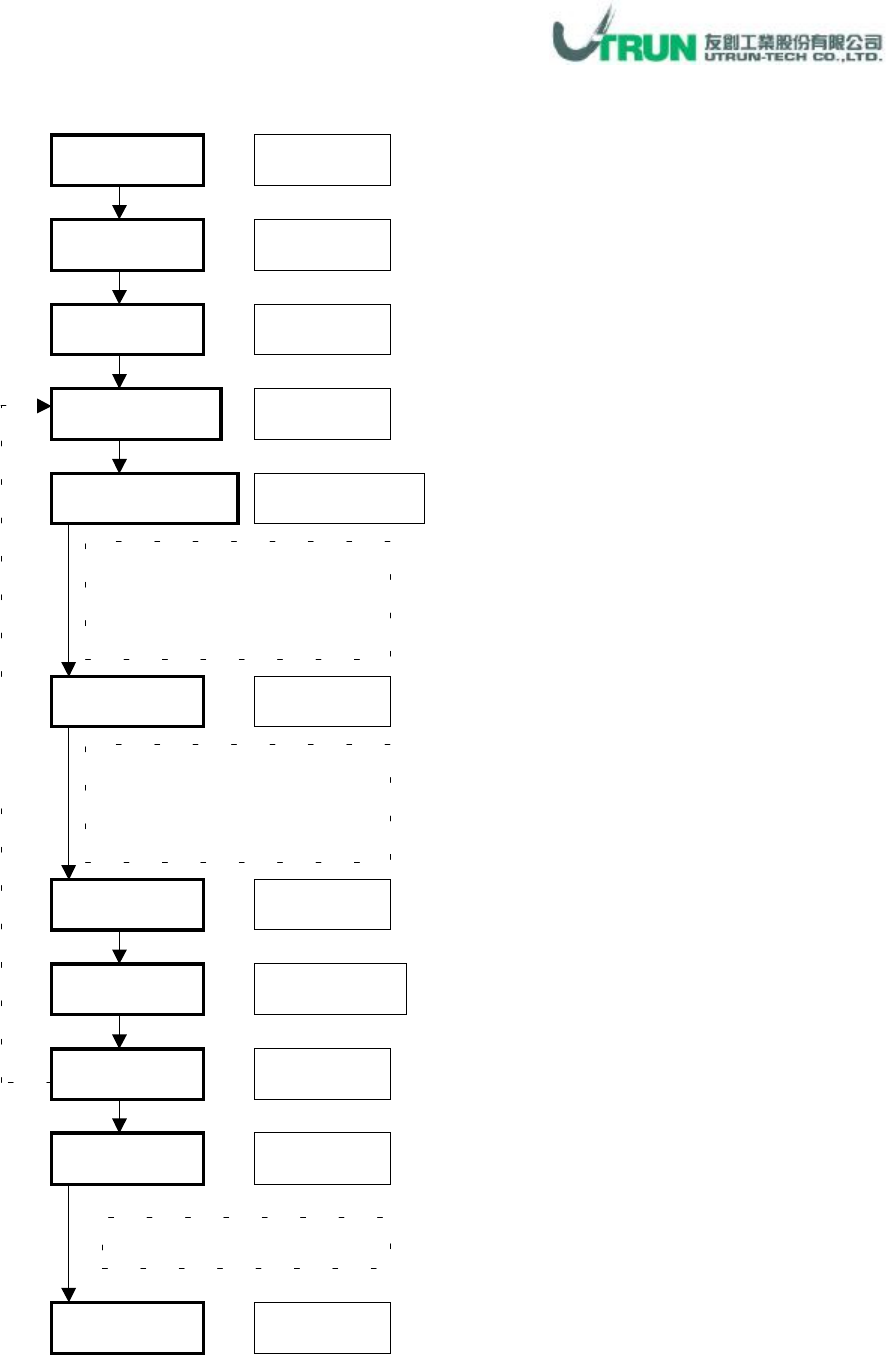
6
Parts Edit
:
Edit Application(1)
-
New Part Library Making
Parts
Template
視窗下拉
游標點選
游標點選
Recognition Method
Machine Type
游標點選
游標點選
Copy
游標點選
END
游標點選
Recognition Method
項目
請參考零件明細說明
(零件資料:新零件資料庫建立)
Edit
視窗下拉、
點選
樣本資料
移動選擇
樣本資料碼
參考樣本零件範例說明
(零件資料:新零件資料庫建立)
Part Code
零件碼鍵入
Updata
游標點選
Parts Library
確認新零件碼是否有建立
重
覆
設
定