00195421_OIS_SIS_Install_de_en.pdf - 第26页
Installationsanleitung OIS Client, OIS Server, SIS Server Version 5.0 Installation Manual 3.7 Identify S tation (only OIS client) For a station to be monitored, it must be identified. ¾ Select the Station identification …

OIS Client, OIS Server, SIS Server Version 5.0 Installationsanleitung
Installation manual
3.6 System time (only OIS client)
The OIS operating data is stored using the appropriate station´s system time. The SIS operating data are
stored with the server system time. Therefore, it is important that the system time on all station computers is
synchronized to allow the operating data to be evaluated correctly. To do this, you must install a time server
client on each machine.
SIPLACE Explorer also requires the system time of the OIS and SIS operating data to be synchronized.
Note:
To synchronized the system time, install the current version of TimeSync.
TimeSync is not included in the OIS package.
TimeSync is provided on the support media DVD. In the software guide (00194669-xx) you find
detailed information for the installation of TimeSync.
25 von 50
Installationsanleitung OIS Client, OIS Server, SIS Server Version 5.0
Installation Manual
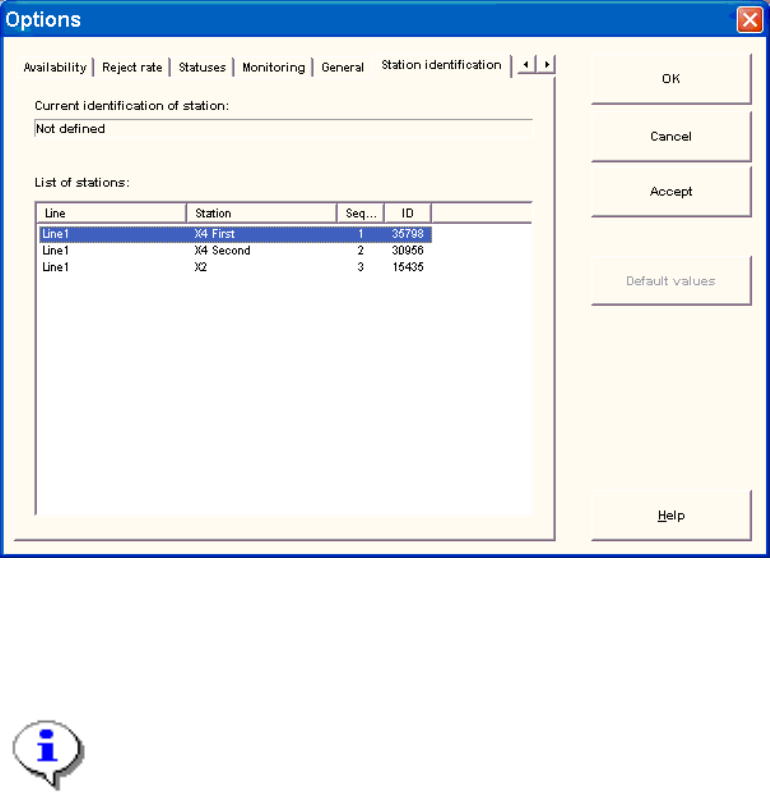
3.7 Identify Station (only OIS client)
For a station to be monitored, it must be identified.
¾ Select the Station identification item from Options menu.
¾ Select the appropriate station in the OIS client from the list.
¾ Double-click the station to identify
¾ Close the dialog by clicking OK.
Note:
To select the station, the line configuration must be created first on the OIS server using
OIS Line Config, see the Administration Guide (item number 00195419-01).
26 von 50

OIS Client, OIS Server, SIS Server Version 5.0 Installationsanleitung
Installation manual
1 Lieferumfang
SIPLACE OIS Applikation V5.0 (Artikelnummer: 00385470-01) enthält:
Quantity Item Item number
1 CD-ROM mit OIS und SIS Software V5.0 00385471-01
1 Installationsanleitung 00195421-01
1 DVD Support Media 00383100-02
Hinweis zur Support Media DVD:
Bitte verwenden Sie das Dokument “Navigation Guide for the Installation Procedure of
SIPLACE Software Systems” (Art. Nr. 00195050-xx) zum Navigieren durch die
Dokumentation.
Der Navigation Guide sowie alle Dokumente, auf die verwiesen wird, sind auf der Support
Media DVD (Art. Nr. 00383100-xx) verfügbar, die mit jedem Software Produkt ausgeliefert
wird.
27 von 50