00195421_OIS_SIS_Install_de_en.pdf - 第50页
Siemens AG 2007 All ri g hts reserved Sub j ect to chan g e without p rior notice Item-No.: 00195421-01 Siemens AG To be ordered fr om: Siemens AG, Automation and Drives Electronic Assembly Systems Rupert-Mayer-Strasse 4…
Installationsanleitung OIS Client, OIS Server, SIS Server Version 5.0
Installation Manual
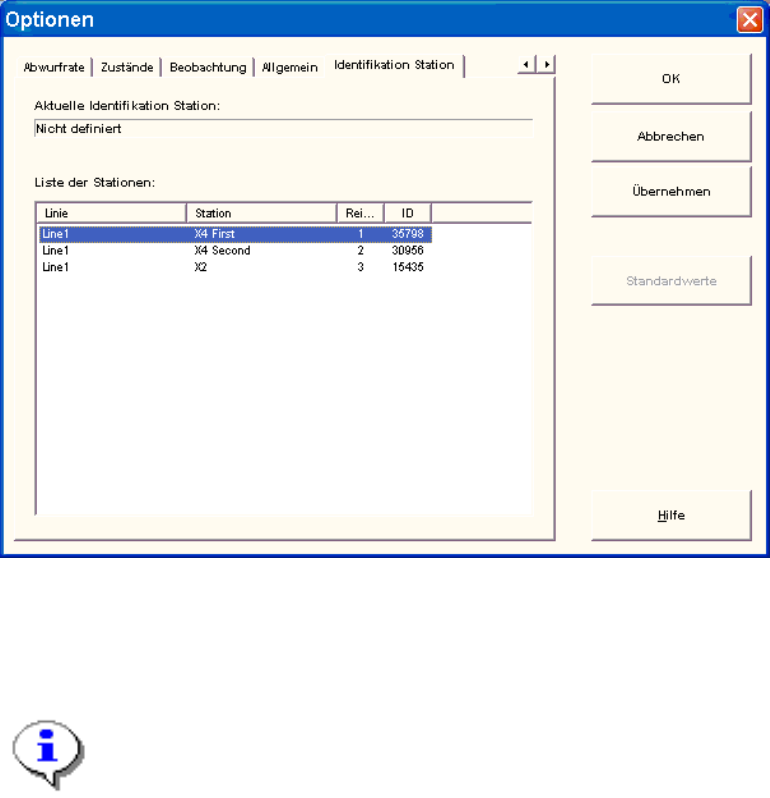
3.7 Station identifizieren (nur OIS Client)
Um Betriebsdaten zu erfassen und analysieren, muss die Station identifiziert werden.
¾ Wählen Sie im Menü Optionen den Menüpunkt Identifikation Station aus.
¾ Wählen Sie aus der Liste die entsprechende Station im OIS Client aus.
¾ Doppelklicken Sie die Station, um sie zu identifizieren.
¾ Schließen Sie den Dialog mit OK.
Hinweis:
Um die Station auswählen zu können, muss die Linienkonfiguration zuerst mit dem
OIS Line Config am OIS Server erstellt werden, siehe Administrationshandbuch
(Artikelnummer: 00195418-01).
48 von 50
OIS Client, OIS Server, SIS Server Version 5.0 Installationsanleitung
Installation manual
49 von 50

Siemens AG 2007 All ri
g
hts reserved Sub
j
ect to chan
g
e without
p
rior notice
Item-No.: 00195421-01 Siemens AG
To be ordered from:
Siemens AG, Automation and Drives
Electronic Assembly Systems
Rupert-Mayer-Strasse 44
D-81359 Munich / Germany
Printed in the Federal Republic of Germany