00198611-01_IM_712.0_R18-2_EN.pdf - 第52页
Station Software Ver sion 712.0 (R18 - 2) / Installation Manual 11/2018 Edition 52 6 Installing Copla n Computer Sof tware or Feede r Computer Software If the 3D coplanarity module or t he SIPLACE BulkFee der X is used, …
Station Software Version 712.0 (R18-2) / Installation Manual 11/2018 Edition
51
5.7 Enabling Firewall (Option)
The station software installation also sets rules for the firewall which allow the station software to
be operated with enabled firewall.
NOTICE
Exception:
Placement machines with a separate Vision computer (i.e. with Coplan computer
software or BulkFeeder computer software) CANNOT be operated with enabled firewall!
Proceed as follows to enable the firewall:
► Log in under the ASM_Admin user account on the station computer.
► Select Start – Control Panel – Windows Firewall – Turn Windows Firewall on or off.
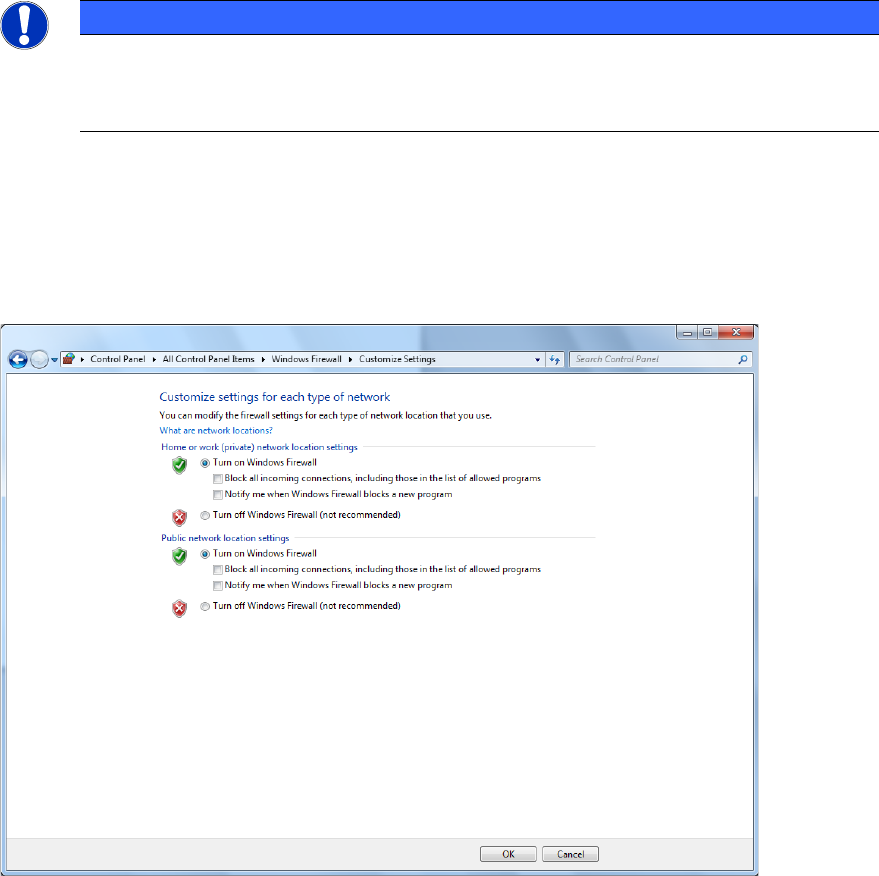
The following dialog box is displayed.
Figure 5-42: Enabling Windows Firewall
► Enable the Turn on Windows Firewall option under Home or work /private) network
location settings and Public network location settings respectively.
► Click OK to exit the dialog box.
Station Software Version 712.0 (R18-2) / Installation Manual 11/2018 Edition
52
6 Installing Coplan Computer Software or Feeder
Computer Software
If the 3D coplanarity module or the SIPLACE BulkFeeder X is used, an additional SIPLACE Vision
computer named Coplan computer and feeder computer respectively is required. For simplification,
these computers are called "Vision computer" in this chapter if the current description is valid for
both variants.
NOTICE
The 3D coplanarity module and SIPLACE BulkFeeder X options cannot run
simultaneously. I.e., a Vision computer can either be set up as Coplan computer or as
feeder computer.
Detailed information on the 3D coplanarity module can be found in the corresponding Assembly
Instructions, item numbers [00195344-xx] (for X-series), [00196842-xx] (for SX1/SX2) und
[00197395-xx] (for X-series S).
Detailed information on the SIPLACE BulkFeeder X can be found in the SIPLACE BulkFeeder X
Operating Manual, item no. [00198045-xx].
The respective software can either be installed directly on the Vision computer or via a remote
connection from the station computer.
Both installation options are described in the following.
6.1 Installing the Software Directly on the Vision Computer
CAUTION
The station software must not run on the station computer during installation of the
respective software on the Vision computer!
► Log in to the Vision computer under the ASM_Admin user account.
► Insert the installation media and mount the *.iso file.
► Open Windows Explorer.
► Double-click the BundleInstallerVision.exe file to start installing the station software.
Station Software Version 712.0 (R18-2) / Installation Manual 11/2018 Edition
53
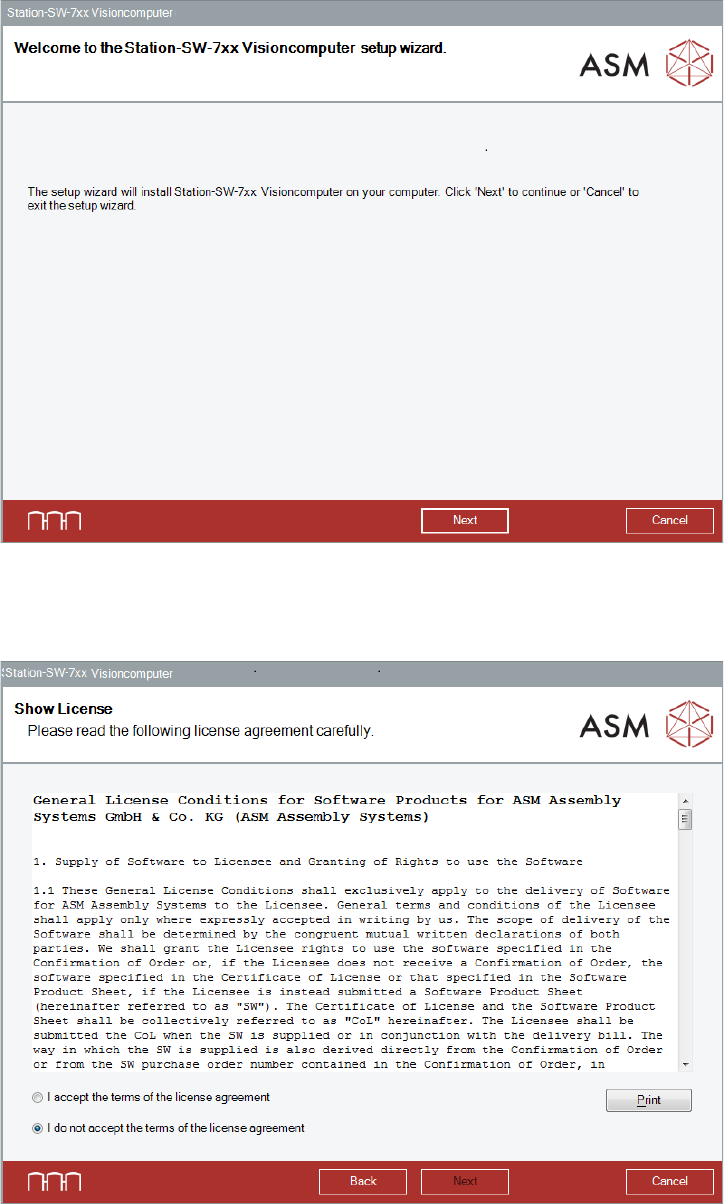
The Welcome dialog box of the Visioncomputer setup wizard is displayed.
Figure 6-1: Welcome dialog box
► Click the Next button.
The Show License dialog box is displayed.
Figure 6-2: Accepting license