00198486-01_Programming_Training_E_by_DEK_EN.pdf - 第46页
10 Fiducial Setup Room for Your Sketches and Notes 46 Programming Training E by DEK 12/2017 Room for Your Sketches and Notes
10 Fiducial Setup
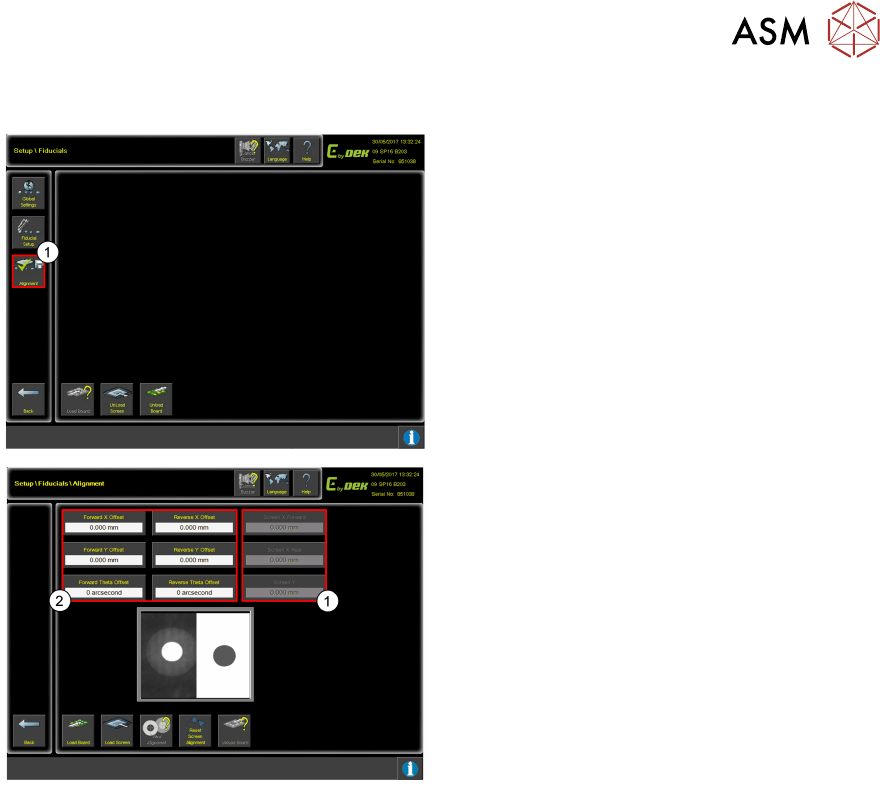
10.8 0 Offsets
Programming Training E by DEK 12/2017 45
10.8 0 Offsets
1. Click on Alignment.
1. Check Screen offsets are set to 0 when creating or copying a product file.
This is the rough alignment position for stencil load each time the product is loaded. If not 0
when setting up the product file, it can mean that the Fiducial positions need to be searched
for as it may have already applied a large offset.
2. These offsets can be adjusted to add extra movement to the actuators to remove any
measured offsets with the print. These offsets are configurable in separate print directions.
10 Fiducial Setup
Room for Your Sketches and Notes
46 Programming Training E by DEK 12/2017
Room for Your Sketches and Notes

11 Objectives
Programming Training E by DEK 12/2017 47
11 Objectives
●
Obtain another product substrate and stencil from your instructor and set up a new product on
the machine.
●
Have the print checked for good alignment and correct deposit.
●
Discuss how the product file could be amended for increased throughput without negative
effect on print quality.