Operating Instructions_VF366_en.pdf - 第280页
7|Treatment of messages and malfunctions a) click on the [All messages] button. ð All messages are displayed. Displaying all messages for a specific calendar day ü Displaying all messages for a specific calendar day: a…
7|Treatment of messages and malfunctions
7.6 The [Messages administration] dialog
The [Messages administration] dialogue is used to clearly display all the messages
accumulated in a specific period of time. You can sort messages by various criteria,
or view only the ones received in a specific time period.
NOTE
Are any changes possible?
The [Messages administration] user rights are required to access this dialog. Settings
can only be displayed if no name and password are logged in. In this case, press the
[ESC] key on your keyboard, or click on the button [Cancel] when a password is re-
quired.
Opening the [Messages administration] dialogue
ü Opening the dialogue:
a) click on the
button in the bottom toolbar of the [Messages] dialogue.
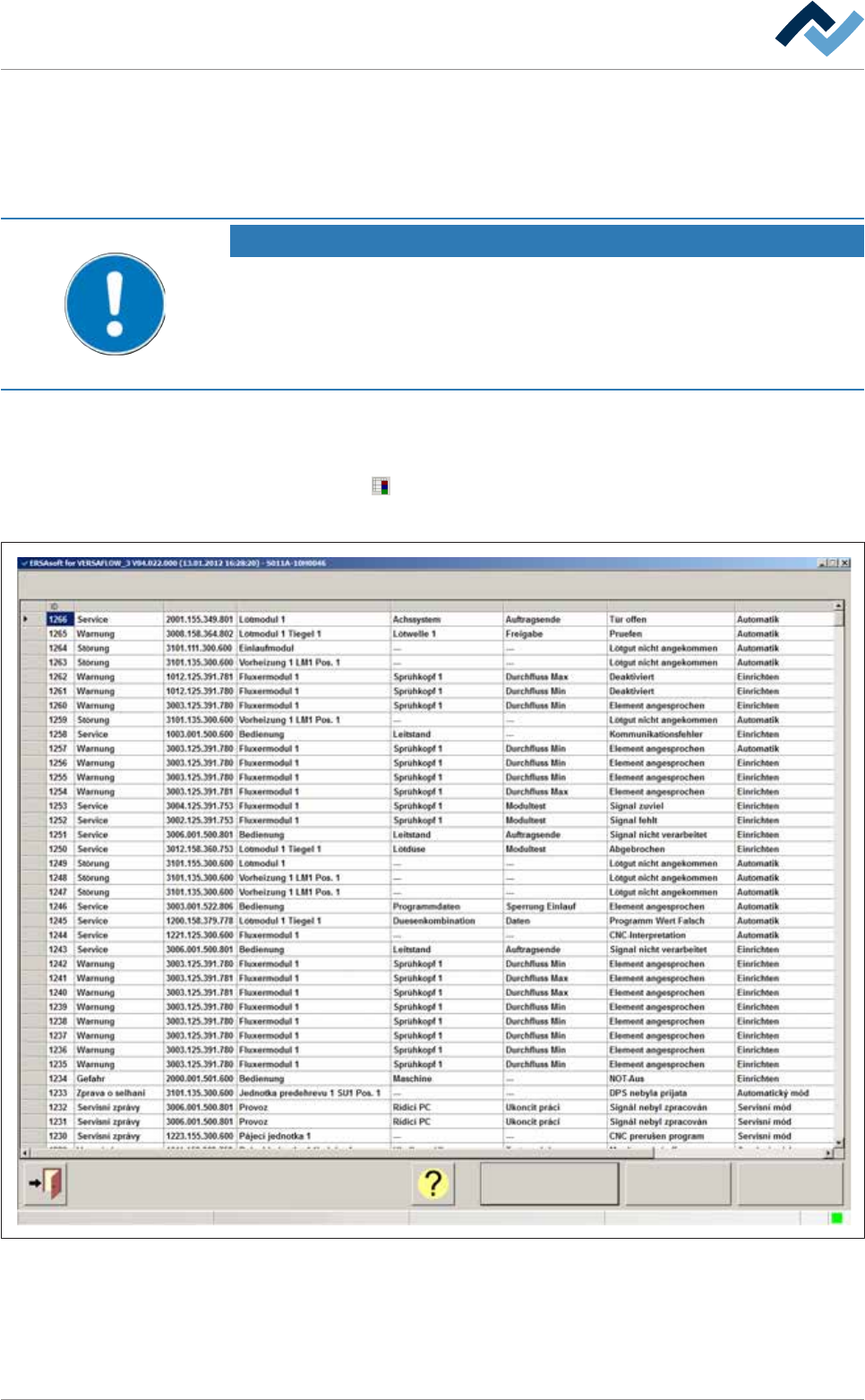
ð The [Messages administration] dialogue is opened:
All messages
Messages administration
User ersa
Calendar Assemble
Code Facility 1 Facility 2 Facility 3 Text Operation modeType
Maintenance mode
Fig.78: The [Messages administration] dialog
Displaying all messages
ü Displaying all messages:
Ersa GmbH Operating Instructions_VF366_en|Rev. 14|30/11/2017 279/551
7|Treatment of messages and malfunctions
a) click on the [All messages] button.
ð All messages are displayed.
Displaying all messages for a specific calendar day
ü Displaying all messages for a specific calendar day:
a) click on the [Calendar] button.
ð A dialogue for selecting a calendar day is displayed.
b) Select a calendar day.
ð All messages accumulated on that day will be displayed.
Grouping the displayed messages
ü Grouping the displayed messages:
a) click on the [Assemble] button.
ð The messages are grouped together according to their frequency.
ü Sorting messages alphabetically:
a) click on a column heading.
ð The messages in this column are sorted alphabetically.
The detailed description of a message in the table
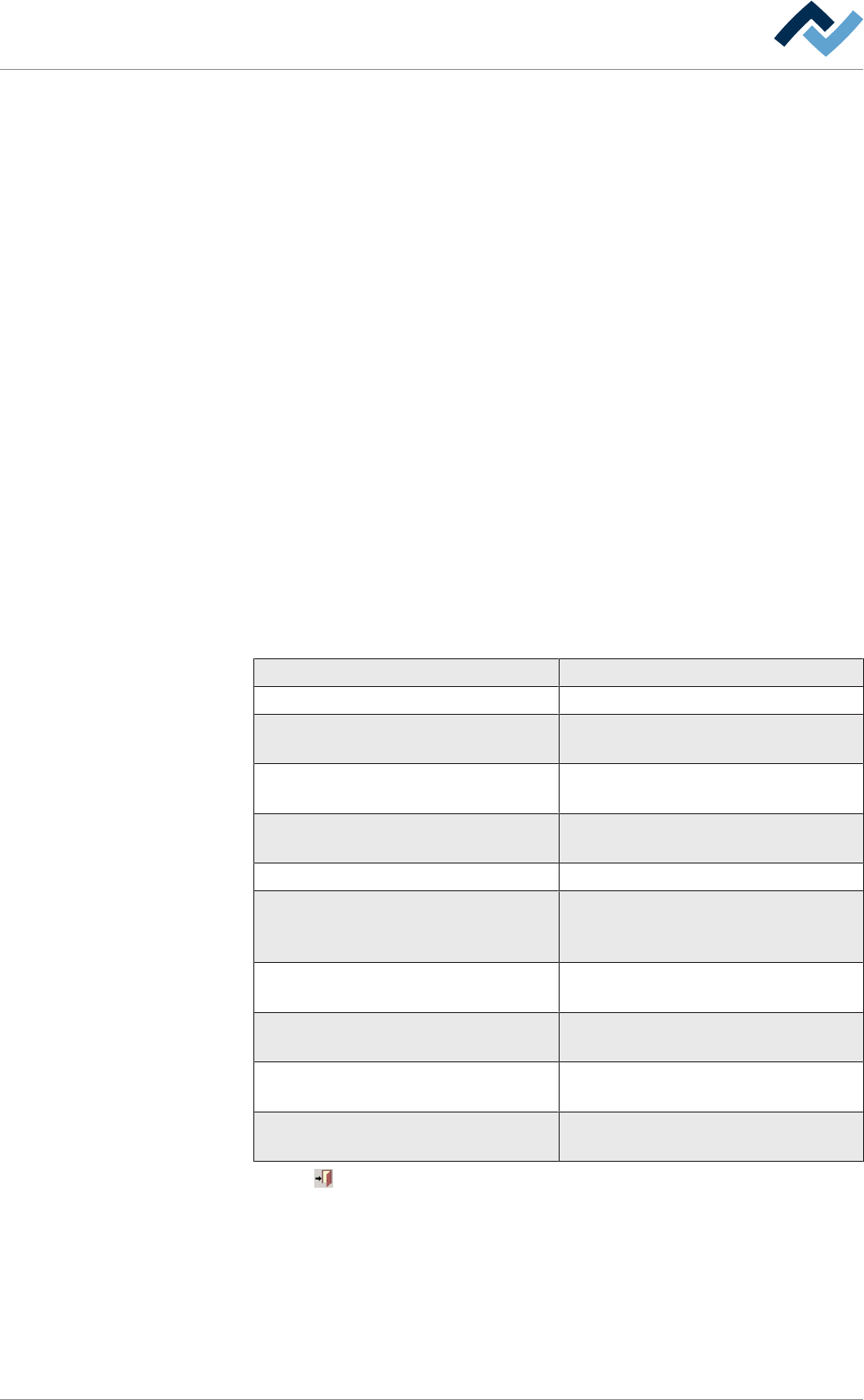
The [Messages administration] dialogue contains the following columns:
column description
[ID] message serial number.
[Type] Indicates the message type (kind of mes-
sage).
[Code] Indicates the code number of the mes-
sage.
[Facility 1], [Facility 2], [Facility 3] Indicates which facility the message
refers to.
[Text] Displays a descriptive message text.
[Operation mode] Indicates in which operating mode the
machine was when the message ap-
peared.
[Date ackn.] Indicates when the message was ac-
knowledged.
[Occured] Indicates the time when the message
appeared.
[Acknowledged] Indicates the time when the message
was acknowledged.
[User] Indicates which user acknowledged the
message.
Click on
to close the dialog.
Ersa GmbH Operating Instructions_VF366_en|Rev. 14|30/11/2017 280/551

8|Service and maintenance
8 Service and maintenance
8.1 Service table.................................................................................................................................................. 283
8.2 Read this first!............................................................................................................................................... 286
8.2.1 Nationally valid safety and accident prevention regulations .........................................................286
8.2.2 Safe system operation ....................................................................................................................286
8.2.3 For your safety................................................................................................................................286
8.2.4 Service work on the spray fluxer ....................................................................................................286
8.2.5 Maintenance work at the soldering pot .........................................................................................287
8.2.6 Before service and maintenance work ...........................................................................................288
8.2.7 Service work on preheaters............................................................................................................290
8.2.8 Service in multi-shift operation ......................................................................................................290
8.2.9 Open and secure the hood via the PC ............................................................................................291
8.2.10 Handling of gas pressure springs ....................................................................................................292
8.3 Lubricants, auxiliary agents, tools................................................................................................................. 293
8.3.1 Lubricants used...............................................................................................................................293
8.3.2 Use of high-temperature grease in the hot area............................................................................294
8.3.3 Cleaning agents used......................................................................................................................294
8.3.4 Tools and auxiliary materials ..........................................................................................................295
8.4 Maintenance work to be performed before each shift ................................................................................ 297
8.4.1 Conveyor profiles and chains: visual inspection.............................................................................297
8.4.2 Solder nozzles: Visual inspection (selective soldering module) .....................................................298
8.4.3 Selective soldering module: Clean the solder pot ..........................................................................299
8.5 Maintenance work to be performed daily .................................................................................................... 307
8.5.1 Sensors: visual inspection...............................................................................................................307
8.5.2 Spray fluxer cleaning.......................................................................................................................308
8.5.3 Dynamic IR emitters with glass plate: Visual inspection and cleaning ...........................................310
8.5.4 Compressed air heating: Visual inspection.....................................................................................312
8.5.5 Solder feeding: visual inspection ....................................................................................................314
8.6 Maintenance work to be performed weekly ................................................................................................315
8.6.1 Checking the EMERGENCY STOP function ......................................................................................315
8.6.2 Suction in the process room visual inspection ...............................................................................316
8.6.3 Suction in the flux material storage space visual inspection ..........................................................317
8.6.4 Checking the function of the differential pressure switch (suction) ..............................................317
8.6.5 Check the pneumatic system..........................................................................................................319
8.6.6 Check the nitrogen input pressure .................................................................................................321
8.6.7 Check the nitrogen flow rate to the solder nozzle .........................................................................323
8.6.8 Solder level monitoring Checking input pressure...........................................................................324
8.6.9 Checking the nitrogen flow to the solder level monitoring............................................................326
8.6.10 Solder level monitoring: Check for proper operation.....................................................................327
8.6.11 Conveyor system: visual inspection................................................................................................328
8.6.12 Flux reserve: Visual inspection, cleaning ........................................................................................329
8.6.13 Spray fluxer: Cleaning the whole fluxer area..................................................................................330
8.6.14 Cleaning the selective soldering module .......................................................................................332
8.6.15 Visual inspection of the axis system (mechanics)...........................................................................333
8.7 Maintenance work to be performed monthly ..............................................................................................335
8.7.1 Cleaning the machine outside ........................................................................................................336
8.7.2 Switch cabinets and PC Visual inspection.......................................................................................337
8.7.3 Visual inspection of the differential pressure switches..................................................................338
8.7.4 Checking the pneumatic system (in general)..................................................................................339
8.7.5 Checking the nitrogen system (in general) .....................................................................................340
8.7.6 Selective soldering module: Visual inspection................................................................................341
Ersa GmbH Operating Instructions_VF366_en|Rev. 14|30/11/2017 281/551