NXT系列 编程手册 1.pdf - 第199页
2. Job 编制器 PRG-NXTS-009S1 186 NXT 系列 编程手册 Stage Type: DP20 Stage Type: DP45 Stage Type: TUM2 供料器使用比例 (SideA : S ideB) SideA SideB 2 : 8 S lot 1.....4 Slot 5..... 20 3 : 7 S lot 1.....6 Slot 7..... 20 4 : 6 S lot 1.....8 …
PRG-NXTS-009S1 2. Job 编制器
NXT 系列 编程手册 185
20.根据需要选择以下项目:
21.对于进行双模组生产的 Job,请根据需要在 [Paired module production] 组框中选择适
当的选项。
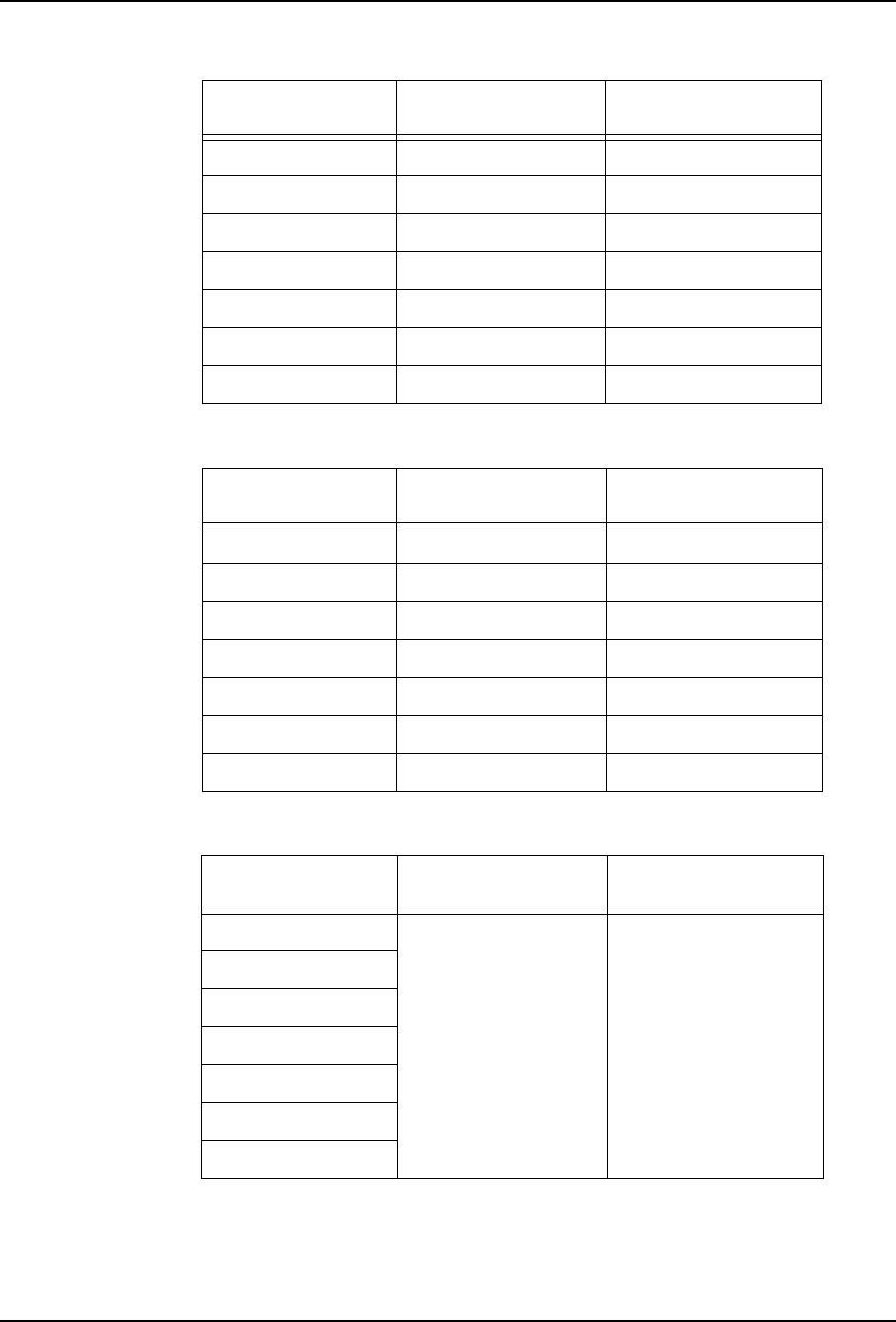
22.从下拉式菜单中选择 [Feeder usage ratio (Side A : Side B)]。 供料器比例会根据
Stage Type 而发生变化,请参考以下表格的内容。
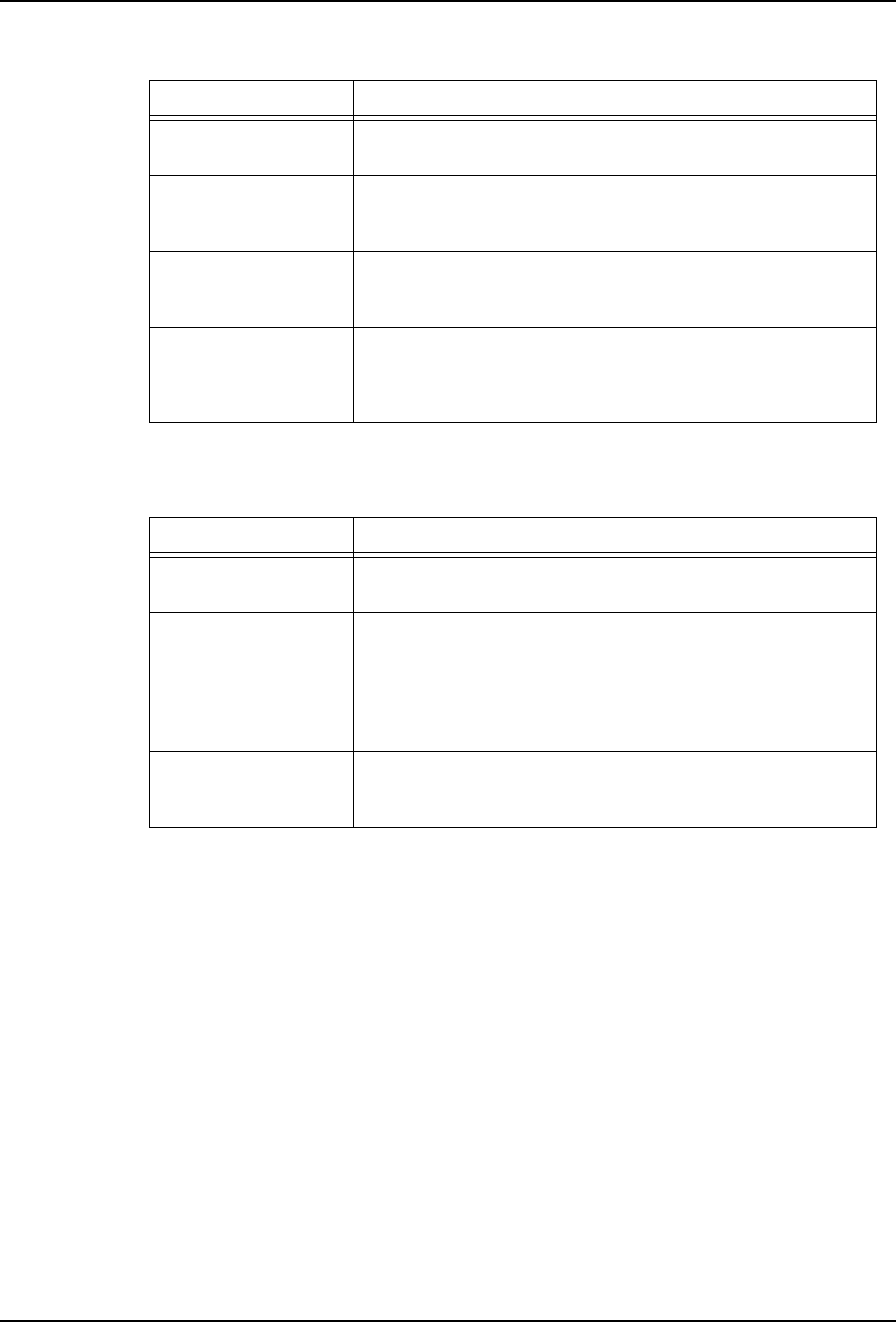
设定 说明
Display cycle time
graph
选择该选项后,将在处理过程中显示周期时间图。
Allocate parts with
excessive sequences
to multiple modules
指定是否将贴装频率高的元件分配到多个供料器中并装载到
不同模组中。如果选择了该项目,则贴装频率高的元件就将
被装载到多个供料器中并在多个模组中贴装。
Optimize nozzle
station
设定是否进行根据优化的吸嘴配置。
选择此项,以最适合的方式变更吸嘴的配置。
Use the same nozzle
allocation for all
jobs
设定是否为所有 Job 都配置相同吸嘴。勾选 [Optimize
nozzle station] 后该功能有效。但是,如果在 STEP2 中勾
选了 [Use the Machine Configuration as is in each
job],则该功能无效。
设定 说明
Optimize panel
stopping position
M3 双模组生产时,设定是否优化电路板停止位置。该设定只
有进行 M3 双模组生产时有效。
Optimize for single
module production
设定是否对 X 为 250 ~ 305 mm 的电路板进行 M3 单模组生
产。
该设置不影响该范围外的电路板。
选择该选项生产范围内的电路板时,进行 M3 单模组生产。
Allocate parts in
the interference
area to M6 modules
M3 双模组生产时,设定是否将干扰区域的元件分配到 M6 模
组上。
2. Job 编制器 PRG-NXTS-009S1
186 NXT 系列 编程手册
Stage Type: DP20
Stage Type: DP45
Stage Type: TUM2
供料器使用比例
(SideA : SideB)
SideA SideB
2 : 8 Slot 1.....4 Slot 5.....20
3 : 7 Slot 1.....6 Slot 7.....20
4 : 6 Slot 1.....8 Slot 9.....20
5 : 5 Slot 1...10 Slot 11...20
6 : 4 Slot 1...12 Slot 13...20
7 : 3 Slot 1...14 Slot 15...20
8 : 2 Slot 1...16 Slot 17...20
供料器使用比例
(SideA : SideB)
SideA SideB
2 : 8 Slot 1.....9 Slot 10...45
3 : 7 Slot 1...14 Slot 15...45
4 : 6 Slot 1...18 Slot 19...45
5 : 5 Slot 1...23 Slot 24...45
6 : 4 Slot 1...27 Slot 28...45
7 : 3 Slot 1...32 Slot 33...45
8 : 2 Slot 1...36 Slot 37...45
供料器使用比例
(SideA : SideB)
SideA SideB
2 : 8 TUM(A) TUM(B)
3 : 7
4 : 6
5 : 5
6 : 4
7 : 3
8 : 2
PRG-NXTS-009S1 2. Job 编制器
NXT 系列 编程手册 187
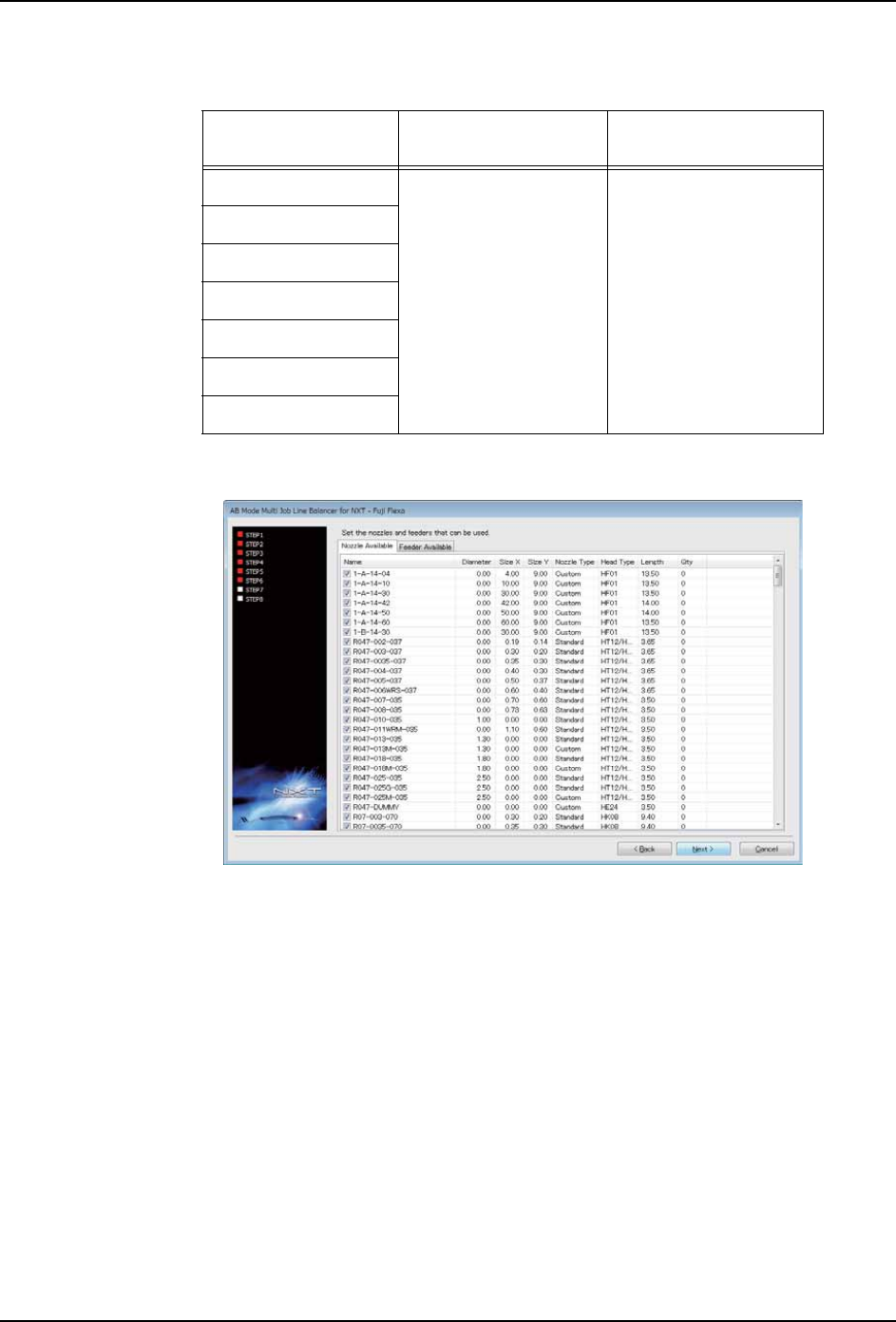
Stage Type: TULT (TULTC)
备注 )不能向 TULT(TULTC) 的供料器部分配置供料器。
23.单击 [Next],显示 STEP6 画面。
24.在 [Feeder Available] 标签页中勾选可以使用的供料器。
25.在 [Nozzle Available] 标签页中勾选可以使用的吸嘴。
26.单击 [Next],显示 STEP7 画面。
供料器使用比例
(SideA : SideB)
SideA SideB
2 : 8 TULT(A) TULT(B)
3 : 7
4 : 6
5 : 5
6 : 4
7 : 3
8 : 2
05OTM-0060-Ea