YS100_Ope_E.pdf - 第82页
2-15 2 asic operation n Axis movement "Move Axis" screen 1 2 3 4 5 6 24206-L1-00 Button name Function 1 Zoom in/out (+, -) Zooms in or out the image. (16 times to 1/16 times) 2 Mark Light Allows changing mark…
2-14
2
asic operation
2.3 Unit screen
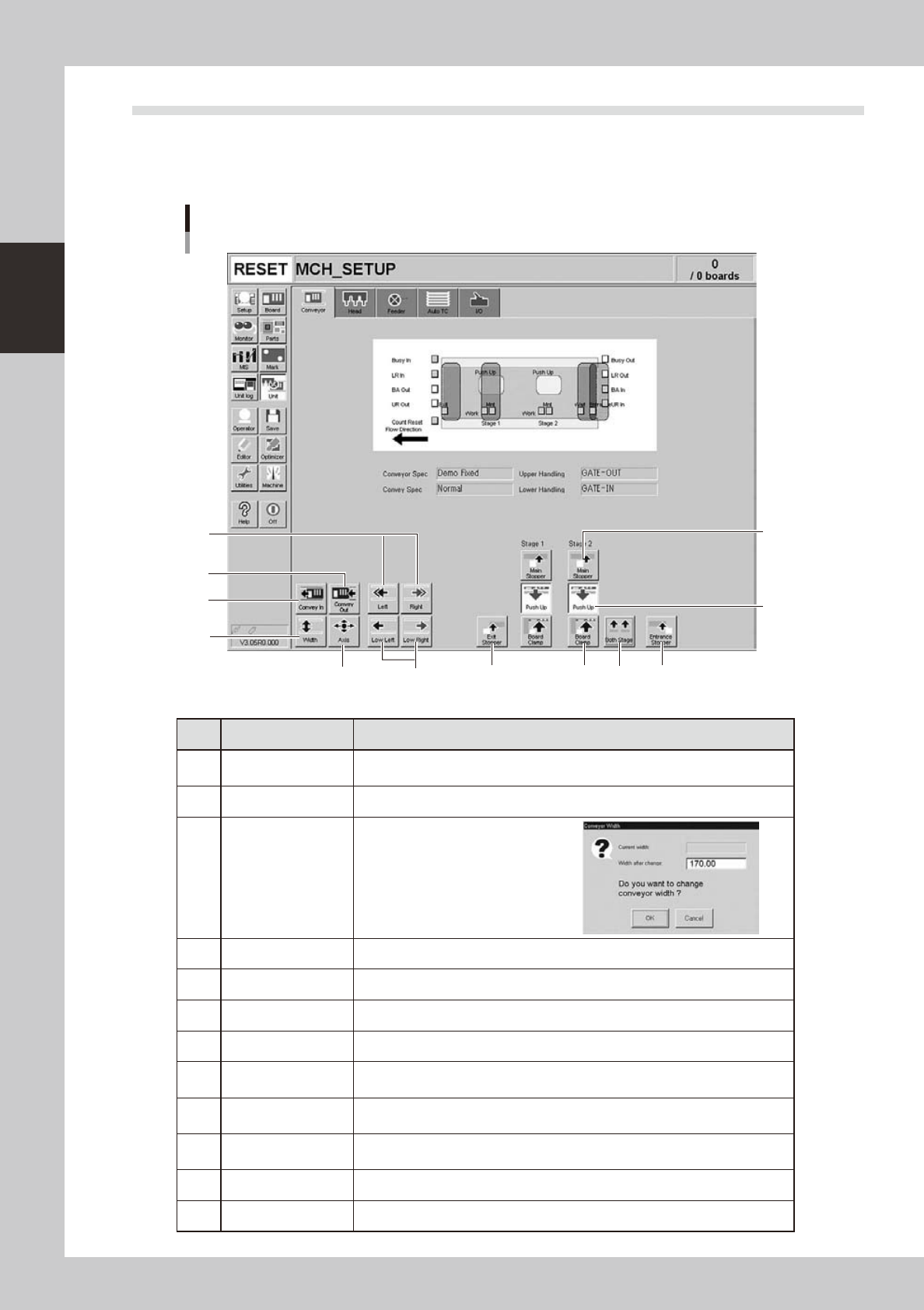
This section describes the manual operation buttons on the Unit screen.
n
Manual conveyor operation
Conveyor manual buttons
1
2
3
4
5
6 7
8
9
10
11 12
24204-L1-00
Button name Function
1 Convey In
Moves the board from the conveyor entrance or standby position to the clamp
position and clamps it.
2 Convey Out Unclamps the board and moves it to the exit stopper position.
3 Width
Displays the "Conveyor Width" dialog
box. Check or enter the conveyor
width and press the [OK] button to
adjust the conveyor width.
4 Axis Opens the "Move Axis" screen that allows manual movement on each axis.
5 Left, Right Rotates the conveyor belt.
6 Low Left, Low Right Rotates the conveyor belt at a slow speed.
7 Exit Stopper Raises or lowers the exit stopper that stops a board at the conveyor exit.
8 Main Stopper
Raises or lowers the main stopper that stops a board in the clamp position on
the conveyor.
9 Entrance Stopper
Raises or lowers the entrance stopper that stops a board at the standby position
on the conveyor.
10 Push Up
Opens the "Conveyor Push Up" dialog box. Check or enter the board thickness
and press the [OK] button to clamp the board by pushing it up from the bottom.
11 Board Clamp Clamps the board by pushing up its edges from the bottom.
12 Both Stages Moves stage 1 and stage 2 in synchronization with each other.
2-15
2
asic operation
n
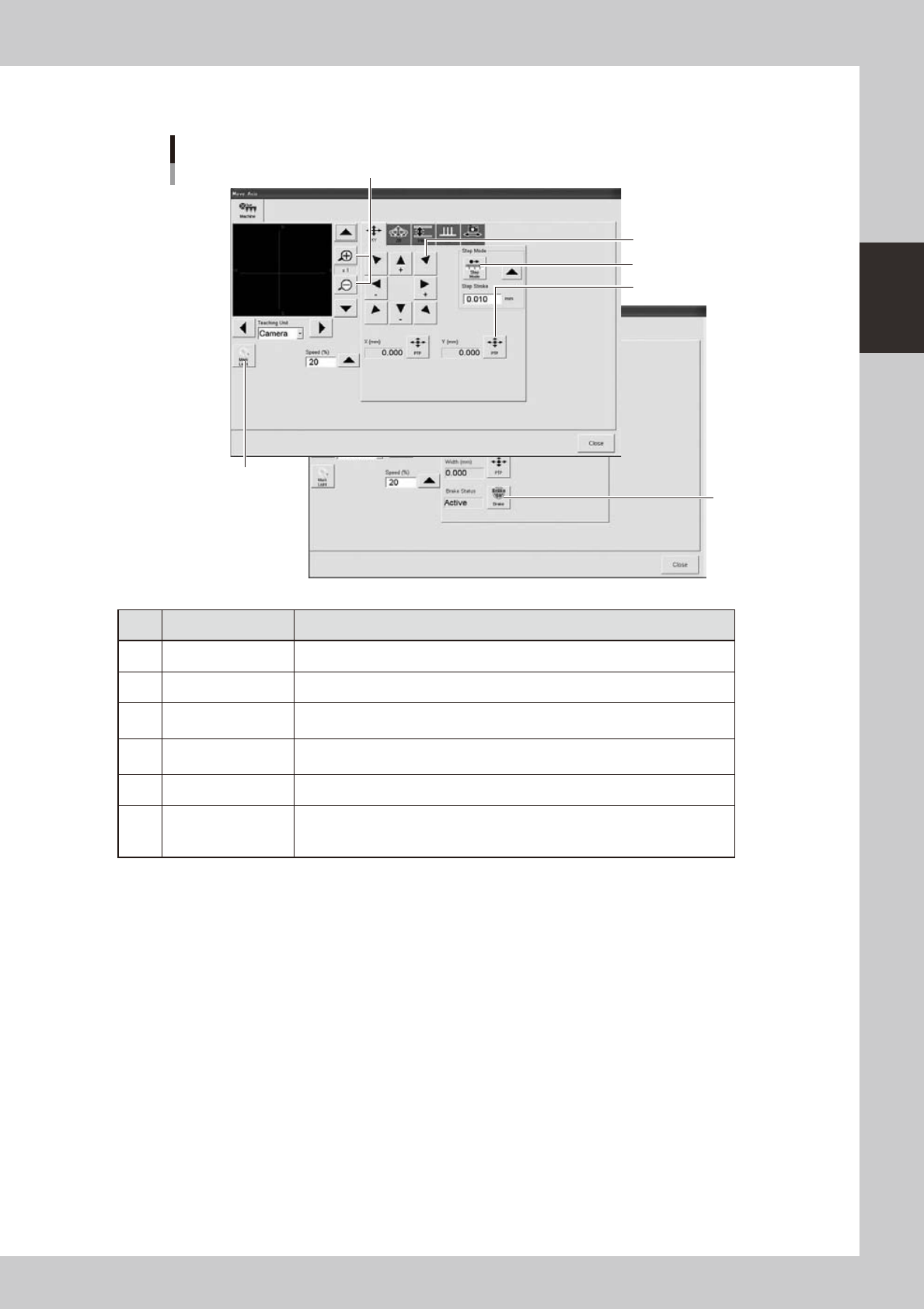
Axis movement
"Move Axis" screen
1
2
3
4
5
6
24206-L1-00
Button name Function
1 Zoom in/out (+, -) Zooms in or out the image. (16 times to 1/16 times)
2 Mark Light Allows changing mark lighting manually. Using this button does not affect data.
3 PTP
Displays the "PTP" dialog box that allows directly specifying the position where
you want to move the selected axis.
4 Step Mode
When this button is pushed in, the selected axis can be moved in "step mode
(inching mode)" with the arrow buttons at a specified step stroke (inching stroke).
5 Arrow Use these buttons to move the selected axis in the desired direction.
6 Brake
Use this button when you want to release the brake during emergency stop.
(W-axis and PU axis only)
The brake is automatically released when the servo is turned on.
2-16
2
asic operation
n
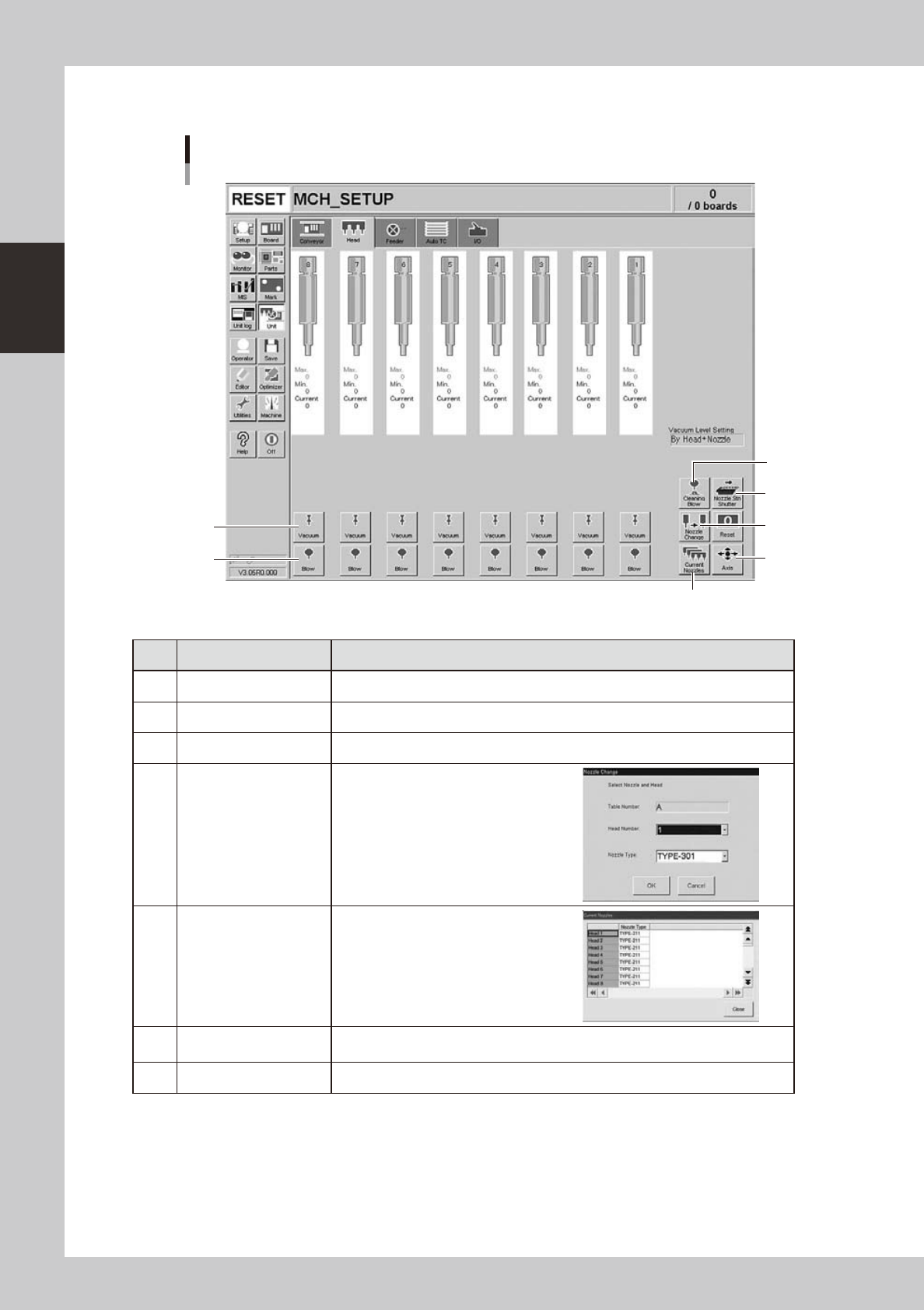
Manual head operation
[Unit] – [Head] screen
1
2
3
4
5
6
7
24207-L1-00
Button name Function
1 Vacuum Turns the vacuum of each head on or off.
2 Blow Turns the air blow in each head on or off.
3 Nozzle STN Shutter Opens or closes the nozzle station shutter.
4 Nozzle Change
Opens the "Nozzle Change" dialog box.
Specify the head and nozzle type to
perform nozzle change.
5 Current Nozzles
Shows a list of nozzle types currently
attached to each head.
6 Axis
Opens the "Move Axis" screen. This is the same as the [Axis] button on the [Unit]-
[Conveyor] screen.
7 Cleaning Blow Displays a confirmation dialog box for nozzle shaft blow.