00197193-02_IM_SIPLACE_EDM_2.1_EN.pdf - 第34页
EDM V2.1 / I nstallat ion Ma nual Ausgabe 11/2012 E dition 34 5.3.7.2 Notifica tion Ru les A n otific ation r ule consist s out of t wo parts: 1. P atterns to describe t he set of notificat ions the ru le applies t o, an…
EDM V2.1 / Installation Manual Ausgabe 11/2012 Edition
33
5.3.7.1 The rule set
By default, changes on EDM Line computers are transferred to the EDM Master and collected in
the clearing pool.
The predefined set of rules prevents that changes by EDM specific actions and typical user
scenarios (e.g. “Level 3 Optimization” on the EDM Line) are sent to the EDM Master. Its behavior
may be changed by editing or adding a rule to the rule system.
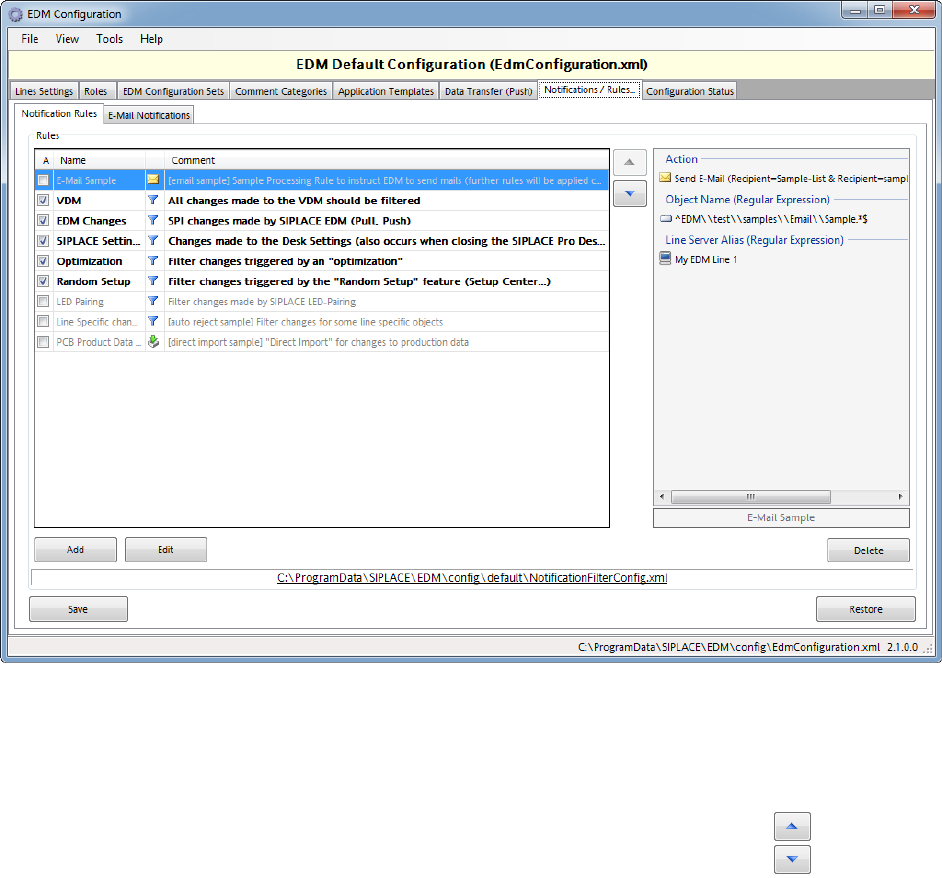
A defined rule is enabled if the associated box is checked.
Active filter rules are shown in bold letters, active processing-only rules in italic letters. On the
right-hand side of the GUI, a summary description of the selected rule is given.
5.3.7.1.1 Rule set evaluation
• The rules are evaluated in descending order of the rule set list. Use the up- and down-
buttons to control the sequence of the rules.
• The handling option of the first rule that matches the incoming notification
determines its target destination, and the evaluation of the rule set is
terminated.
- However, a matching rule with “Not Specified” handling option just applies its
processing instructions (e.g. sending an e-mail or changing the comment), and the
evaluation continues with the next rule in the list
• If none of the rules matches, the default behavior (showing a comment dialog on the EDM
Line and sending the changes to the clearing pool) is applied.
Figure
5-5 EDM Notification Rule Set Editor
EDM V2.1 / Installation Manual Ausgabe 11/2012 Edition
34
5.3.7.2 Notification Rules
A notification rule consists out of two parts:
1. Patterns to describe the set of notifications the rule applies to, and
2. Actions to be applied on matching notifications:
o Handling options to describe the target destination of the notifications
Filter at line server. Matching notifications are discarded on the EDM Line,
and no data is transferred to the EDM Master.
Auto Reject. Changes are discarded on the EDM Master. These changes
bypass the data preparation engineer.
Direct Import. Changes are imported into the Master database, without
being displayed in the clearing pool. These changes bypass the data
preparation engineer.
“Not Specified”. Special rule that only applies “processing instructions”
o Processing Instructions
Comment Options define whether a comment dialog is shown on the EDM
Line when a matching change is detected and, additionally, the user may
define default values for the comment entries, cf. section 5.3.7.3.3.
E-Mail Options, cf. section 5.3.7.3.2.
5.3.7.2.1 Rule patterns
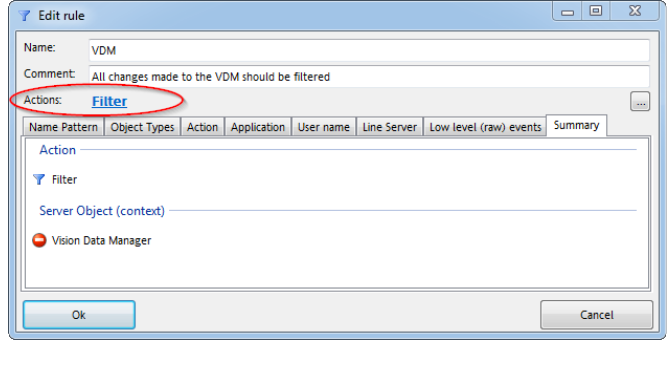
Change notifications can be filtered using a combination of:
● name of the changed object (FullTypePath)
● (SIPLACE Pro) object types
● action
● application
● user names (SIPLACE user or Windows user)
● line server
● “low level” (raw) events (should only be used if really necessary)
- sub-object type
Figure
5-6 Notification rule editor window
EDM V2.1 / Installation Manual Ausgabe 11/2012 Edition
35
- properties
- events
- association delegates
There is a separate tab for each of these properties. If no value is selected in one of the tabs, the
associated property is not relevant (i.e. the rule matches all notifications if no property values are
selected at all). If one or more values are selected, in general, these categories comprise a set of
“OR” rules. This means that as soon as at least one of the defined conditions applies to the
incoming notification, the notification rule is matched (e.g. if there are several “object types”
selected, the rule applies to all of them).
The whole rule matches only if every category (tabs) matches (“AND” logic). E.g. if a “name” is
defined and several “object types” are selected, the rule matches if and only if the notification refers
to one of the selected object types and the object name referred to matches the name pattern.
5.3.7.3 Email configuration
EDM email notification uses SMTP to distribute notifications arriving at the Master Server. The
following must be configured:
● The network address of the SMTP server (“Server”)
● User and password: These fields are only active, if UseSmtpAuthentication in Advanced
Settings is set to True. The password used for SMPT authentication is saved in the
configuration files, using basic encryption.
● The sender to be entered in the message (“From”)
● A set of distribution lists
Email distribution lists make it possible to keep email traffic to a minimum and to send the emails to
precisely the person(s) responsible. A distribution list only responds to notifications from a specific
line.
The storage location of the configuration file is specified for informational purposes and must not be
changed. Direct manipulation of the configuration file should be avoided.
5.3.7.3.1 Distribution Lists
A line must be selected before a new distribution list can be added. A name and a comment are
assigned to each new list.
5.3.7.3.1.1 Managing distribution lists
After a distribution list has been selected, the email addresses of the recipients can be entered. All
recipients on the distribution list receive emails regarding notifications that refer to one of the
selected object types. Only those notifications are taken into account that originate from the line for
which the distribution list was created.