00197193-02_IM_SIPLACE_EDM_2.1_EN.pdf - 第39页
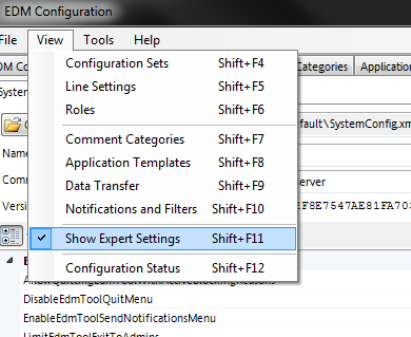
EDM V2.1 / I nstallat ion Ma nual Ausgabe 11/2012 E dition 39 5.3.9 A dvanc ed Settings The A dvanced Settings vi ew (only v isible if “ Show Ex pert Settings ” in the V iew m enu is activ e) reveals s ome in - de p th o…
EDM V2.1 / Installation Manual Ausgabe 11/2012 Edition
38
5.3.8 Configuration Status Monitor
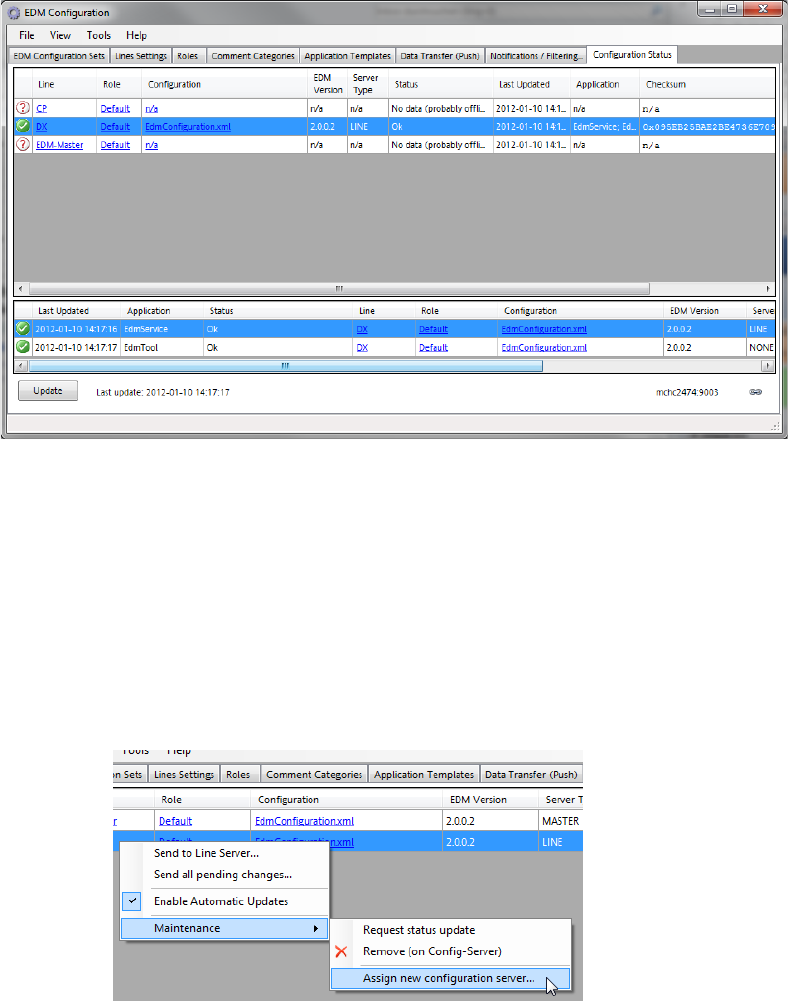
The Configuration Status tab gives some information about the status of the EDM Client
computers (upper pane) and their EDM applications (lower pane).
5.3.8.1 Changing the Configuration Server of one EDM Client
In order to make an EDM Server get its configuration set from another Configuration Server, these
steps are required:
1. Open the Configuration Status tab of the Configuration GUI on the old Configuration
Server and click the Update button.
2. For each EDM computer in the list of computers (you may select multiple lines at once),
open the context menu and select “Assign new configuration server”
3. In the text box, change the hostname part of the URI to match the new configuration server
4. On the new configuration server, type-in the appropriate settings for the EDM Client’s alias
and host name.
EDM V2.1 / Installation Manual Ausgabe 11/2012 Edition
40
6 Appendix (Technical Reference)
6.1 File system folder structure
By default, the EDM Setup creates the following subdirectories on the computers’ file system:
6.1.1 Standard Installation Path
Default value: “%ProgramFiles%\SIPLACE\EDM”
This path points to the installation directories of the EDM files that are considered read-only during
“normal” operation. During installation, the user has the possibility to change this path to another
location (the actual EDM Installation folder can be determined by examining the registry value of:
“HKEY_LOCAL_MACHINE\SOFTWARE\Wow6432Node\Siemens SIPLACE\EDM\SetupLog\CurrentVersion\Path”).
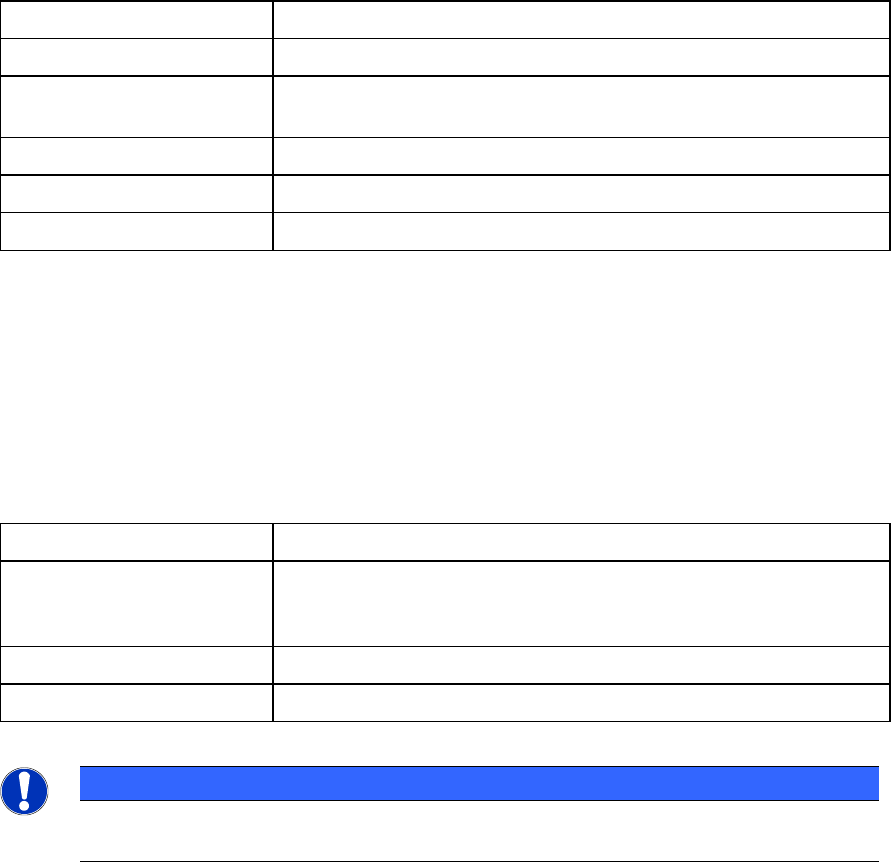
Folder Contents
SIPLACE EDM Applications and libraries
Database Database for change notifications and Clearing Pool
(Master Server only )
DBScripts Scripts to create and access the database (Master Server only)
de, en, … Language-dependent resources
help Online documentation
Table 6-1: Folders of the default installation path
6.1.2 Program Data Installation Path
Default value: “%ProgramData%\SIPLACE\EDM”
This path is the location where SIPLACE EDM puts its variable data and log files. This location can
be changed by modifying the “DataDir” and “ConfigDir” EDM registry settings (see 6.2).
Folder Contents
config Application configuration, client workflow configuration, filter
configuration, email configuration and logging configuration.
See 6.3 for details about the contents of this folder.
logs Log files (for debugging among other things)
templateStorage Storage location for application templates
Table 6-2: Folders of the program data path
NOTICE
Under Windows XP, the config, templateStorage and logs folders are located under the
standard installation path.