00197193-02_IM_SIPLACE_EDM_2.1_EN.pdf - 第38页
EDM V2.1 / I nstallat ion Ma nual Ausgabe 11/2012 E dition 38 5.3.8 Configuration Status Monitor The Conf iguration Sta tus tab gives s ome inf ormation abou t the status of the E DM Clien t computer s ( upper pane ) and…
EDM V2.1 / Installation Manual Ausgabe 11/2012 Edition
37
NOTICE
As the rule actions define the conditions for sending email messages, line-based
recipient lists should be avoided.
Instead, use “All Lines”-based recipient lists to profit from the recipient list association to
the EDM rule actions.
EDM V2.1 / Installation Manual Ausgabe 11/2012 Edition
38
5.3.8 Configuration Status Monitor
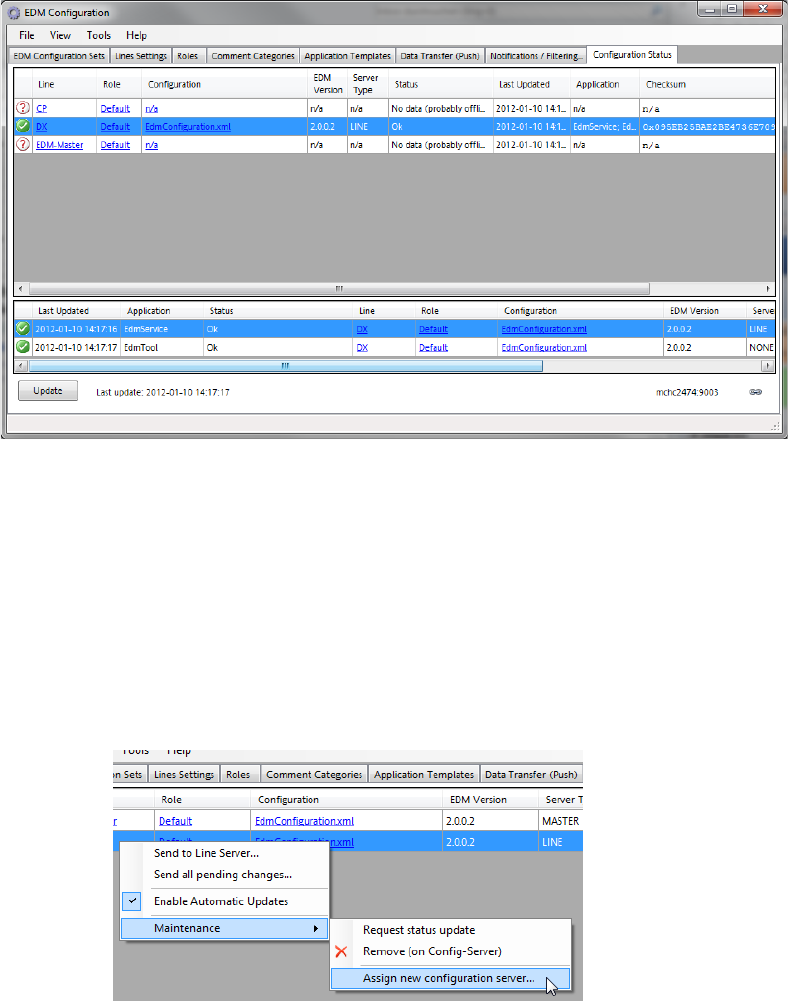
The Configuration Status tab gives some information about the status of the EDM Client
computers (upper pane) and their EDM applications (lower pane).
5.3.8.1 Changing the Configuration Server of one EDM Client
In order to make an EDM Server get its configuration set from another Configuration Server, these
steps are required:
1. Open the Configuration Status tab of the Configuration GUI on the old Configuration
Server and click the Update button.
2. For each EDM computer in the list of computers (you may select multiple lines at once),
open the context menu and select “Assign new configuration server”
3. In the text box, change the hostname part of the URI to match the new configuration server
4. On the new configuration server, type-in the appropriate settings for the EDM Client’s alias
and host name.