Printer 600 Paste Dispenser System.pdf - 第12页
3$67(',6 3(16(56< 67(0 $'-8670 (176$1 '6(77,1 *6 10.12 Technical Reference Manual Chapter Issue 2 Jul 02 ADJUSTMENTS AND SETTINGS Paste Carriage Home Sensor 1. In Diagnosti cs select Paste Dispens e…

3$67(',63(16(56<67(0
6(48(1&(6
Chapter Issue 2 Jul 02 Technical Reference Manual 10.11
NOTE
1. The paste start and paste stop positions are held in the product file. The
default positions are set by the board length. These positions can be
customized in the edit data menu.
2. An alternate paste dispense can be set to apply paste to either the centre
50% or end 25% of the standard dispense. The ratio of alternate to standard
dispenses can also be set.
3. The speed of the paste dispenser, driven between the paste start and paste
stop positions, is programmable and determines the volume of paste
applied.
4. The paste dispense position can be set to either the front or rear of the
image.
5. Paste can be dispensed with a board loaded and held at print height. This
overcomes the problem of paste dropping from the squeegees or paste
dispenser onto and through the image.
3$67(',63(16(56<67(0
$'-8670(176$1'6(77,1*6
10.12 Technical Reference Manual Chapter Issue 2 Jul 02
ADJUSTMENTS AND SETTINGS
Paste Carriage
Home Sensor
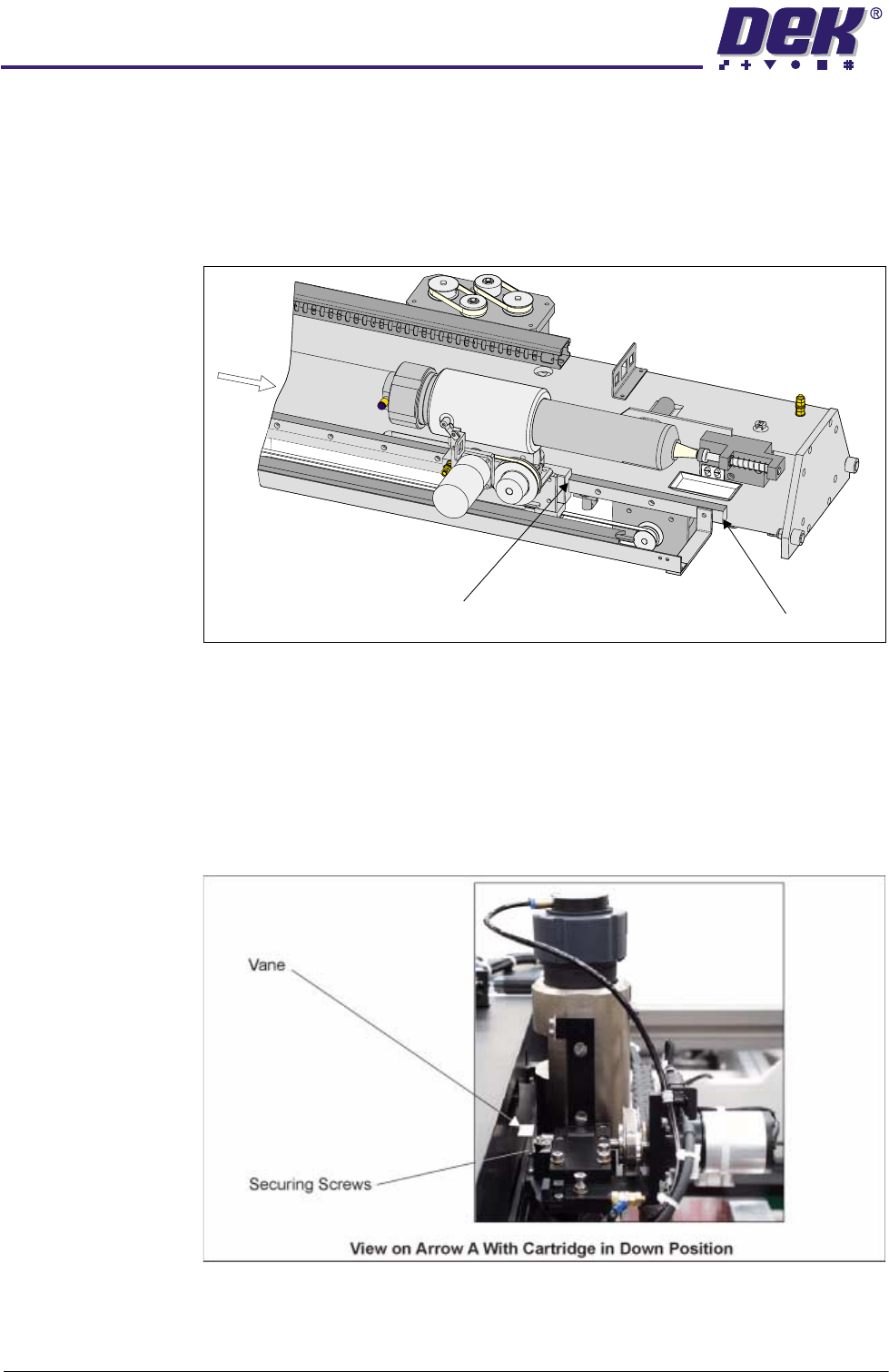
1. In Diagnostics select Paste Dispense System.
2. Select Carriage Home.
3. Check that the distance from the edge of the paste carriage bearing block
to the end of the paste carriage THK rail is 175mm -177mm.
4. If adjustment is necessary, select Drive Cartridge Down.
5. Slacken the two paste carriage home Hall effect vane securing screws,
using a 2.5mm Allen key and adjust the vane. Tighten the two securing
screws.
6. Repeat Steps 2 - 5 until the setting is achieved.
7. Ensure that the vane does not foul the sensor as it passes through the Hall
effect.
A
Edge of
Bearing Block
End of THK Rail
3$67(',63(16(56<67(0
$'-8670(176$1'6(77,1*6
Chapter Issue 2 Jul 02 Technical Reference Manual 10.13
Cartridge Vertical (Down) Hard Stop and Sensor
Setting Cartridge
Vertical (Down)
Hard Stop
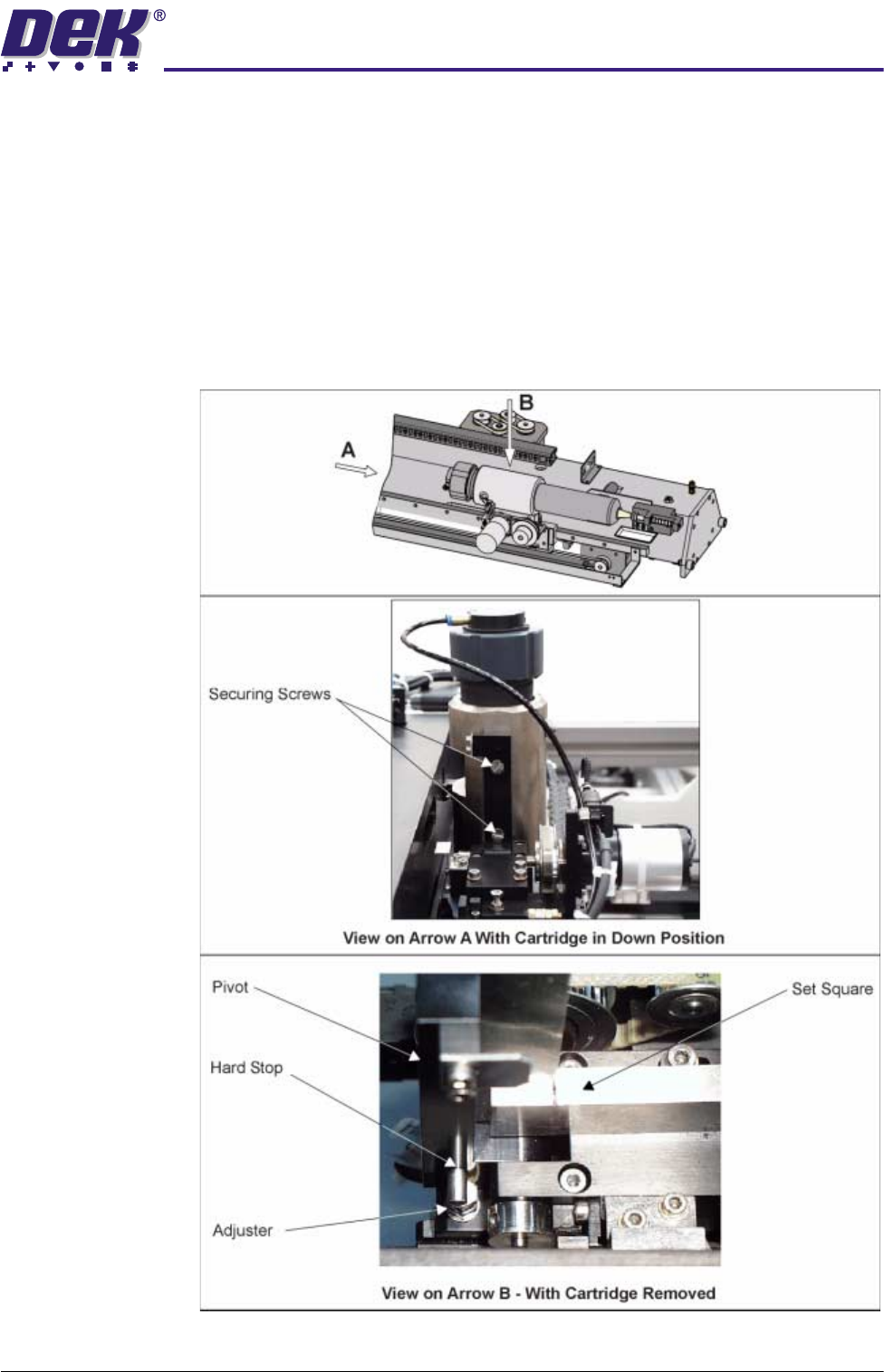
1. In Diagnostics select Paste Dispense System.
2. Select Drive Cartridge Down.
3. Using a set square, check that the paste cartridge is vertical.
4. If adjustment is necessary, remove the two countersunk securing screws
and lift the paste dispenser clear, to gain access to the adjuster.
5. Set the adjuster so that the pivot is vertical.
6. Before refitting the paste dispenser carry out the Setting Cartridge Vertical
(Down) Sensor procedure.