Printer 600 Paste Dispenser System.pdf - 第16页
3$67(',6 3(16(56< 67(0 $'-8670 (176$1 '6(77,1 *6 10.16 Technical Reference Manual Chapter Issue 2 Jul 02 Cartridge Empty Sensor Mechanica l Setting 1. Check the 10mm measurement as shown below . Che…
3$67(',63(16(56<67(0
$'-8670(176$1'6(77,1*6
Chapter Issue 2 Jul 02 Technical Reference Manual 10.15
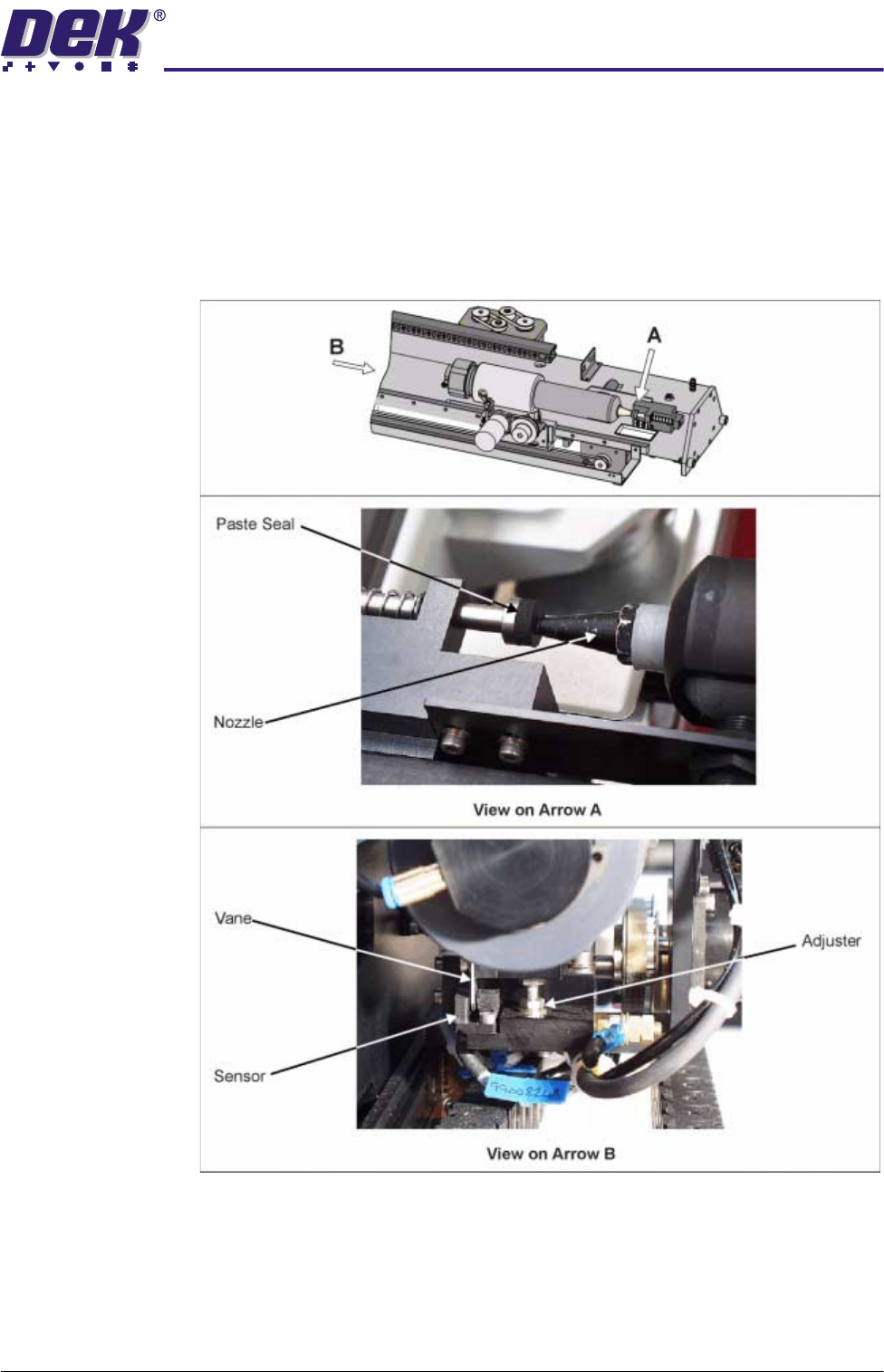
Cartridge Horizontal (Up) Hard Stop and Sensor
Setting Cartridge
Horizontal (Up) Hard
Stop
1. Insert a paste cartridge into the paste dispenser.
2. In Diagnostics select Paste Dispense System.
3. Select Carriage Home.
4. Check that the nozzle is central on the paste seal. Set the adjuster to
achieve this.
Setting Cartridge
Horizontal (Up)
Sensor
1. No adjustment of the sensor is necessary.
2. Confirm that the vane does not foul the sensor as it passes through the Hall
Effect.
3$67(',63(16(56<67(0
$'-8670(176$1'6(77,1*6
10.16 Technical Reference Manual Chapter Issue 2 Jul 02
Cartridge Empty Sensor
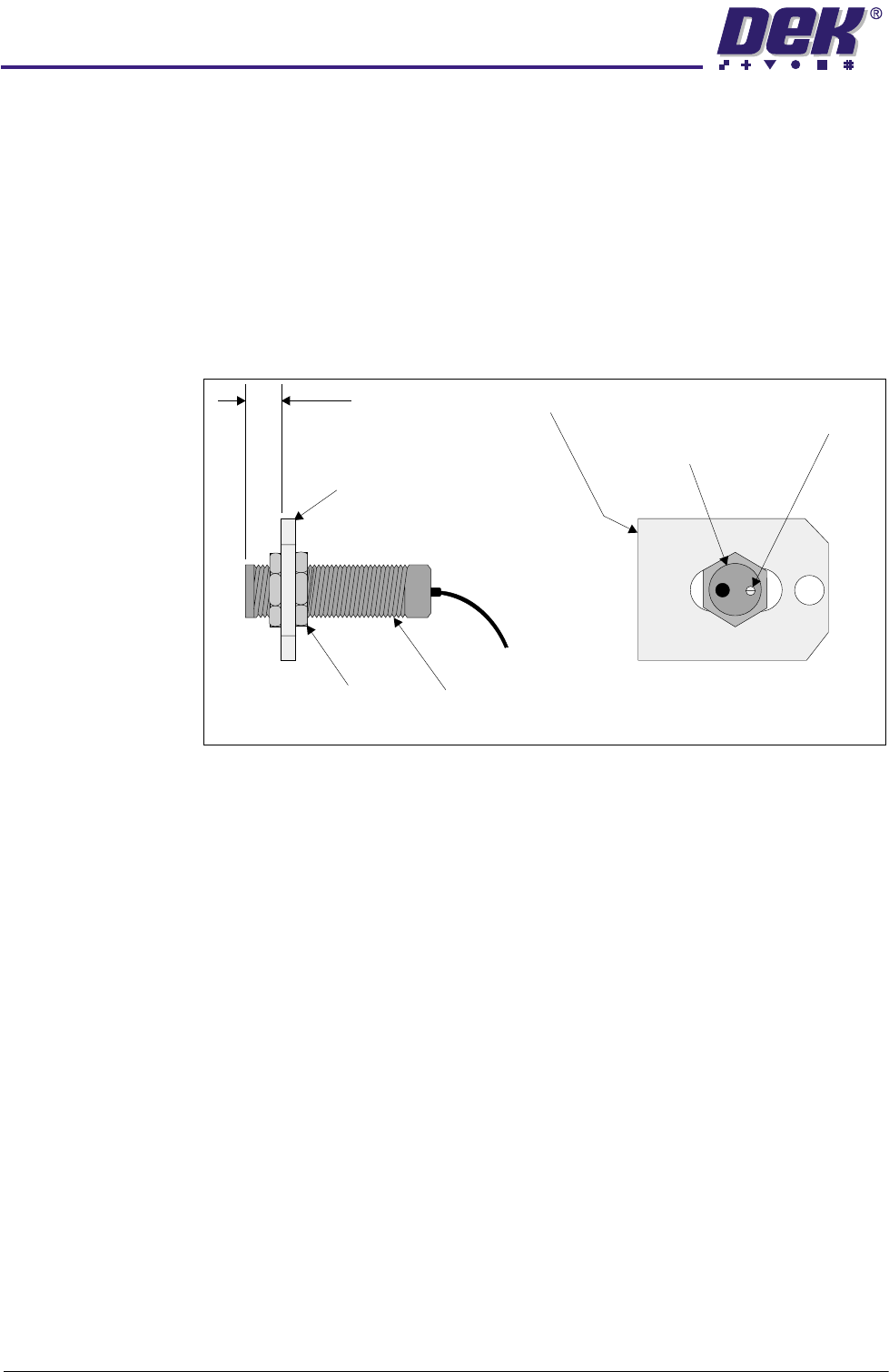
Mechanical Setting 1. Check the 10mm measurement as shown below. Check the cartridge
empty sensor is mounted centrally in the sensor bracket.
2. If adjustment is required, loosen the securing nuts on the sensor bracket,
adjust the cartridge empty sensor to achieve the 10mm dimension with the
sensor central in the bracket. Tighten the securing nuts.
NOTE
If the sensor is too close to the cartridge it could foul the cartridge when
dispensing paste.
Electrical Setting 1. Fit an empty paste cartridge into the paste dispenser.
2. In Diagnostics select Paste Dispense System. Select Carriage Home.
3. If the LED adjuster and indicator is illuminated, turn it clockwise until the light
switches off (paste cartridge empty OFF in Diagnostics).
4. Turn the LED adjuster and indicator anti-clockwise until the instant the light
switches on (paste cartridge empty ON in Diagnostics). Note the position of
the LED adjuster and indicator (position A).
5. Fit a full paste cartridge containing the paste most commonly used on the
machine being adjusted.
6. Select Carriage Home to drive the dispenser to the home position
7. Turn the LED adjuster and indicator anti-clockwise until the instant the light
illuminates (paste cartridge empty ON). Note the position of the LED
adjuster and indicator (position B).
8. Turn the LED adjuster and indicator clockwise half the difference between
the positions A and B. The LED adjuster and indicator should not be
illuminated (paste cartridge empty OFF).
Securing Nuts
(2 positions)
Sensor Bracket
10mm
LED Adjuster
and Indicator
View on Rear of Cartridge
Empty Sensor and Bracket
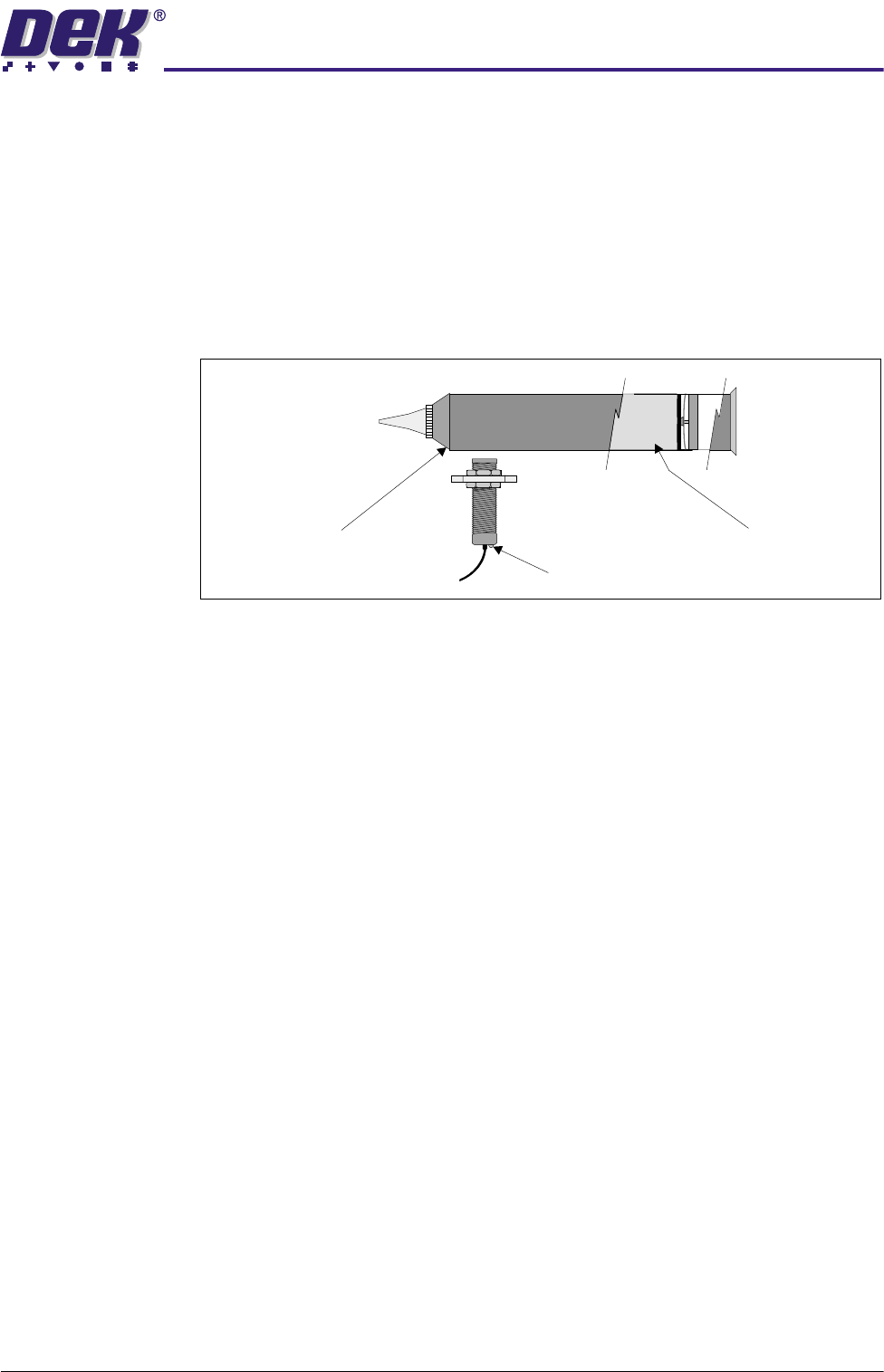
Sensor Bracket
Cartridge Empty
Sensor
Cartridge Empty
Sensor
3$67(',63(16(56<67(0
$'-8670(176$1'6(77,1*6
Chapter Issue 2 Jul 02 Technical Reference Manual 10.17
NOTE
The solder paste consistency varies throughout the cartridge. Take a full
cartridge and ensure the sensor can detect paste throughout the length of
the cartridge without the output switching on and off. Keep the distance
between the sensor and the cartridge the same as when mounted in the
dispenser, as changes in distance cause the output to switch. Each new
paste cartridge should be given a vigorous shake and squeeze prior to
fitting, this helps prevent future problems with the sensor due to paste
inconsistency.
Paste Dispenser
Regulator
For information on the regulator setting refer to the Pneumatic Module Chapter.
Paste Dispense
Clutch Setting
NOTE
Ensure that the tension of the paste dispense drive belt is uniform, ie top and
bottom.
1. Remove the clutch locking nut from the end of the clutch body assembly.
Paste
(Cutaway View)
Paste Cartridge
LED Adjuster and Indicator