00193796-10.pdf - 第29页
Installation Manual, Station Software Version 505.04 SP2 Edition 11/2007 29 of 154 Log book entries → Check the Do you want to read the log file? box if you want to view the entries in log file . The Notepad is started a…
Installation Manual Station Software Version 505.04 SP2
28 of 154
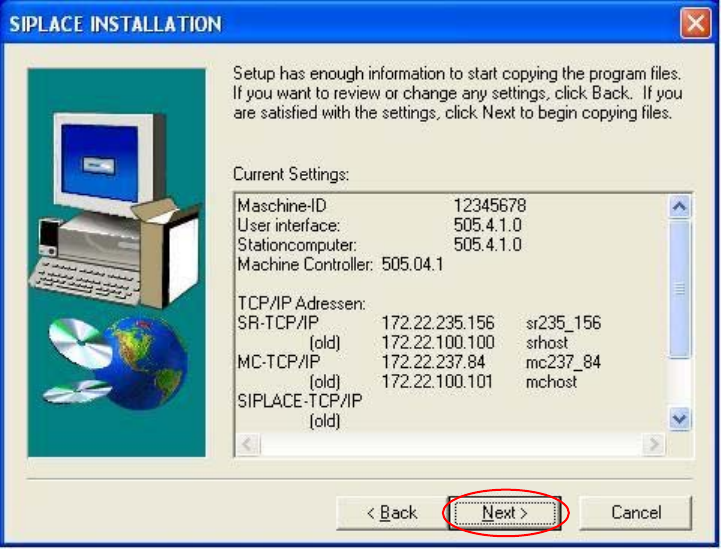
Checking entries
The entries which you have made will be listed again:
Fig. 4-13: Checking entries
→ Check the entries again.
→ If the entries are correct, click the Next button.
The installation program now copies all the required files from the CD to your station computer.
Installation Manual, Station Software Version 505.04 SP2 Edition 11/2007
29 of 154
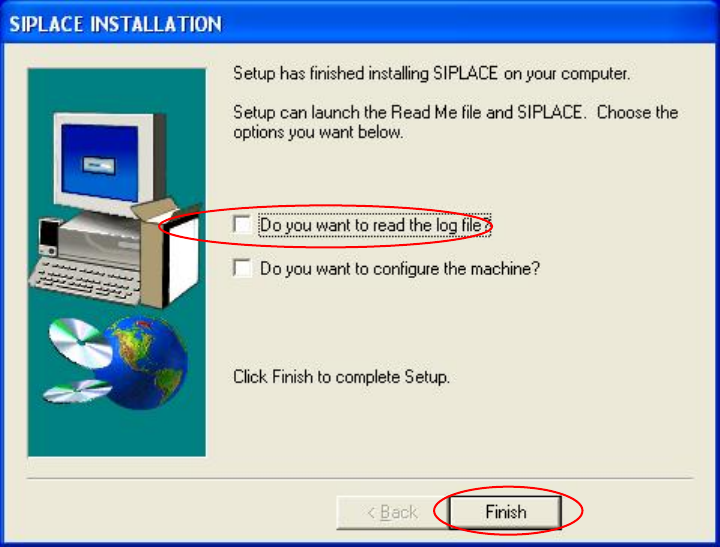
Log book entries
→ Check the Do you want to read the log file? box if you want to view the entries in log file. The
Notepad is started and displays the appropriate file.
Fig. 4-14: Setup completed
→ Click the Finish button.
Changing the hardware configuration
If you want to change the hardware configuration of the machine, e.g. the head configuration,
proceed as follows.
→ Activate the checkbox Do you want to configure the machine? in the dialog box shown
above (see Fig. 4-12).
→ Click the Finish button.
→ In the dialog box that now appears (see Fig. 4-13) activate the option No, I will restart my
computer later.
→ Click the Finish button.
→ In the Start menu, click Shut Down, and select Shut Down from the dropdown list followed by
the OK button.
→ Switch the machine off when the station computer has shut down.
→ Switch the machine back on again.
Installation Manual Station Software Version 505.04 SP2
30 of 154
→ Log in again as Administrator on the station computer.
→ Execute the program Start-->Programs-->Siplace-->Machine Configurator.
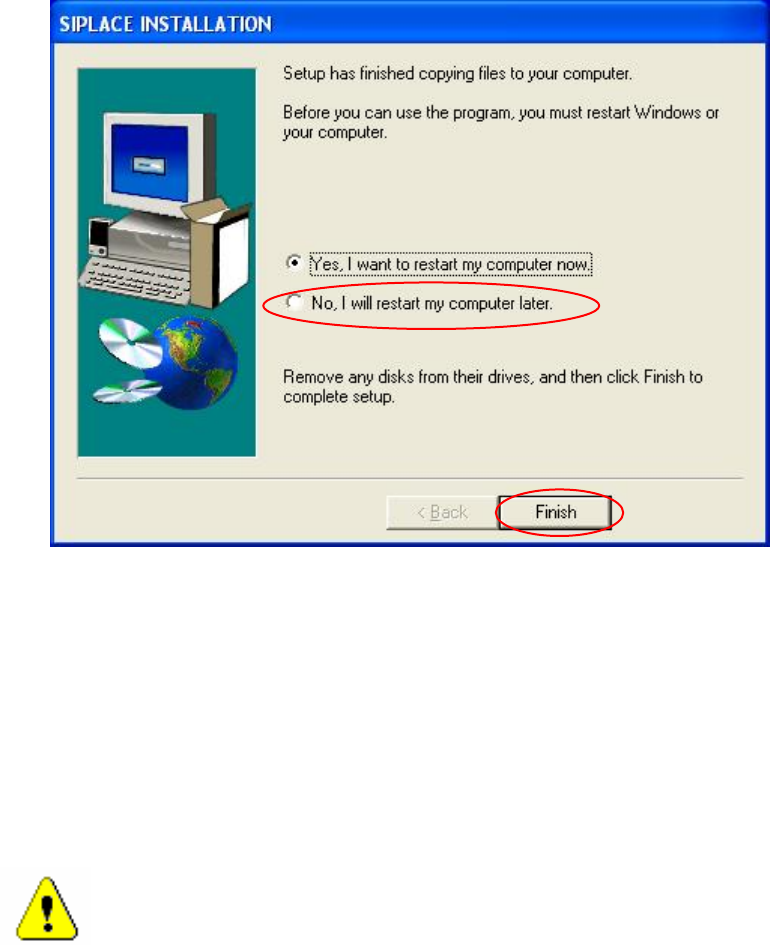
Final screen
The following dialog box appears at the end of the installation:
Fig. 4-15: Final dialog of the SIPLACE installation
→ Select the option No, I will restart my computer later.
→ Click the Finish button.
→ In the Start menu, click Shut Down, and select Shut Down from the dropdown list followed by
the OK button.
→ Switch the machine off when the station computer has shut down.
→ Switch the machine back on again.
Caution:
The machine must always be switched off after installation or after modifiying the configuration.
When the machine is switched back on again it reconfigures the software.