00193796-10.pdf - 第48页
Installation Manual Station Software Version 505.04 SP2 48 of 154 4.3.2 Hard disk partitioning Partitioning required for the hard disk: C: partition 50 MByte, active boot partition D: partition 450 MByte, SIPLACE Softwar…
Installation Manual, Station Software Version 505.04 SP2 Edition 11/2007
47 of 154
4.3.1.13 Setup page "PC Health Status"
In the "Selection options" column, the setting for fail-safe default is indicated in italics and the setting
for optimized default is underlined
.
Menu item Note Selection options
Throttling
Temperature
This setting specifies the internal chip temperature at
which the processor automatically begins thermal
throttling.
90°C/194°F;
100°C/212°F
110°C/110.00°C
All other menu items indicate internal voltages and cannot be changed.
4.3.1.14 Setup page “Frequency/Voltage Control”
In the "Selection options" column, the setting for fail-safe default is indicated in italics and the setting
for optimized default is underlined
.
Menu item Note Selection options
Auto Detect
DIMM/PCI Clk
If this function is Enabled, only CPCI and DIMM slots
which are also occupied are clocked.
Enabled
Disabled
Spread Spectrum
If this function is Enabled, the average frequency of the
clock cycles generated in the clock synthesizer is
modulated within tight boundaries. This widens the noise
spectrum but lowers the amplitude.
Enabled
Disabled
Installation Manual Station Software Version 505.04 SP2
48 of 154
4.3.2 Hard disk partitioning
Partitioning required for the hard disk:
C: partition 50 MByte, active boot partition
D: partition 450 MByte, SIPLACE Software
The total size of both partitions must not exceed 504 Mbyte.
The DOS program fdisk is used for partitioning.
It can be called via the command line after booting with a DOS system floppy or will start
automatically when the operating system is installed if the hard disk was not set up correctly.
Installation Manual, Station Software Version 505.04 SP2 Edition 11/2007
49 of 154
4.3.3 Installing the machine controller operating system
4.3.3.1 Creating the installation floppies
The two floppies required for the operating system of the machine controller can be created on any
PC which is running Windows XP, which has a floppy drive and a CD-ROM drive, for example, the
station computer.
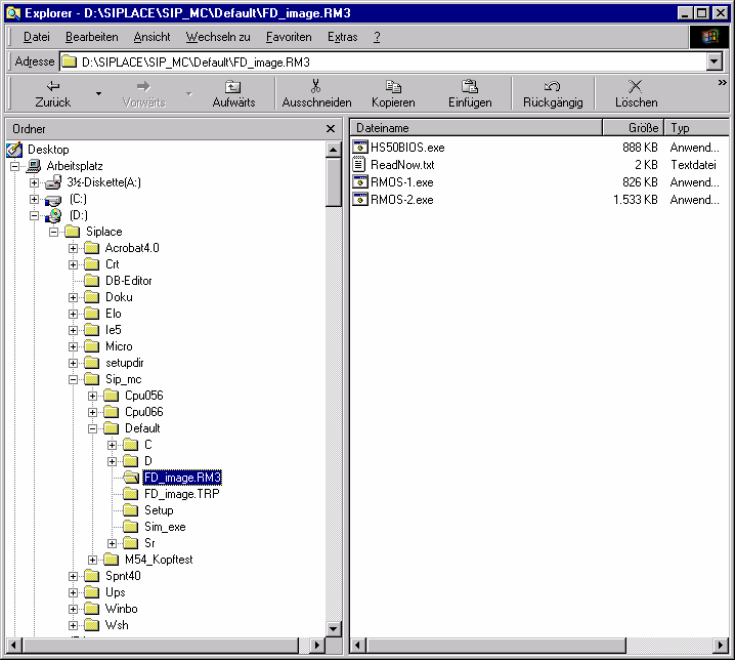
An image in the form of a self-extracting EXE file is stored in the folder
\SIPLACE\Sip_mc\Default\FD_IMAGE.RM3 for both of the installation floppies. The numbers at the
end of the file name (Rmos-1.exe, Rmos-2.exe) correspond to the number of the floppy. The
floppies can be created in any order.
→ Insert a formatted floppy (3.5", 1.44MB) into drive A.
→ Open the folder \SIPLACE\Sip_mc\Default\FD_IMAGE.RM3 by using the explorer.
→ Start the relevant executable (this can be started directly from the explorer with a double click).