TK55253.FeederMaintenanceNotice.pdf - 第5页
Product Engineering Division SMT Sect ion Robotics Operations Y AMAHA MOTOR CO., L TD. MDOC-SOFT50282 6/2 1 3.4 Drive Cnt Af te r T ape Guide Maintenance ▲ ▲ ▲ ▲ 3 (Aut o Loa ding Fe eder o nly) If there is a f eeder tha…
Product Engineering Division
SMT Section
Robotics Operations
YAMAHA MOTOR CO., LTD.
MDOC-SOFT50282
4/21
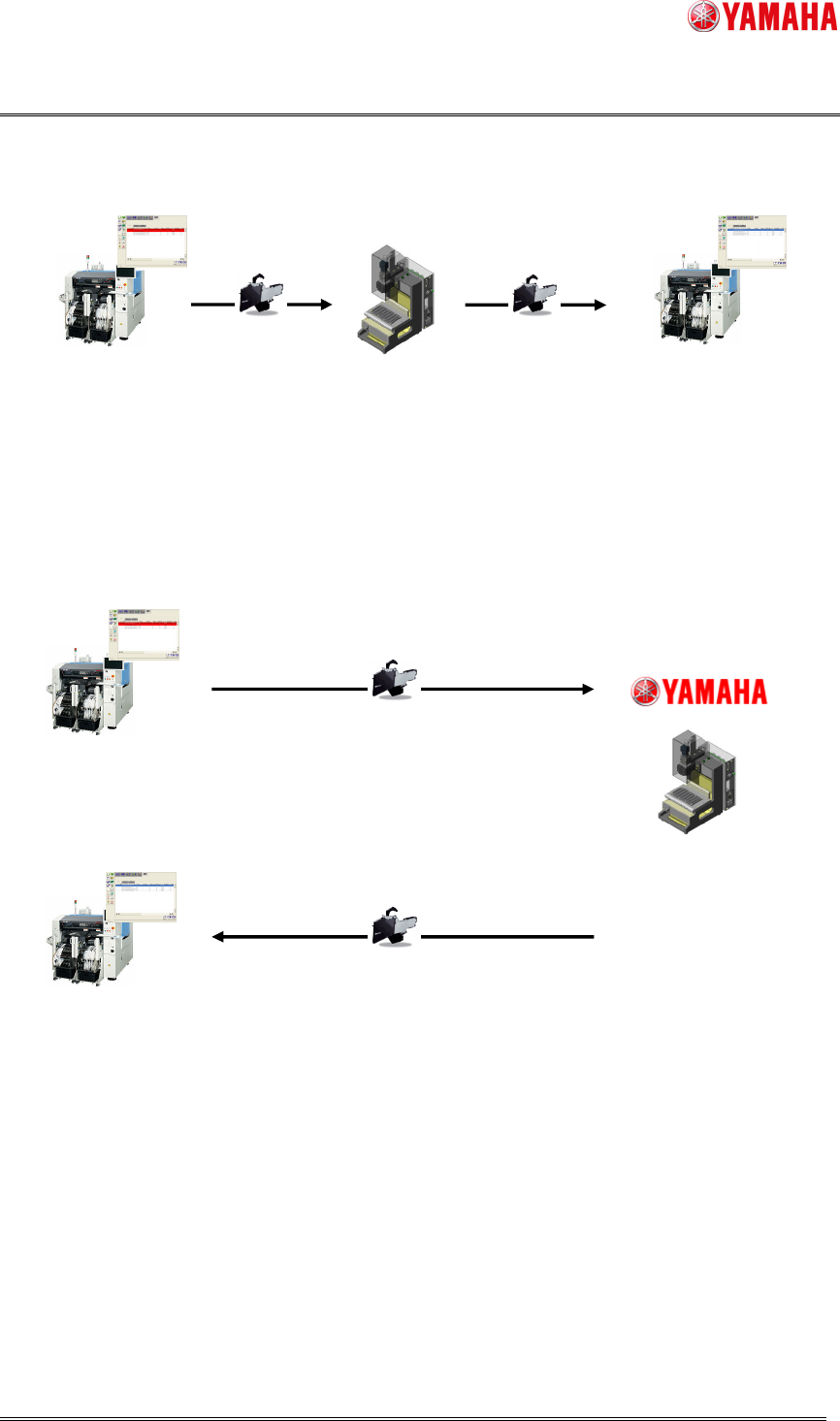
【With SS Tune-up Station】
【Without SS Tune-up Station】
Fig 2.1 Maintenance work image
Maintain the feeder on SS Tune-up Station
Maintenance
Notice appears
Feeder
SS Tune-up Station
Maintenance Notice disappears
Notice・Error Resolution
Mounter
Maintenance Notice appears
Notice・Error Occurrence
Feeder
Mounter
Send the feeder to Yamaha/distributor
Yamaha maintains the feeder
Maintenance Notice disappears
Notice・Error Resolution
SS Tune
-
up Station
Yamaha/distributor sends the feeder back

Product Engineering Division
SMT Section
Robotics Operations
YAMAHA MOTOR CO., LTD.
MDOC-SOFT50282
6/21
3.4 Drive Cnt After Tape Guide Maintenance
▲
▲▲
▲3
(Auto Loading Feeder only)
If there is a feeder that has driven a specified number of times since the last maintenance
of the feeder guide, a maintenance message appears to inform you that it is the time for
maintenance.
After use of Auto Loading Feeder over a specific number of times, The blade on tape
guide may be worn out. There is a possibility that cover tape cannnot be cut correctly.
Therefore, it is recommended maintenance practice.
Please have a maintenance according to 3. Maintenance/Replacing parts in chapter4 of
“Auto Loading Feeder User's Manual”.
3.5 Message
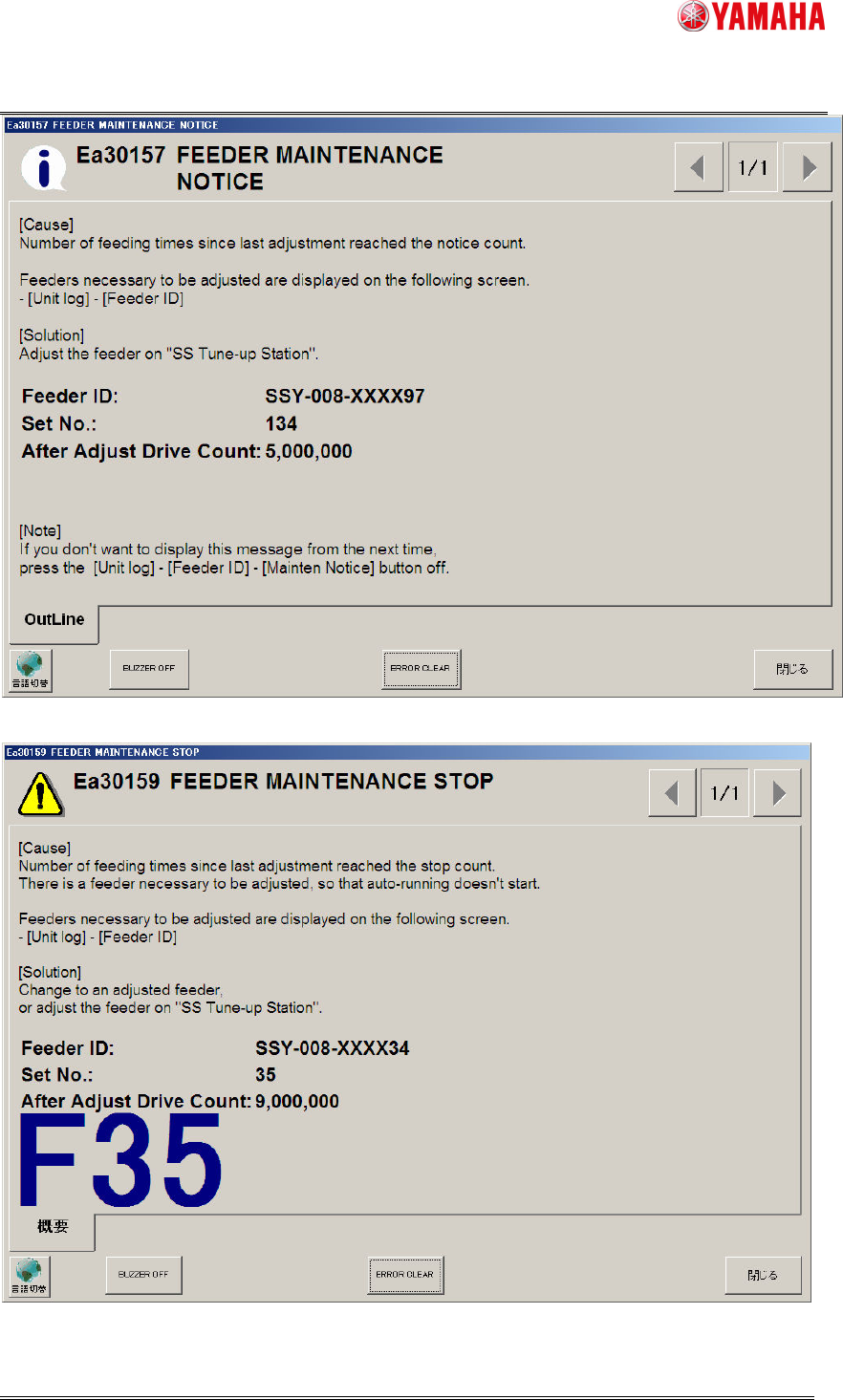
When a feeder satisfies the conditions of maintenance notice, the feeder maintenance
notification is displayed. When the message is displayed during auto-running, auto-running
is continued.
When a feeder satisfies the conditions of maintenance stop, the feeder maintenance stop
error is displayed. If the error occurs during auto-running, auto-running is stopped. The
maintenance stop function is disabled by default, but can be enabled on the machine
setting (4.2 Machine Setting).
▲1
On the machine setting, you can change the timing to display the message or error (4.2
Machine setting). The initial timing is when a feeder is attached or removed.
If more than one feeder satisfies the maintenance conditions at the same time, only the
one with the smallest feeder number is displayed. For the other feeders, see [Feeder ID
Log] screen.
Product Engineering Division
SMT Section
Robotics Operations
YAMAHA MOTOR CO., LTD.
MDOC-SOFT50282
7/21
Fig 3.1 Feeder Maintenance Notice
Fig 3.2 Feeder Maintenance Stop
▲1