User-Manual-NeoDen-IN6-Reflow-oven.pdf - 第13页
11 Figure 5. Too much or not e nough reflow Figure 6. Cooling too fast or not enoug h When the f inal c urve is consistent with the desired figure as much as possible, the furnace parameters should be recorded or s tored…
10
belt speed proportionally if it is too long, and vice versa.
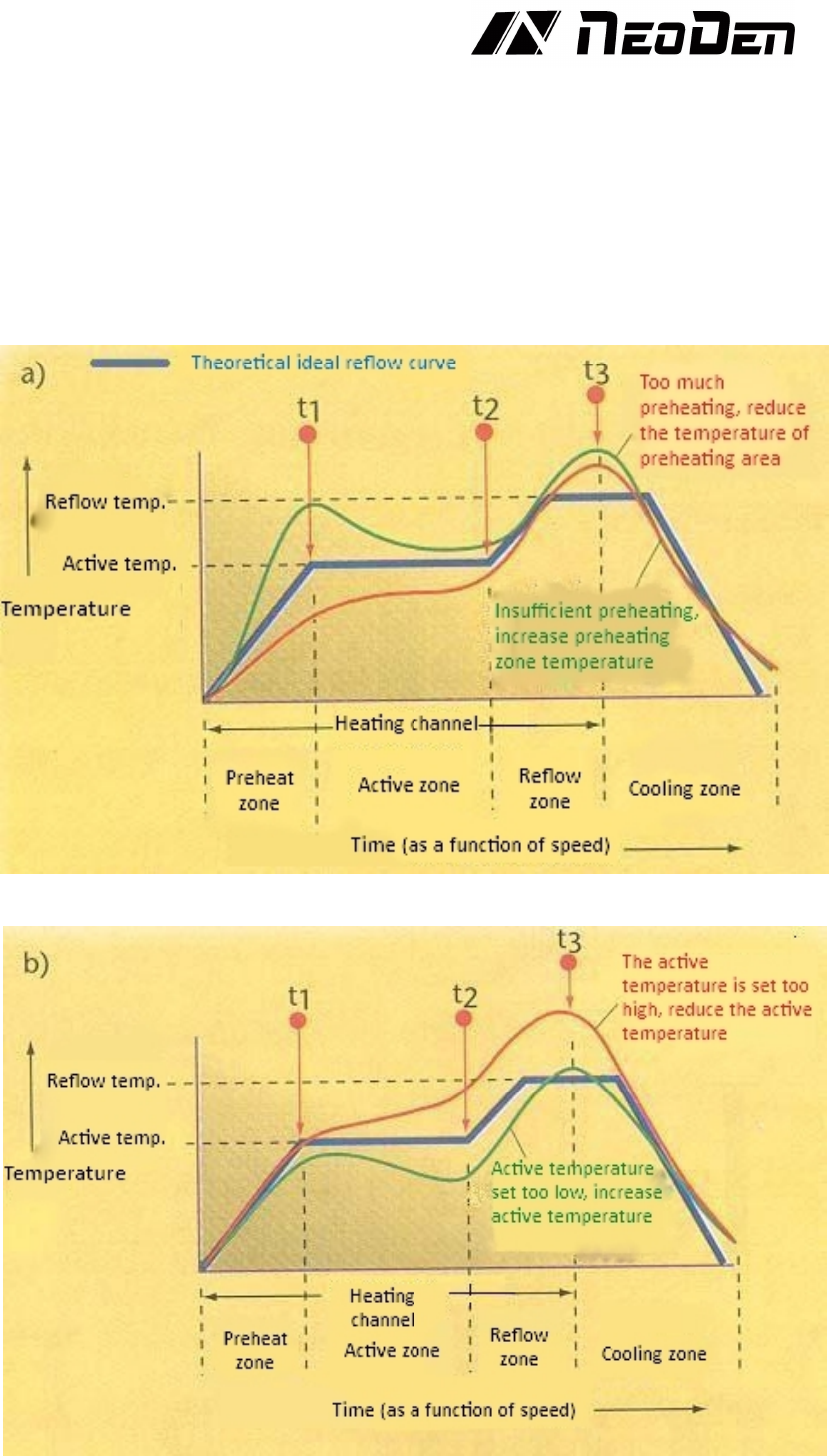
Next, the shape of the graph curve must be compared with the desired one (Fig. 2). If the shape
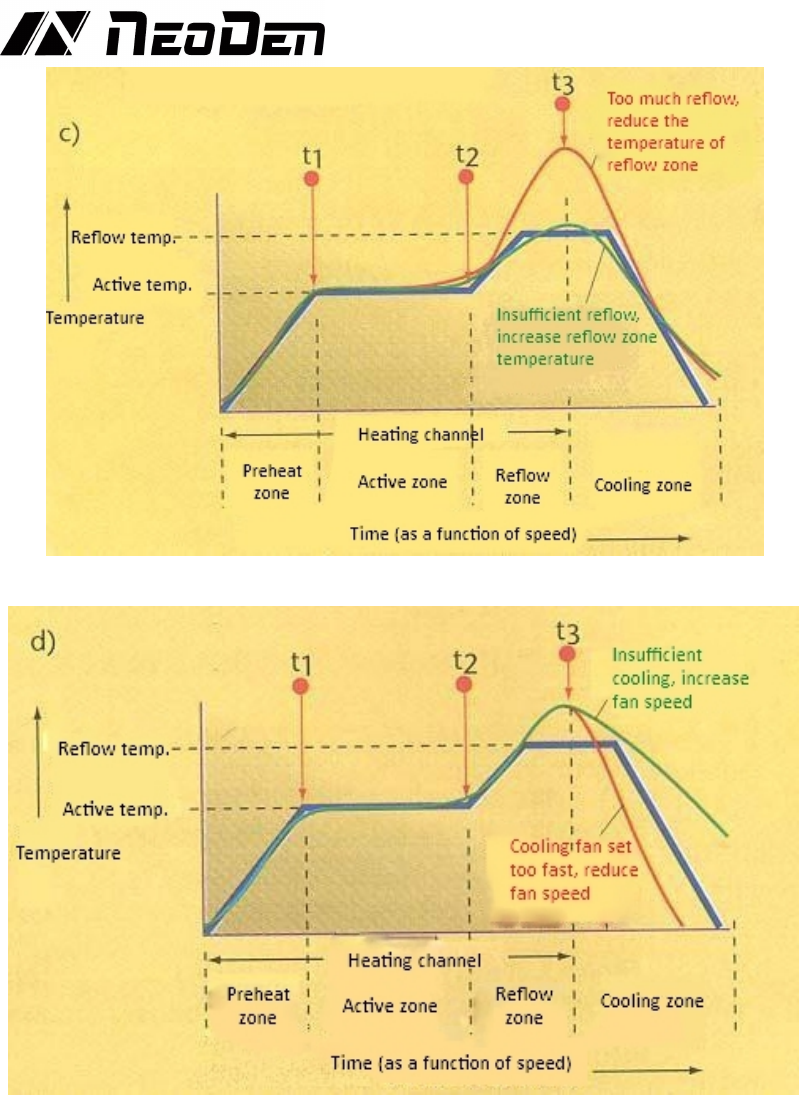
is inconsistent, it shall be compared with the following graph (Fig. 3 ~ 6). Select the curve that
best matches the shape of the actual shape. The deviation from the left to the right (process
sequence) should be considered. For example, if there is a difference between preheating and
reflow area, first adjust the difference between preheating area correctly. Generally, it is better
to adjust one parameter at a time, and run the curve setting before making further adjustment.
This is because the change of a given area will also affect the result of the subsequent area. We
also suggest that the adjustments made by novices should be relatively small. Once experience
has been gained in a particular furnace, there will be a better "feel" for how much adjustment to
be made.
Figure 3. Insufficient or excessive preheating reflow curve
Figure 4. Too high or too low temperature in the active zone
11
Figure 5. Too much or not enough reflow
Figure 6. Cooling too fast or not enough
When the final curve is consistent with the desired figure as much as possible, the furnace
parameters should be recorded or stored for later use. Although this process starts slowly and
laboriously, it can finally achieve proficiency and speed, resulting in high-quality PCB
production efficiency.
6. Details about temperature area setting
♦Set the temperature and belt speed to initial value, to the cooling oven, should be preheated
for 25 minutes.
♦When the temperature is stable, let PCB pass heat reflow system. If there is no reflow, can
properly reduce the transfer chain rotation speed. Another way is that, do not adjust the speed,
and increase the temperature properly. When adjust the temperature, notice that it cannot
exceed the PCB and component bearing capacity.
♦Let the PCB pass the reflow system in the new speed or new set temperature. If there is no
reflow, turn to redo the above step. Otherwise, need temperature fine-turning.

12
♦The heat temperature wave is adjustable according to the PCB. You can adjust the transfer
chain rotation speed to adjust the temperature. Reduce the transfer chain rotation speed can
increase the product heat temperature. On the contrary, you can reduce the product heat
temperature.
Attention:
♦If the PCB has been placed components, the PCB pass the reflow and it reflow not very
completely, suggest you adjust then reflow again. Normally, it will not impact the PCB and
components.
♦From low to high when set temperature. If the heat range is over the reflow temperature too
high, should increase the transfer chain rotation speed or reduce the set temperature.
♦Different PCBs boards have different heat transmission rate and heat absorption capacity, so it
requires the reflow oven offers different heated time and quantity of heating. To double-side
PCB, multi-board and other PCBs with many bonding pads, they have a higher temperature
setting. To one-side PCB, paper board and less bonding pads’ PCB, they have a lower
temperature setting. And it also be affected by quantity of PCB that you place. During actual
work, reflow oven will adjust itself automatically to some changes of PCB. If based on our
suggested temperature, the machine can work well, unless very big change of PCB’s
absorption capacity, then it needs to adjust properly.
7. Temperature measurement method
♦Attach the temperature thermocouple sensor to the PCB which is the same or similar size as
the working PCB in order to observe the reflow. Put the PCB on the transfer chain, then will
get the temperature profile, after that compare with the recommend temperature profile. If it is
the same to the standard profile or correspond with automodulation profile, then you can start
to produce, otherwise follow the temperature profile, the temperature controller with large
temperature difference is used to set the compensation temperature by 5 degrees, or the whole
machine integrated adjustment, in order to achieve the temperature profile can be produced
♦When starting to put PCB or abruptly change the number of PCB to be reflow oven, there is a
difference between the actual temperature and setting temperature, put the PCB with constant
speed for a period of time, the temperature difference will turn to normal temperature
difference range.
8. Both side soldering instruction
♦Use hot air reflow soldering can finish double-side component soldering. Double-side
soldering design means components are in double-side of the PCB need to soldering. Double
side soldering includes double-side soldering tin and single-side soldering tin and another side
drying glue, as for single-side soldering tin and another side drying glue, it is easier. First,
finish one side’s soldering tin as the same as single-side, then finish another side tape glue
drying in low temperature, finish double-side SMT craft, after that carry on the next step plug-
in or tin process on craft. Double-side soldering is generally treated as below follows:
♦Start the reflow oven, set up the transfer chain speed controller, finish the A side components
reflow soldering with normal soldering craft.
♦Upend the PCB, repeat normal procedure to mount the component, adopt top heating strategy
to let the B side reflow soldering, but the upend A side has been reflow soldering, the
compounds in thick liquid volatilize, the melting point of tin is higher than the solder paste,
which in order to keep the A side components not fall out.