User-Manual-NeoDen-IN6-Reflow-oven.pdf - 第7页
5 can use t he " <<<", " >>>" "Up" and "Down" buttons to change the TAB name, long press OK to save these parameters to this TAB. When you would like to call the …
4
case of causing any accident.
4.3 Status of Indicators
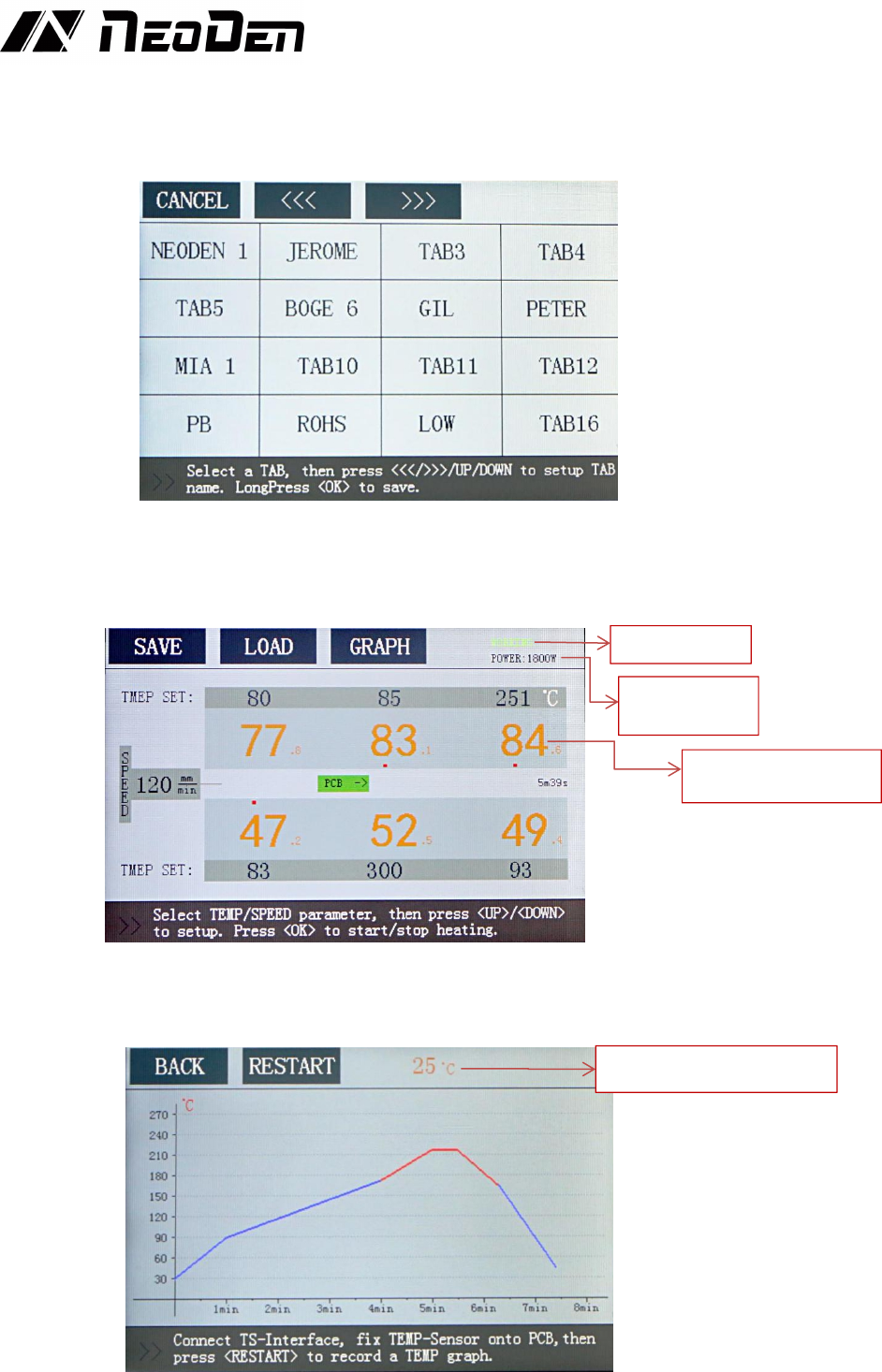
There is a green bar indicator at the PCB entrance that indicates whether the temperature in all
zones has reached the set temperature. This indicator lights up when the actual temperature of
all zones reaches the set temperature.
4.4 Operation instructions
♦ Power-on
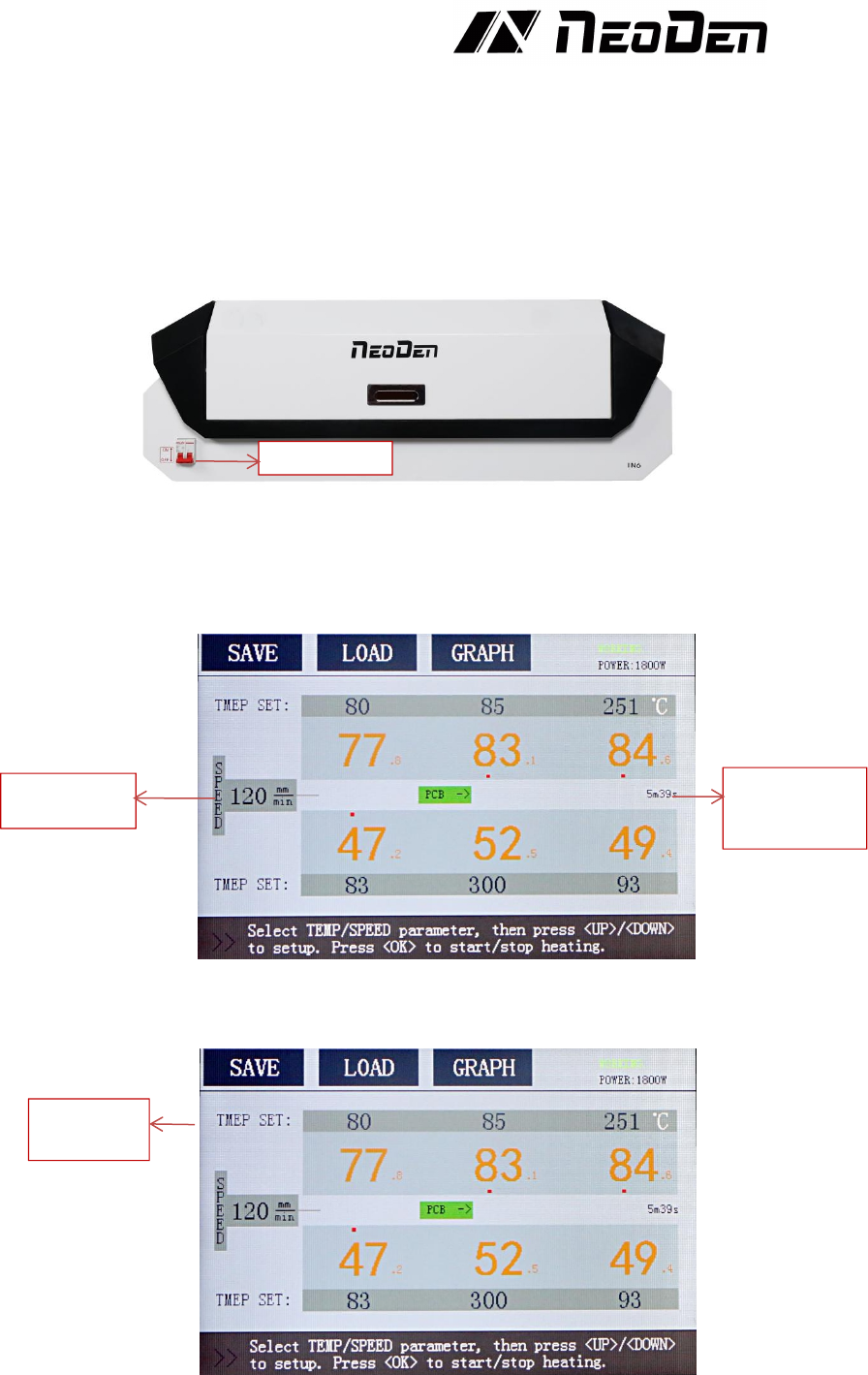
Turn the red power switch to the ON position and the machine starts.
♦Transfer chain speed setting
Tap the speed parameter on the screen and press the Up/Down button to set the appropriate
transfer chain rotation speed. When the speed is set, the time required to transport a PCB at this
setting speed is displayed on the right side of the screen.
♦Temperature zone setting
Tap the temperature parameter on the screen and press the up/down buttons to set the
temperature. Black is “the set temperature”, and orange is “the real-time temperature”.
♦Save and Usage of speed and temperature settings
After setting the transfer chain speed and the temperature of each zone, you could press the
SAVE button to save the setting parameters of the transfer chain and the zone temperature.
When the SAVE button is pressed, it will enter the TAB interface. Click on a TAB, then you
Speed setting
Time required
to transport a
PCB
Temperatur
e setting
Power switch
5
can use the "<<<", ">>>" "Up" and "Down" buttons to change the TAB name, long press OK
to save these parameters to this TAB.
When you would like to call the previously saved speed and temperature of the transport chain,
click the LOAD button on the screen to enter the TAB interface, click the TAB name, and then
click the CONFIRM button to load the speed and temperature settings of the transport chain.
♦Start or stop heating
Press the OK button in the main interface, the machine will switch from STANDBY state to
WORKING state, and begin to warm up.
If you need to switch from WORKING state to STANDBY state, just press the OK button in
WORKING state.
♦Temperature curve
Connect the temperature sensor to the TEMP SENSOR connector, attach the temperature
sensor to the PCB, and then click the “Restart” button on the Graph interface after PCB is
put into the oven to get the temperature curve.
Working State
Real-time
Power size
Real time temperature
of heating unit
PCB real time temperature
6
♦Power-off
Turn the red power switch to the OFF position and turn off the machine.
♦Change language and the unit of temperature in machine
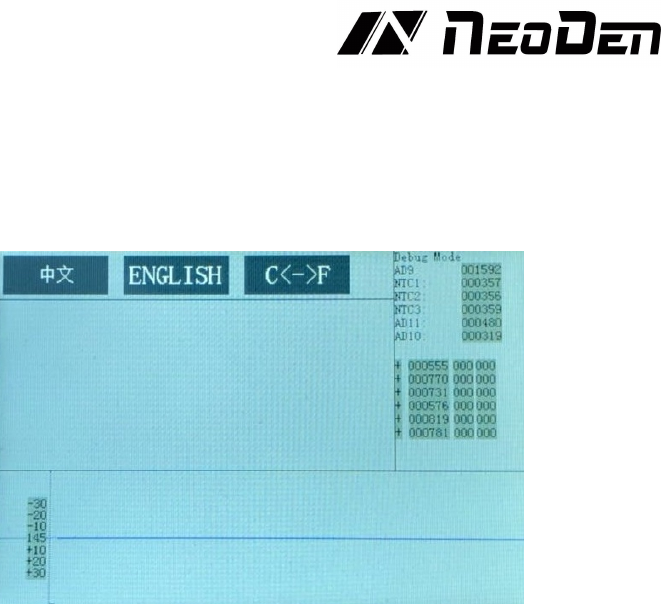
After the power switch is turned to ON, the NeoDen logo will be displayed on the screen. Long
press the OK button to enter the Debug mode interface. In this interface, you can change the
language and temperature unit of the machine.
5. Temperature wave setting principle
5.10 what is the heating unit temperature?
The heating unit temperature refers to the real-time temperature of the heating plate.
5.11 what is furnace temperature?
Furnace temperature refers to the air temperature between the chain surface and the heating
plate.
5.12 what is PCB surface temperature?
PCB surface temperature refers to the temperature of component welding feet during PCB
welding. (the guiding temperature on the welding curve provided by the solder paste
manufacturer refers to the plate temperature.)
When working, the temperature displayed on the panel is the actual temperature of the heating
unit, which does not represent the temperature in the furnace and the actual temperature of the
board. Therefore, the displayed temperature will be about 20-40 degrees higher than the
temperature in the furnace. The actual temperature is related to the chain speed, PCB size,
thickness, material and component density.
5.1 The reflow soldering theory and the temperature wave
When the PCB goes into heat up area (dry area), the solvent and gas in the solder paste will
evaporate. At the same time, the flux can wet the pad and the component tip and foot. The
solder paste melts, caves in and covers the pad, leading to the pad and component pins insulate
the oxygen. PCB goes into heat preservation area. PCB and components get full preheating. In
case of damaging the PCB and components when it goes into the welding area and the
temperature heats up quickly. When PCB goes into the welding area, the temperature heats up
and the solder paste melts. When PCB goes into cooling area, the liquid solder paste the
soldering points solidify. The reflow process is finished.
The temperature is the key to welding quality. The actual and the setting temperature warming
slope and the peak temperature should be accordant. Before the temperature reaches 160℃,
please control
the heat up speed in about 1℃/S. If heat up too quickly, the PCB and the components will be
damaged, and the PCB may be out of shape. On the other side, the flux volatilizes too fast. And
it is easy to make soldering tin ball. Set the peak temperature 20℃-40℃ higher than the solder
paste melting point. Set the reflow time 10S-60S. If the peak temperature is low or the reflow