User-Manual-NeoDen-IN6-Reflow-oven.pdf - 第8页
6 ♦ Power-off Turn the r ed power switch to the OFF position and turn off the machine. ♦ Change l anguage and the unit of temperature in machine After t he power switch is turned t o ON, t he NeoDen logo will be display …
5
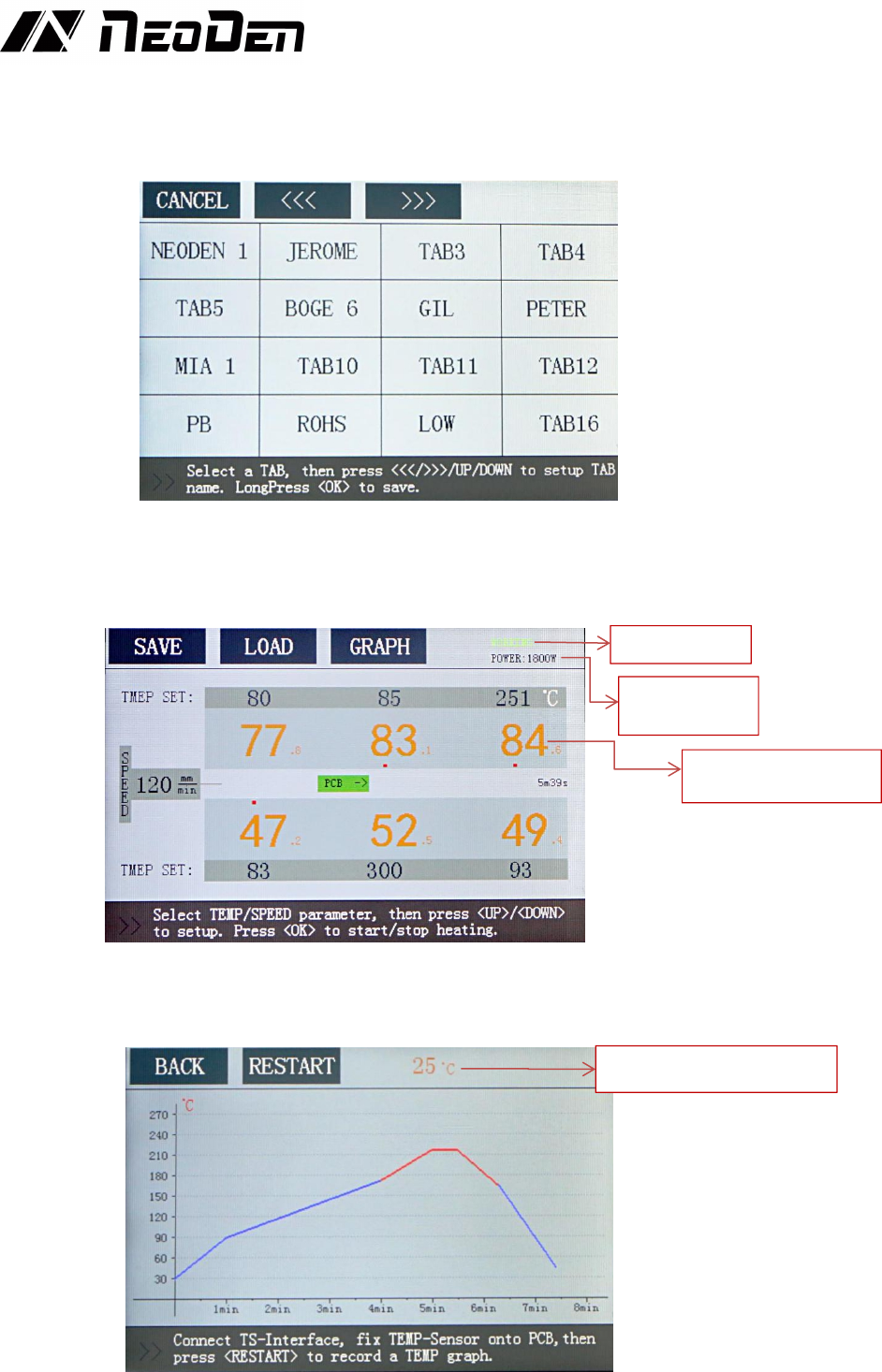
can use the "<<<", ">>>" "Up" and "Down" buttons to change the TAB name, long press OK
to save these parameters to this TAB.
When you would like to call the previously saved speed and temperature of the transport chain,
click the LOAD button on the screen to enter the TAB interface, click the TAB name, and then
click the CONFIRM button to load the speed and temperature settings of the transport chain.
♦Start or stop heating
Press the OK button in the main interface, the machine will switch from STANDBY state to
WORKING state, and begin to warm up.
If you need to switch from WORKING state to STANDBY state, just press the OK button in
WORKING state.
♦Temperature curve
Connect the temperature sensor to the TEMP SENSOR connector, attach the temperature
sensor to the PCB, and then click the “Restart” button on the Graph interface after PCB is
put into the oven to get the temperature curve.
Working State
Real-time
Power size
Real time temperature
of heating unit
PCB real time temperature
6
♦Power-off
Turn the red power switch to the OFF position and turn off the machine.
♦Change language and the unit of temperature in machine
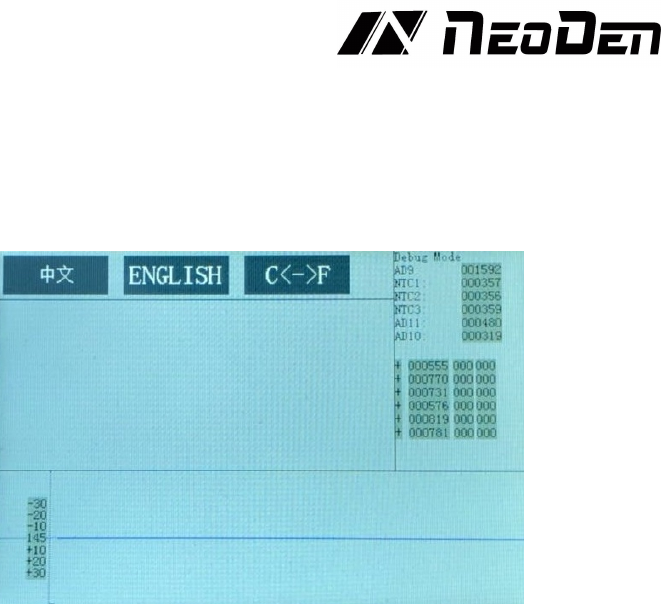
After the power switch is turned to ON, the NeoDen logo will be displayed on the screen. Long
press the OK button to enter the Debug mode interface. In this interface, you can change the
language and temperature unit of the machine.
5. Temperature wave setting principle
5.10 what is the heating unit temperature?
The heating unit temperature refers to the real-time temperature of the heating plate.
5.11 what is furnace temperature?
Furnace temperature refers to the air temperature between the chain surface and the heating
plate.
5.12 what is PCB surface temperature?
PCB surface temperature refers to the temperature of component welding feet during PCB
welding. (the guiding temperature on the welding curve provided by the solder paste
manufacturer refers to the plate temperature.)
When working, the temperature displayed on the panel is the actual temperature of the heating
unit, which does not represent the temperature in the furnace and the actual temperature of the
board. Therefore, the displayed temperature will be about 20-40 degrees higher than the
temperature in the furnace. The actual temperature is related to the chain speed, PCB size,
thickness, material and component density.
5.1 The reflow soldering theory and the temperature wave
When the PCB goes into heat up area (dry area), the solvent and gas in the solder paste will
evaporate. At the same time, the flux can wet the pad and the component tip and foot. The
solder paste melts, caves in and covers the pad, leading to the pad and component pins insulate
the oxygen. PCB goes into heat preservation area. PCB and components get full preheating. In
case of damaging the PCB and components when it goes into the welding area and the
temperature heats up quickly. When PCB goes into the welding area, the temperature heats up
and the solder paste melts. When PCB goes into cooling area, the liquid solder paste the
soldering points solidify. The reflow process is finished.
The temperature is the key to welding quality. The actual and the setting temperature warming
slope and the peak temperature should be accordant. Before the temperature reaches 160℃,
please control
the heat up speed in about 1℃/S. If heat up too quickly, the PCB and the components will be
damaged, and the PCB may be out of shape. On the other side, the flux volatilizes too fast. And
it is easy to make soldering tin ball. Set the peak temperature 20℃-40℃ higher than the solder
paste melting point. Set the reflow time 10S-60S. If the peak temperature is low or the reflow
7
time is short, it will affect the welding quality, and serious is causing the solder paste does not
melt. If the peak temperature is high or the reflow time is long, the metal power will be
oxidized and affect the welding quality and serious is causing the component and PCB
damaged.
5.2 The set of the temperature wave
Set according to the temperature curve of solder paste and the welding principle provided
above. Solder paste with different metal content should use different temperature curve, and set
specific reflow temperature curve according to the temperature curve provided by solder paste
manufacturer. In addition, the temperature curve is also related to the density and size of the
heated PCB and components.
In the assembly of printed circuit board (PCB) using surface mount components, an optimized
reflow temperature curve is one of the most important factors to obtain high quality solder
joints. The temperature curve is a function of the temperature on the circuit assembly to the
time. In the reflow process, at any given time, it represents the temperature on a specific point
on the PCB to form a curve.
Several parameters affect the shape of the curve, the most important of which is the belt speed
and the temperature setting of each zone. The belt speed determines the duration of the board
exposed to the set temperature in each zone. Increasing the duration allows more time for the
circuit assembly to approach the temperature setting in that zone. The total duration of each
zone determines the total processing time.
The temperature setting of each zone affects the temperature rising speed of PCB, and high
temperature produces a large temperature difference between the PCB and the zone. The set
temperature of the increase zone allows the board to reach the set temperature faster. Therefore,
a graph must be made to determine the temperature curve of PCB. Next is the outline of this
step, which is used to generate and optimize graphics.
Before starting the curve making process, the following equipment and auxiliary tools are
required: high precision temperature curve instrument (in6), thermocouple (in6), tool for
attaching thermocouple to PCB (mainly high temperature tape) and solder paste parameter table.
There are several ways to attach thermocouples to PCB, the better way is to use high-
temperature solder such as silver / tin alloy, and the solder joints are minimized.
Another acceptable method is fast, easy and accurate enough for most applications. A small
amount of thermal compound (also called thermal conductive paste or thermal grease, which is
often used on computer CPU or graphics card CPU) spots cover the thermocouple, and then use
high-temperature tape (such as Kapton) to stick it.
Another way to attach thermocouples is to use high-temperature adhesives, such as
cyanoacrylate adhesives, which are generally not reliable.
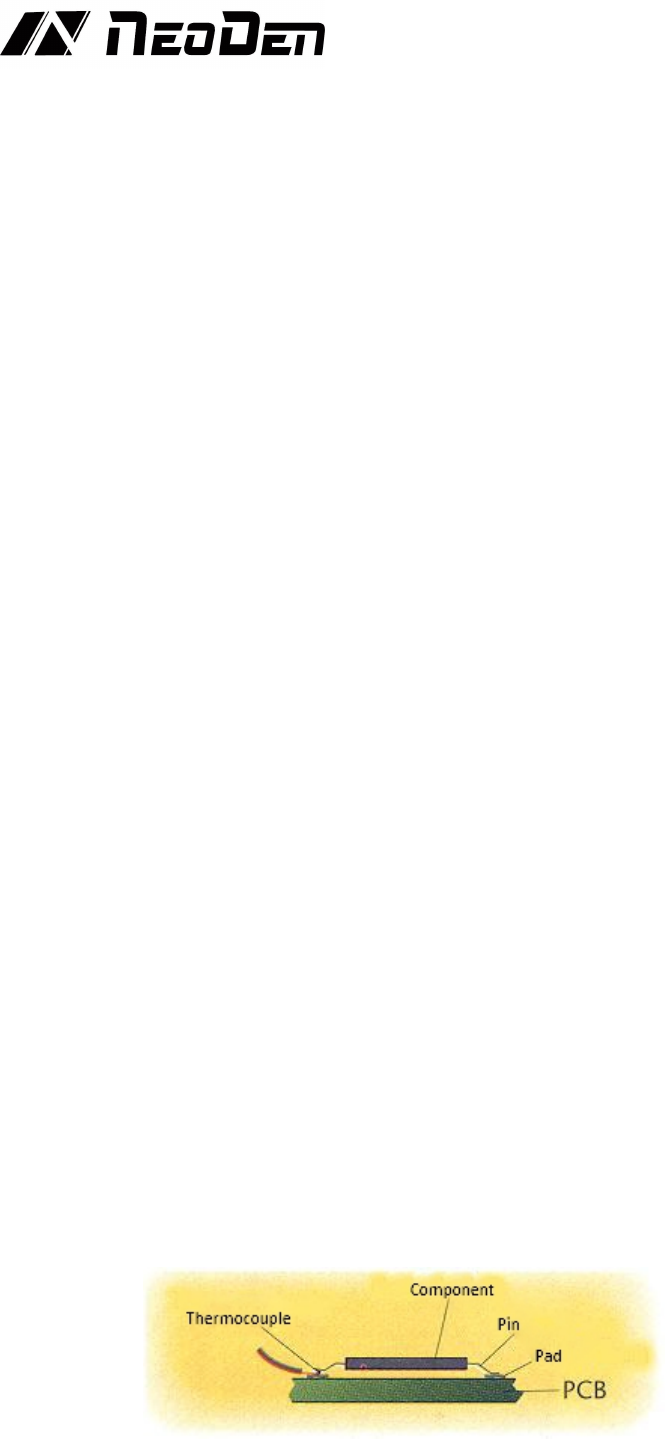
The attachment position should also be selected. It is usually best to attach the thermocouple tip
between the PCB pad and the corresponding component pin or metal end.
(Figure 1. Attach thermocouple tip between PCB pad and corresponding component pin or
metal end)