00197726-12_VB_SE3.11_DE_EN.pdf - 第23页
SIPLACE Explorer from 3. 11 (R 20 -2) Ausgabe 11/20 20 Edition 23 of 44 6 SIPLACE Error Reporting SIPLACE Explorer provides SIPLA CE Error Reporting, which can be us ed to record production line errors which occur in SIP…
SIPLACE Explorer from 3.11 (R20-2) Ausgabe 11/2020 Edition
22 of 44
5 Installation
For detailed information about the installation and configuration process, refer to the document "SIPLACE
Explorer Installation and Configuration Manual". This includes a description of the installation process via
the install shield wizard and details of manual configurations to be performed.
SIPLACE Explorer from 3.11 (R20-2) Ausgabe 11/2020 Edition
23 of 44
6 SIPLACE Error Reporting
SIPLACE Explorer provides SIPLACE Error Reporting, which can be used to record production line errors
which occur in SIPLACE Explorer and Tomcat. The files recorded can then be sent for error analysis to
service department.
The following files are compiled by SIPLACE Error Reporting.
● OIS/SIS database configuration information, such as database version number, line and station
names.
● Information about the production lines configured in SIPLACE Explorer.
● Log files from SIPLACE Explorer
● Log files from Tomcat
● OIS/SIS databases
● SIPLACE Explorer line databases
● SIPLACE Explorer factory databases
● Log Files
6.1 SIPLACE Explorer Log Files
The following SIPLACE Explorer log files are recorded:
● config\version.cfg
● config\lines.xml
● Lines\Line1\SMA.gms
● Automatic Production Reporting Application.log
● FactoryConfigurationUtility.log
● logs\dev.log
● logs\dev_error.log
● logs\dev_process.log
● logs\FactoryConfigurationUtility.log
● logs\manager.log
● logs\runtime.log
● logs\runtime_error.log
● logs\runtime_process.log
● logs\ErrorReporting.log
SIPLACE Explorer from 3.11 (R20-2) Ausgabe 11/2020 Edition
24 of 44
6.2 Tomcat Log Files
All files with the ending “log” will be recorded, provided their time stamp is not older than one month and
their size is < 50 MB.
6.3 How to Start SIPLACE Error Reporting
► Start the SIPLACE Error Reporting from the Windows Start menu:
Start → Programs → SIPLACE Error Reporter.
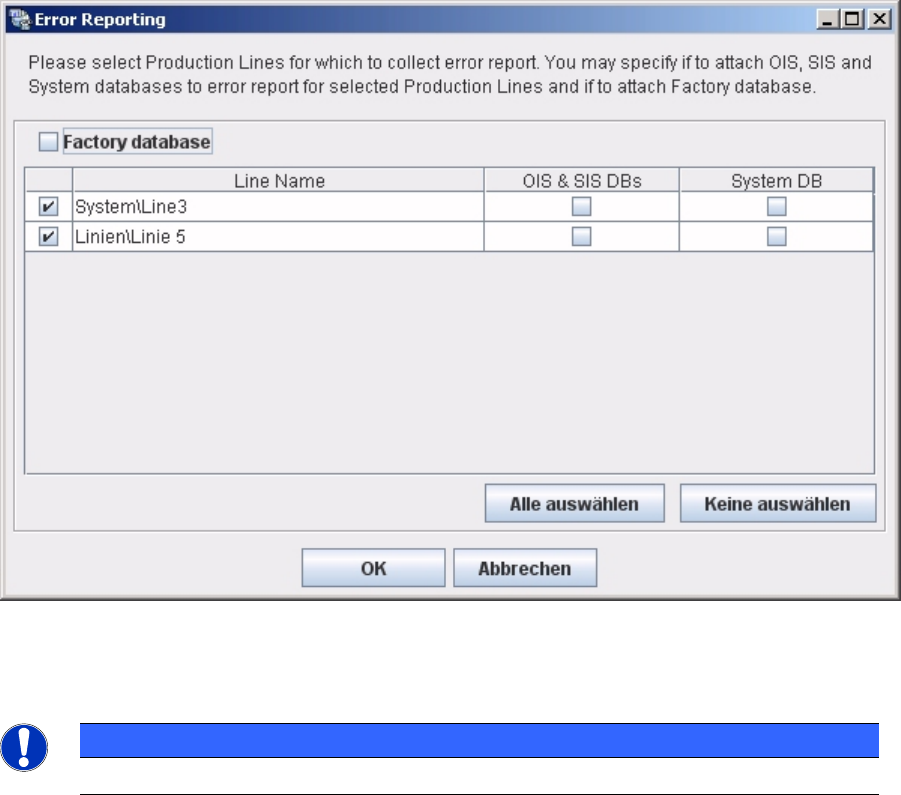
► SIPLACE Error Reporting will open:
► Select the production lines and databases for which you need error information.
NOTICE
Only select those production lines at which errors have occurred.
► Check your selection and confirm with OK. For further details of SIPLACE Error Reporting, please
use the Navigation Guide button of the Support Media Launcher to navigate through the
documentation.