00197726-12_VB_SE3.11_DE_EN.pdf - 第24页
SIPLACE Explorer from 3. 11 (R 20 -2) Ausgabe 11/20 20 Edition 24 of 44 6.2 Tomcat Log Files All files with the ending “lo g” will be recorded, provided their time stamp is not ol der than one month and their size is <…
SIPLACE Explorer from 3.11 (R20-2) Ausgabe 11/2020 Edition
23 of 44
6 SIPLACE Error Reporting
SIPLACE Explorer provides SIPLACE Error Reporting, which can be used to record production line errors
which occur in SIPLACE Explorer and Tomcat. The files recorded can then be sent for error analysis to
service department.
The following files are compiled by SIPLACE Error Reporting.
● OIS/SIS database configuration information, such as database version number, line and station
names.
● Information about the production lines configured in SIPLACE Explorer.
● Log files from SIPLACE Explorer
● Log files from Tomcat
● OIS/SIS databases
● SIPLACE Explorer line databases
● SIPLACE Explorer factory databases
● Log Files
6.1 SIPLACE Explorer Log Files
The following SIPLACE Explorer log files are recorded:
● config\version.cfg
● config\lines.xml
● Lines\Line1\SMA.gms
● Automatic Production Reporting Application.log
● FactoryConfigurationUtility.log
● logs\dev.log
● logs\dev_error.log
● logs\dev_process.log
● logs\FactoryConfigurationUtility.log
● logs\manager.log
● logs\runtime.log
● logs\runtime_error.log
● logs\runtime_process.log
● logs\ErrorReporting.log
SIPLACE Explorer from 3.11 (R20-2) Ausgabe 11/2020 Edition
24 of 44
6.2 Tomcat Log Files
All files with the ending “log” will be recorded, provided their time stamp is not older than one month and
their size is < 50 MB.
6.3 How to Start SIPLACE Error Reporting
► Start the SIPLACE Error Reporting from the Windows Start menu:
Start → Programs → SIPLACE Error Reporter.
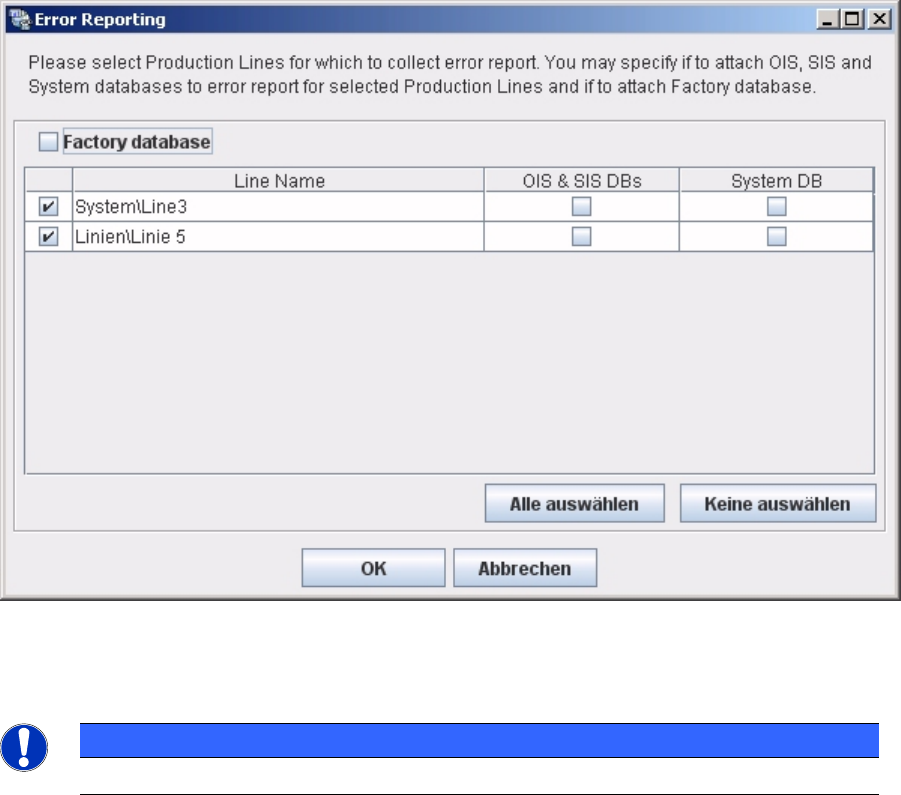
► SIPLACE Error Reporting will open:
► Select the production lines and databases for which you need error information.
NOTICE
Only select those production lines at which errors have occurred.
► Check your selection and confirm with OK. For further details of SIPLACE Error Reporting, please
use the Navigation Guide button of the Support Media Launcher to navigate through the
documentation.

SIPLACE Explorer ab 3.11 (R20-2) Ausgabe 11/2020 Edition
25 of 44
1 Einleitung
In diesem Dokument wird SIPLACE Explorer 3.11 beschrieben.
Diese Anleitung richtet sich an Personen, die SIPLACE Explorer aufbauen, installieren und
betreiben.
In dieser Anleitung finden Sie folgende Informationen:
● "Einleitung" auf Seite 25
● "Lieferumfang" auf Seite 28
● "Systemkomponenten und -Konfigurationen" auf Seite 30
● "Systemanforderungen" auf Seite 33
● "Installation" auf Seite 41
● "SIPLACE Error Reporting" auf Seite 42
HINWEIS
Allgemeiner Hinweis zur datenschutzkonformen Verwendung unserer Produkte
Bitte beachten Sie, dass Sie oder Ihr Unternehmen bei einer Nutzung unserer Produkte
datenschutzrechtliche Pflichten treffen können. Im Anwendungsbereich der EU-
Datenschutzgrundverordnung (DSGVO) können dies insbesondere Informationspflichten
nach Art. 12 ff. DSGVO sein. Es kommen aber auch Auskunfts- (Art. 15 DSGVO),
Berichtigungs- (Art. 16 DSGVO), Lösch- (Art. 17 DSGVO), Sperr- (Art. 18 DSGVO),
Datenportabilitäts- (Art. 20 DSGVO) sowie weitere Pflichten in Betracht. Erkundigen Sie
sich daher bitte vor dem Einsatz unserer Produkte, ob und welche
datenschutzrechtlichen Pflichten Sie oder Ihr Unternehmen insoweit treffen und ob sich
diese mit unserem jeweiligen Produkt umsetzen lassen. Denn die datenschutzrechtliche
Verantwortung liegt insoweit allein bei Ihnen bzw. Ihrem Unternehmen.
1.1 Was ist SIPLACE Explorer?
Über SIPLACE Explorer können Sie schnell und einfach Ihre Echtzeit-Daten und Ihre historischen
Daten in das World Wide Web bringen und vieles mehr. SIPLACE Explorer ist ein komponenten-
basiertes Softwareprodukt nach dem neuesten Stand der Technik für den Zugriff auf
Betriebsautomatisierungs-daten in der Halbleiter-, Leiterplatten- und SMD-Industrie.
Durch die OIS- und SIS-Unterstützung bietet SIPLACE Explorer den einfachsten Weg,
Echtzeitdaten und historische Daten aus einer Fertigungslinie in einer Datenbank und direkt im
Web bereitzustellen.
SIPLACE Explorer ist eine integrierte, visuelle Umgebung, die den ganzen Lebenszyklus von
schnell aufbauenden Echtzeit- und webbasierten Informationssystemen unterstützt.
SIPLACE Explorer bietet Ihnen viele Merkmale, die Ihnen die Arbeit mit Daten aus Ihrer
Fertigungslinie vereinfachen.