00197726-12_VB_SE3.11_DE_EN.pdf - 第32页
SIPLACE Explorer ab 3. 11 (R 20 -2) Ausgabe 11/20 20 Edition 32 of 44 Je nachdem welche Install ationsoption Sie ausgewählt haben, besteht das Software-Paket des SIPLACE Explorer Server s aus verschiedenen Komponenten un…
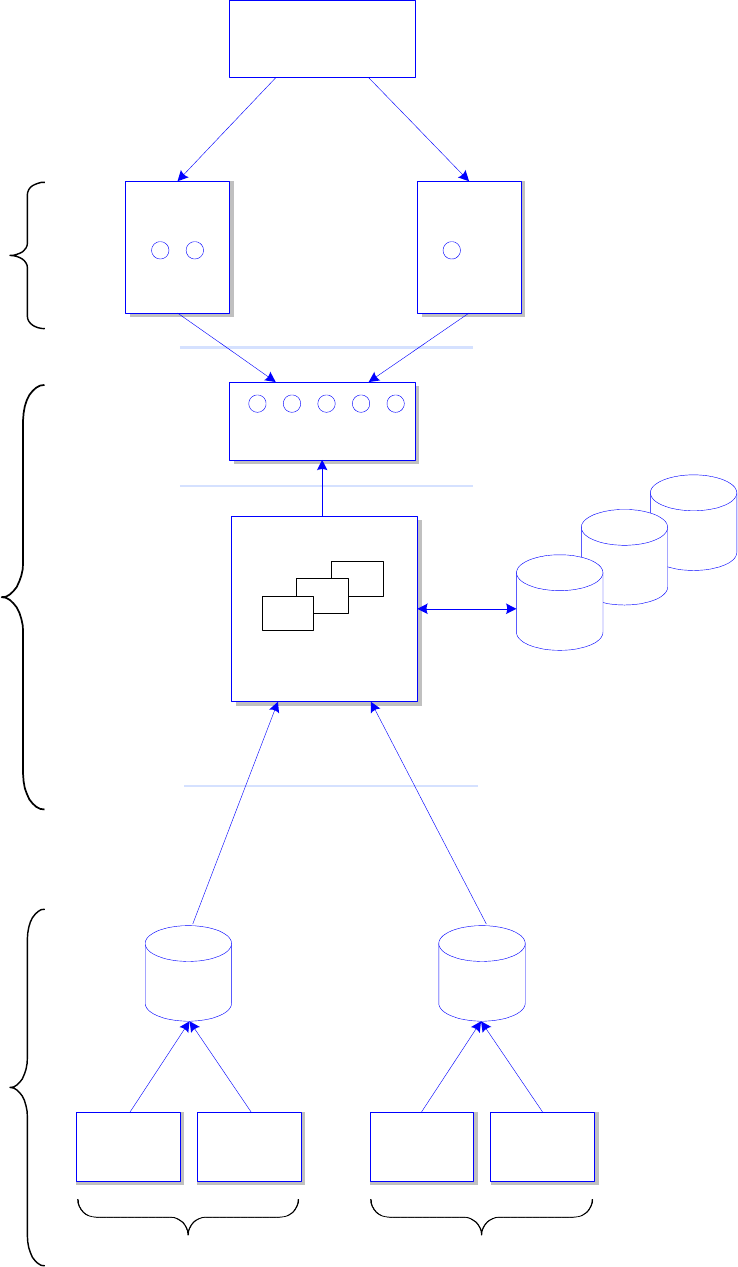
SIPLACE Explorer ab 3.11 (R20-2) Ausgabe 11/2020 Edition
31 of 44
System
DB
System
DB
Web
Browser
applets
SMA / Line 1
...
Web
Browser
applets
SMA / Line 5
servlets, JSP
Tomcat Web Server
SIPLACE Explorer Host
SIPLACE Explorer
Applications 1.. 5
Web Clients
Software
Architecture
One or several NT Servers
SIPLACE
Station 1
SIPLACE
Station N
SIPLACE
Station 1
SIPLACE
Station N
Production Line 1 Production Line 5
...
OIS/SIS
DB
OIS/SIS
DB
...
SIPLACE OIS / SIS
compliant machines
Line 1 ... 5
System
DB
Factory Website
"Single Entry Point"
SIPLACE Explorer ab 3.11 (R20-2) Ausgabe 11/2020 Edition
32 of 44
Je nachdem welche Installationsoption Sie ausgewählt haben, besteht das Software-Paket des
SIPLACE Explorer Servers aus verschiedenen Komponenten und Stand-alone Tools.
● Runtime Environment:
● Archiv-Browser-Utility
● Konsole
● Linien-Konfiguration
● Performance-Analyser
● SE Manager
● Dokumentation
● Standard Monitoring Application (Überwachungs-Anwendung)
● Werks-Konfigurations-Utility
● Development Environment:
● DB-Wartungs-Utility
● Mail-Konfigurations-Utility
● Template Builder
● SE Developer Studio:
● Linien-Konfigurations-Editor
● Betriebsmittel-Editor
● System-Datenbank
● Anwendungslogik
● Bean Factory
● Benutzermanager
● Website Builder
● Ereigniswiedergabe
● Standard Monitoring Application (Überwachungs-Anwendung)
SIPLACE Explorer ab 3.11 (R20-2) Ausgabe 11/2020 Edition
33 of 44
4 Systemanforderungen
Die dem Installations-Paket beiliegende Support-Media prüft die notwendigen
Systemvoraussetzungen ihres Systems und installiert diese. Dazu gehören z.B. Microsoft .NET
Framework, der Lizenzmanager und die Fehlerberichterstattung.
Der Einsatz der Support Media 2.12 (R20-2) ist verpflichtend.
Die Systemvoraussetzungen (unterstützte Betriebssystem- und Datenbankvarianten) sowie eine
Übersicht der zueinander kompatiblen Produkte sind in der Versionsbeschreibung der ASM
Support Media zu finden.
4.1 Installations-Varianten
In SIPLACE Explorer gibt es drei verschiedene Installations-Varianten für die unterschiedlichen
Komponenten:
● Factory Layout Central Installation (CI)
● Factory Layout Distributed Installation (DI)
● Single-Line-Layout
Diese Installations-Varianten gelten als Empfehlungen. Wählen Sie eine dieser Installations-
Varianten für Ihre Installation aus. Die vollständige Installations- und Konfigurationsanleitung finden
sie in dem Dokument "SIPLACE Explorer Installations- und Konfigurationsanleitung".
4.2 SIPLACE Explorer Server
Die nachfolgend beschriebenen Systemanforderungen gelten für die Installations-Varianten
Factory Layout Central Installation (CI) und Factory Layout Distributed Installation (DI).
● Java SE Runtime Environment 8u202
auf der Support Media enthalten
● Java jTDS JDBC Treiber, Version 1.3.1
auf der Support Media enthalten
● Apache Tomcat 8.5.57 Web-Server
auf der Support Media enthalten
● Visual C++ Runtime 2019
auf der Support Media enthalten
● .NET runtime 4.8
auf der Support Media enthalten
● MS Excel Viewer, vom Microsoft-Portal
● MS Internet Explorer, eine der nachfolgenden Versionen:
MS Internet Explorer 9.0
MS Internet Explorer 10.0
MS Internet Explorer 11.0
MS Internet Explorer 11.0 (in Verbindung mit Windows 10, Microsoft Edge Browser wird nicht
unterstützt)
● Acrobat Reader 10.1
auf der Support Media enthalten