00197702-04_VD_SIPLACE-OIB-4.3_EN.pdf - 第20页
Version Descript ion SIPLAC E OIB 4 . 3 05/201 6 E dition 20 6.2 Setup Center A dapt er i s rea ding out the Conf igur ation Ma nager f or it s factory location it is assigned to All Setu p Center e vents contai n a prop…
Version Description
SIPLACE OIB 4.3 05/2016 Edition
19
6 Functions in SIPLACE OIB Setup Center Adapter
6.1 Connection check event in SIPLACE Setup Center Proxy
Since version 3.0 SIPLACE OIB adds support for an event in the Setup Center smart proxy component.
The SIPLACE Setup Center class has a new event implemented that clients can subscribe for:
/// <summary>
/// Occurs when the proxy detects a connection state change.
/// </summary>
public event ConnectionStateChangedEvent ConnectionStateChanged;
/// <summary>
/// This event is fired whenever a connection state change is detected
/// </summary>
/// <param name="args">The <see cref="ConnectionStateDetails"/> instance containing the
event data.</param>
public delegate void ConnectionStateChangedEvent(ConnectionStateDetails args);
The event will contain information about when the connection state change was detected (in UTC time)
and what change was detected.
Changes monitored are:
• Connection state SC proxy -> Setup Center Adapter
• Connection state SC proxy -> OIB Core
• Connection state Setup Center Adapter -> Setup Center Application / Server
• Connection state Setup Center Adapter -> OIB Core
The Proxy will check periodically for state changes. This period can be configured programmatically by a
new static property in the SIPLACESetup Center class:
/// <summary>
/// Gets or sets the check alive frequency in ms.
/// This value must be greater or equal to 1 second (1000) and less or equal to 1 hour
(3600000).
/// Default value is 60000 (1 minute)
/// Can also be set in the application configuration file appSettings like so, value is in
milliseconds:
/// <add key="Asm.As.Oib.SetupCenter.Proxy.CheckConnectionStateFrequency" value="60000" />
/// </summary>
/// <value>The check alive frequency in ms.</value>
public static int CheckConnectionStateFrequency
Alternatively it can be configured in the application configuration file:
<?xml version="1.0" encoding="utf-8"?>
<configuration>
<appSettings>
<add key="Asm.As.Oib.SetupCenter.Proxy.CheckConnectionStateFrequency" value="10000" />
</appSettings>
</configuration>
Version Description
SIPLACE OIB 4.3 05/2016 Edition
20
6.2 Setup Center Adapter is reading out the Configuration Manager for its
factory location it is assigned to
All Setup Center events contain a property called “FactoryLocation” which in previous versions was filled
by what is configured in the application configuration file:
<siplaceSetupCenter factoryLocation="TEST.TEST.TEST" setupCenterSCIPortOut="8001" …>
</siplaceSetupCenter>
Beginning with SIPLACE OIB 3.3 SP 1 this property is filled with the name of the factory location element
that the Setup Center Adapter is configured to in the SIPLACE Factory Explorer application.
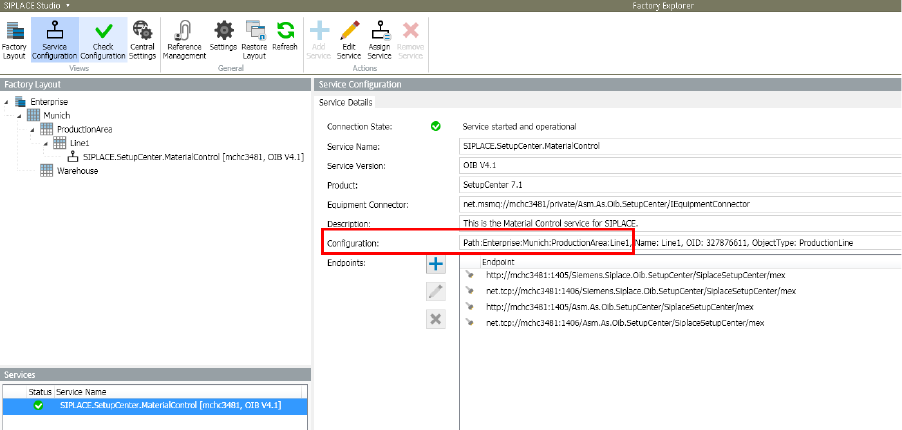
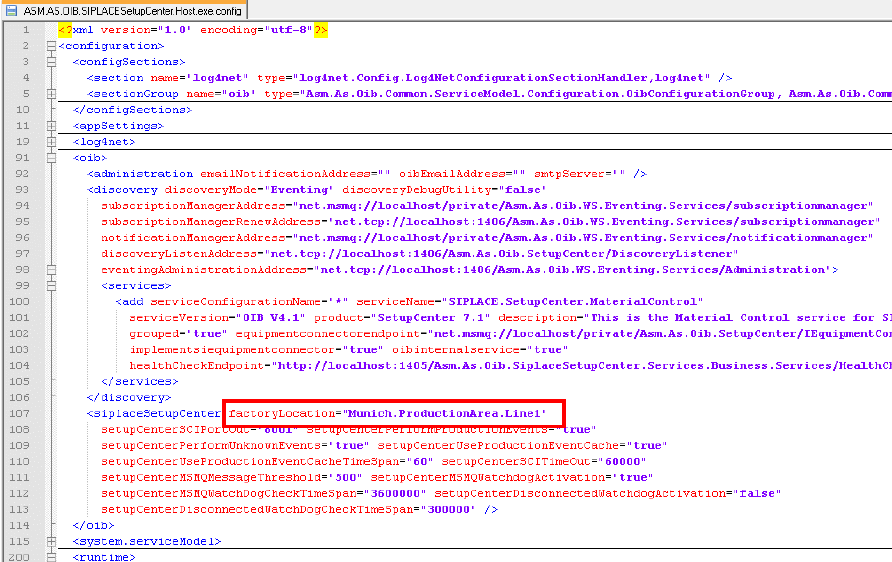
The following images show the Setup Center Adapter being configured to Line1 with Path
"Enterprise:Munich:ProductionArea:Line1". The FactoryLocation property in the Setup Center Adapter
configuration file will be filled automatically with "Munich.ProductionArea.Line1".
The naming scheme for the FactoryLocation property is as following: „Site.Area.StorageZone.StorageUnit“
Version Description
SIPLACE OIB 4.3 05/2016 Edition
21