00197702-04_VD_SIPLACE-OIB-4.3_EN.pdf - 第34页
Version Descript ion SIPLAC E OIB 4 . 3 05/201 6 E dition 34 The f ile will be re ad . I f r eading was succ essf ul, you can update t he Fact or y La yout data. → Select the “ Update F actor y Layout” b utto n to updat …
Version Description
SIPLACE OIB 4.3 05/2016 Edition
33
→
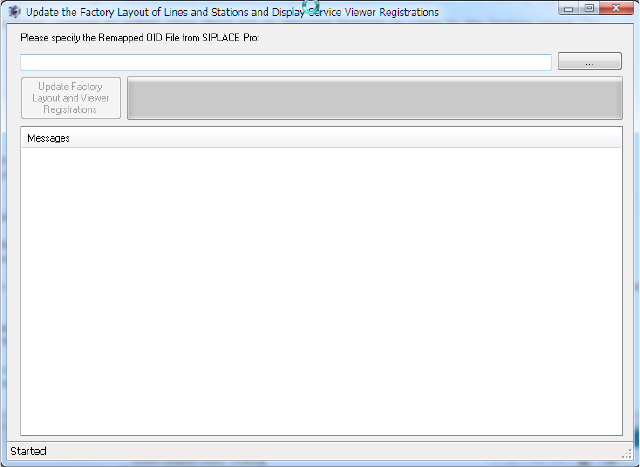
Select the browse button and select the file in the file selection dialog. You will find the file under the
location where the SIPLACE Pro re-indexing procedure has stored it.
Version Description
SIPLACE OIB 4.3 05/2016 Edition
34
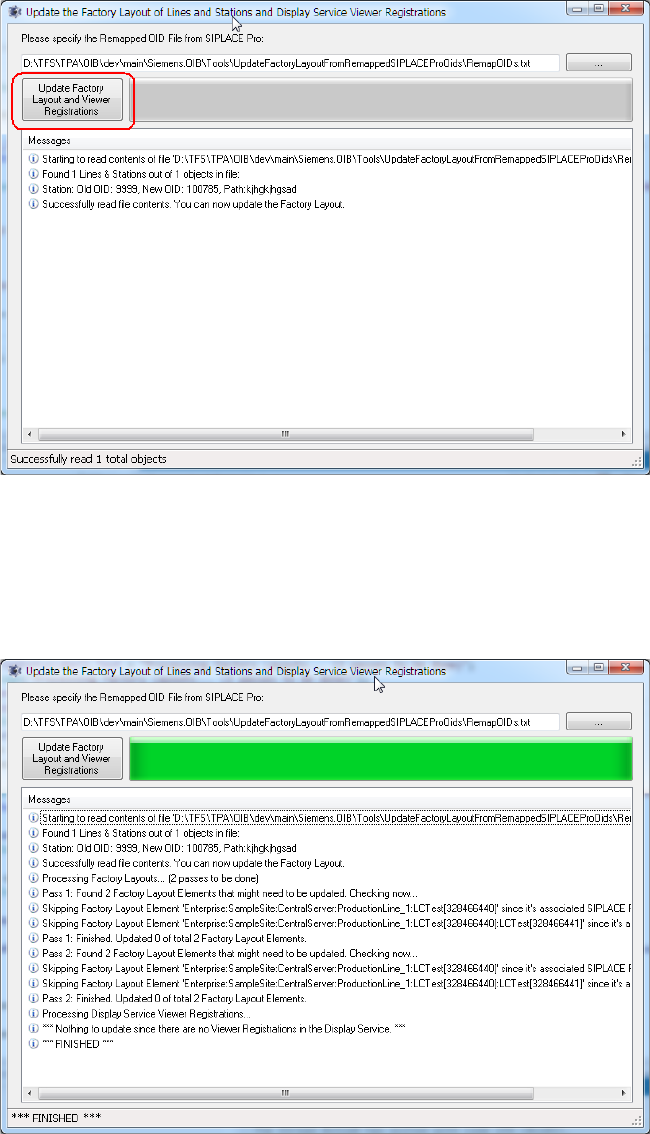
The file will be read. If reading was successful, you can update the Factory Layout data.
→
Select the “Update Factory Layout” button to update the data in the SIPLACE OIB Configuration
Manager and Display Service Viewer Registrations. The tool will provide feedback which data has
been updated.
Version Description
SIPLACE OIB 4.3 05/2016 Edition
35
13.3 SIPLACE OIB Installation cannot be uninstalled
In some rare case the SIPLACE OIB installation cannot be uninstalled. This results in a blocked
deployment situation.
Background
Microsoft reports some issues with the installer technology SIPLACE OIB Installer is using.
CAUTION
The issue has been reported in the Microsoft FixIt Solution Center under:
http://support.microsoft.com/fixit/
Perform the FixIt Solution
→
Open the webpage under the following link from the Microsoft FixIt Solution Center under
http://support.microsoft.com/fixit/
→
Follow the instructions to install the FixIt solution and try to uninstall the SIPLACE OIB installation.