00197702-04_VD_SIPLACE-OIB-4.3_EN.pdf - 第21页
Version Descript ion SIPLAC E OIB 4 . 3 05/201 6 E dition 21
Version Description
SIPLACE OIB 4.3 05/2016 Edition
20
6.2 Setup Center Adapter is reading out the Configuration Manager for its
factory location it is assigned to
All Setup Center events contain a property called “FactoryLocation” which in previous versions was filled
by what is configured in the application configuration file:
<siplaceSetupCenter factoryLocation="TEST.TEST.TEST" setupCenterSCIPortOut="8001" …>
</siplaceSetupCenter>
Beginning with SIPLACE OIB 3.3 SP 1 this property is filled with the name of the factory location element
that the Setup Center Adapter is configured to in the SIPLACE Factory Explorer application.
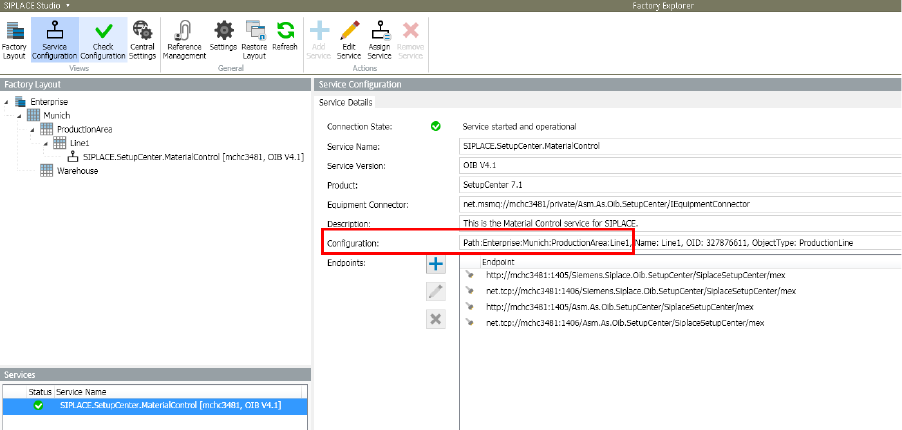
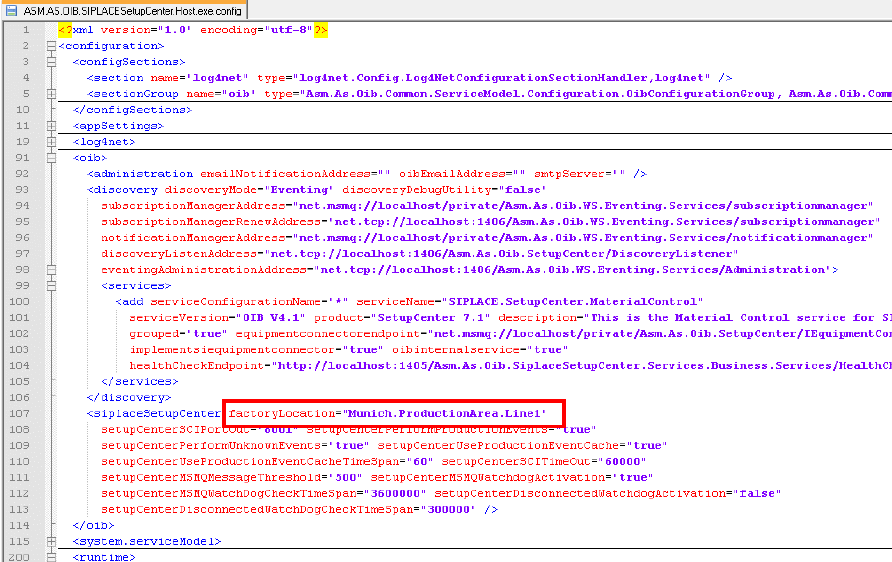
The following images show the Setup Center Adapter being configured to Line1 with Path
"Enterprise:Munich:ProductionArea:Line1". The FactoryLocation property in the Setup Center Adapter
configuration file will be filled automatically with "Munich.ProductionArea.Line1".
The naming scheme for the FactoryLocation property is as following: „Site.Area.StorageZone.StorageUnit“
Version Description
SIPLACE OIB 4.3 05/2016 Edition
21

Version Description
SIPLACE OIB 4.3 05/2016 Edition
22
6.3 Caching of the PackagingUnitQuantityChanged Events for Production
General
The SIPLACE machines are sending for every board released a PackagingUnitQuantityChanged event.
This generates a lot of traffic in the network and the central OIB WS-Eventing. The Setup Center Adapter
implements a caching mechanism of the PackagingUnitQuantityChanged events with the Action = 3 and
StationQuantityChangeReason=2. These events will be cached and the QuantityCorrection will be
accumulated until a send trigger is initiated. Triggers are
• Any other PackagingUnitQuantityChanged event
• Any action effecting the cached component location. For example, if a feeder is removed, all
cached events correlated to that feeder location will be sent.
• Setup changes
• Restart of the Setup Center adapter itself
•
Configurable amount of time, until the first occurrence from an event on one component location.
Default is 60 minutes.
• Splice Chain Split of a Packaging Unit
Configuration
By default the installation is configured to cache these events.
It can be adjusted in the OIB section under configuration->OIB in the config files in the installation
directory.
<oib>
…
<siplaceSetupCenter
factoryLocation="TEST.TEST.TEST"
setupCenterSCIPortOut="8001"
setupCenterPerformProductionEvents="true"
setupCenterPerformUnknownEvents="true"
setupCenterUseProductionEventCache="true"
setupCenterUseProductionEventCacheTimeSpan="60">
</siplaceSetupCenter>
</oib>
Changing the value from setupCenterUseProductionEventCache to false will disable the caching functions.
Changing the value setupCenterUseProductionEventCacheTimeSpan will change the time in minutes.