SOM-1623-002.pdf - 第6页
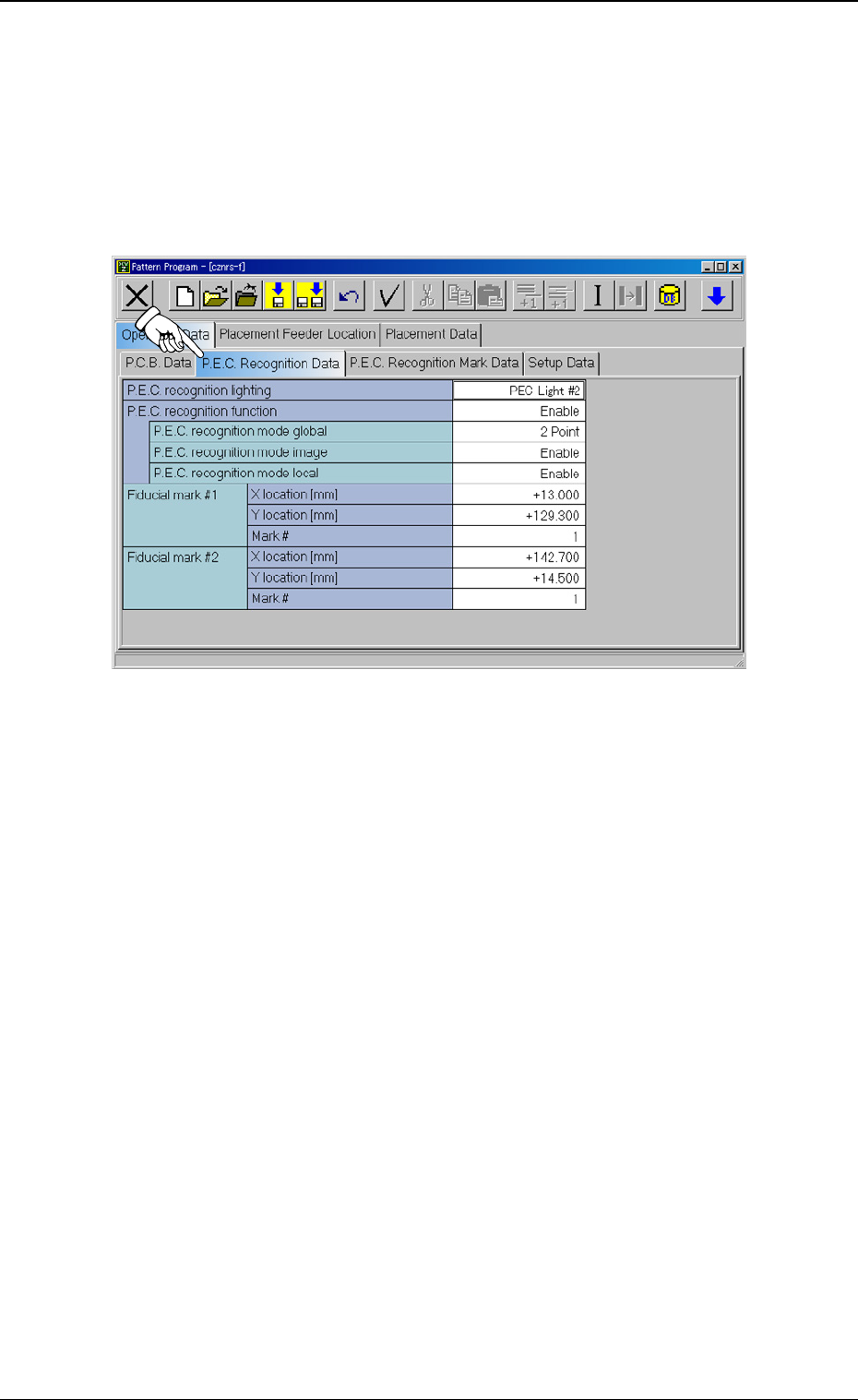
Tg0594-PM-SO 3. Data Setting 0402-002 4 3. Data Setting 3.1 Operation Data (1) When the [P .C.B. Recognition Data] tab is pressed at the “Opera- tion Data” tab sheet, the following tab sheet appears. Fig. 1 (2) Set “PEC …

Tg0594-PM-SO
0402-002 3
1. Scope
By using a black light for P.E.C. recognition, the recognition rate of a
fiducial mark (copper leaf/silver palladium) on a ceramic P.C.B. can be
improved.
2. Specification
2.1 Specifications of P.C.B.
(1) Applicable P.C.B.
Ceramic P.C.B.
2.2 Specifications of Fiducial Marks
(1) Shape and Size
Round/Square (excluding the hollowed ones)
Dimension: 0.5 to 2.0 mm
(2) Material
Copper Leaf
Silver Palladium
(a) When fiducial marks other than the specified ones must
be used, consult our marketing department or sales
agency for the shape, the size, and the material.
(b) A fiducial mark should make ample contrast with the
surroundings.
(c) A test may be required when the fiducial mark cannot be
recognized because of the extreme warpage of the
P.C.B.
(d) Anything like a pattern similar to a fiducial mark should
not exist in the designated window.
Also, the shape (a cutout, a punched hole) of the P.C.B.,
the light reflected from a structure, or the light from the
external elements may sometimes interfere with the
recognition. Consult our marketing department or sales
agency for details.
(e) Consult our marketing department or sales agency if you
require additional information on fiducial marks.
1. Scope
Note
Tg0594-PM-SO
3. Data Setting
0402-002 4
3. Data Setting
3.1 Operation Data
(1) When the [P.C.B. Recognition Data] tab is pressed at the “Opera-
tion Data” tab sheet, the following tab sheet appears.
Fig. 1
(2) Set “PEC Light #2” in the “P.C.B. recognition lighting” text box.
(3) The above setting turns on the black light when a P.C.B. is recog-
nized.
When it is set to “PEC Light #1”, the standard lamp is turned on.
Tg0594-PM-SO
3. Data Setting
0402-002 5
3.2 Camera Offset Data
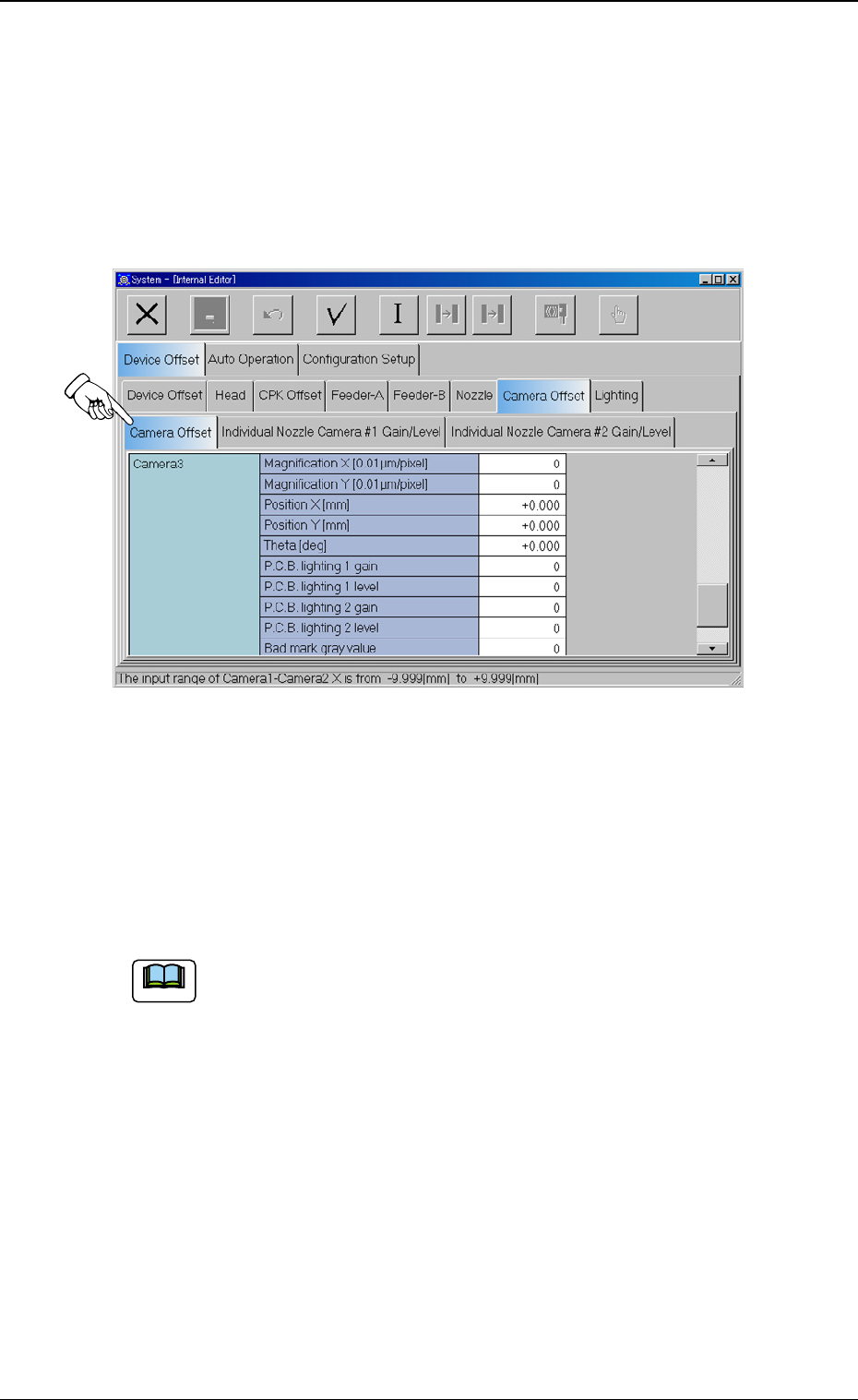
The gain and level data can be set for each of P.C.B. recognition
lighting modes (PEC Light #1/PEC Light #2).
(1) When the [Camera Offset] tab is pressed on the “Device Offset”
tab sheet, the following tab sheet appears.
Fig. 2
(2) Set the gain and level data for P.C.B. recognition lighting.
For “Camera 3”, the gain and level data items for standard light-
ing are “P.C.B lighting 1 gain” and “P.C.B. lighting 1 level”.
For “Camera 3”, the gain and level data items for the lighting for
ceramic are “P.C.B. lighting 2 gain” and “P.C.B. lighting 2 level”.
(a) When the gain value is decreased, the contrast becomes
larger.
(b) When the level value is decreased, the entire brightness
becomes higher.
Note