FUJI CP6 Bulk F3.0 Feeder手册.pdf.pdf - 第14页
Loading and Remo ving P ar ts Loading Pr ocedure • Use chips supplied in an EIAJ case. • Perform the following procedure to load parts from the EIAJ case into the bulk feeder’s hopper. (The numbers in the illustrations r…

Overview
1. Compatible Machine Types
All machines in the CP-6-series (modification to the machine is not necessary).
2. Supported Parts
LWT
1005C (in. 0402): 1.0 (±0.05) mm 0.5 (±0.05) mm 0.5 (±0.05) mm
1608C (in. 0603): 1.6 (±0.07) mm 0.8 (±0.07) mm 0.8 (±0.07) mm
Notes:
1. Refer to the maker’s specifications to ensure that the part dimensions are within the range
specified above.
2. Do not use taped parts that have been removed from their original taping.
3. Bulk Case Capacity
1005C (in. 0402): 50,000 parts
1608C (in. 0603): 15,000 parts
4. Cycle Time
0.09 seconds per part (consecutive placing possible)
5. Programming
As the part supply direction differs by 90 degrees from that of taped components, it is
necessary to change the “Direction” setting in the part data and the placement angle in
the sequence data section of the production program. However, if the polarity function is
enabled, the placement angle setting can be used without change. Refer to the relevant
host system manual for details regarding the polarity function.
6. Mounting Conditions
The conditions for mounting bulk feeders are the same as those that apply to W8mm
tape feeders. Bulk feeders can be used in combination with tape feeders.
Depending on the conditions at the machine, cables and brackets may interfere with the
bulk feeders. Check for potential interference when first mounting the feeders.
The CP-6 cannot recognize when bulk feeders have run out of parts. Operators should be
aware that the CP-6 will report a pickup error when the bulk feeder is empty.
7. Conditions of Usage
• Parts in the bulk feeder may be affected by friction wear due to vibrations and
shocks that occur when the device table moves. Since 1005C (in. 0402) chips will
withstand about 4,000,000 movements, 1608C (in. 0603) chips 1,500,000
movements of the device table, it is advisable to use up all loaded parts before this
limit is reached.
• When loading the bulk feeder with parts, remove any chips remaining in the
hopper before adding the new chips.
• Bulk feeders should always be removed from the machine when not being used.
• Make sure to use the proper types of bulk feeder for 1005C (in. 0402) and 1608C
(in. 0603) chips respectively. The feeders should not be disassembled by the users.
Overview
Version 3.0 1 CP-6 Bulk Feeder Instruction
Loading and Removing Parts
Loading Procedure
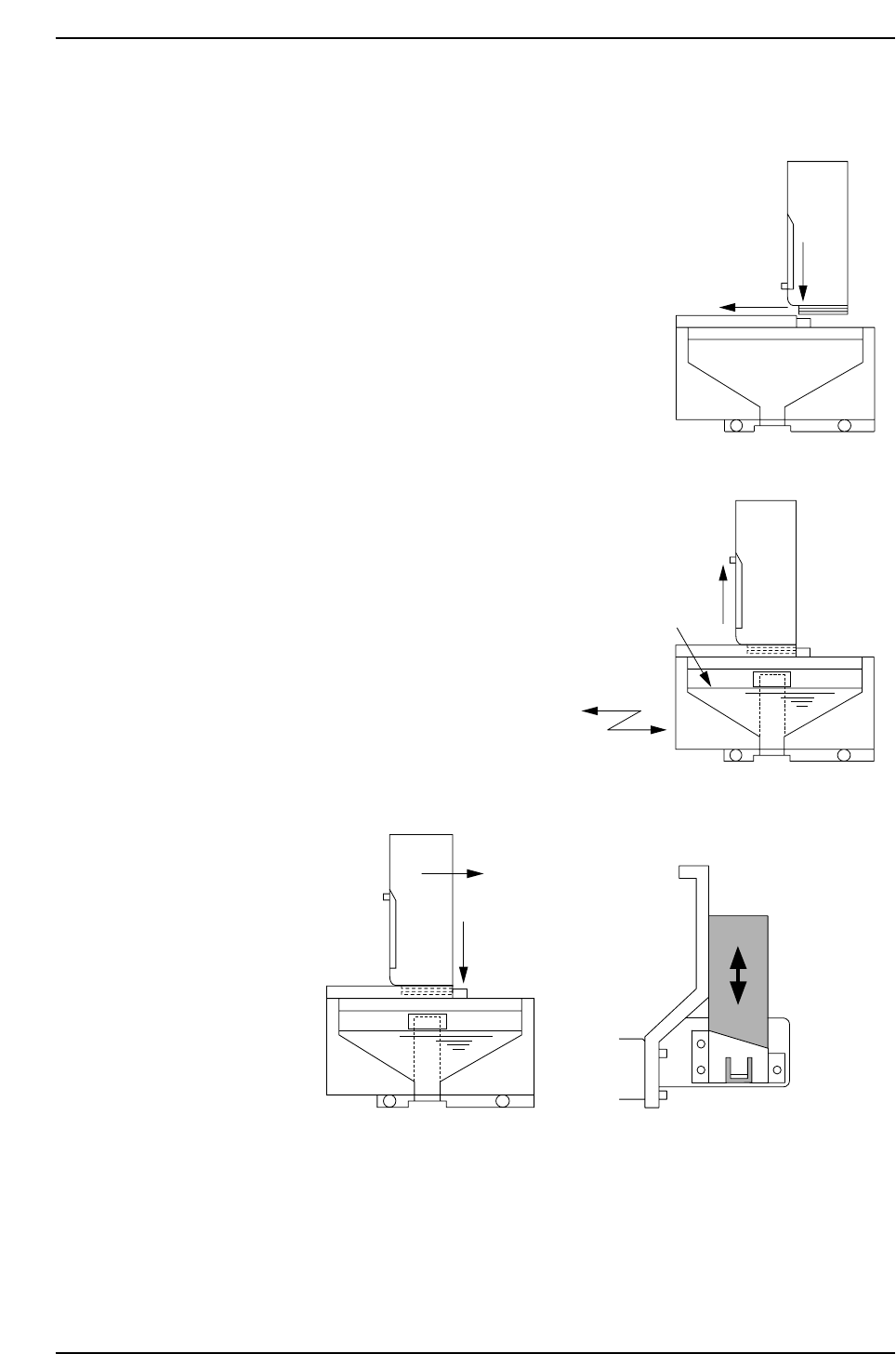
• Use chips supplied in an EIAJ case.
• Perform the following procedure to load
parts from the EIAJ case into the bulk
feeder’s hopper.
(The numbers in the illustrations refer to
steps in the procedure.)
1. Press the EIAJ case down on the stopper
(white button).
2. Slide the EIAJ case horizontally until the
stopper clicks up, locking the case into
position.
3. Raise the lever on the side of the EIAJ
case and allow all the chips to fall into the
hopper.
4. Gently shake the feeder from side to side
to distribute the chips evenly inside the
hopper.
5. Gently press
the stopper
down and let
the feeder
eject the EIAJ
case.
6. Insert the empty EIAJ case in the empty case holder at the rear of the bulk feeder,
to allow identification of the chips being used.
Note: Make sure that the EIAJ case is completely empty prior to insertion into the holder.
Loading and Removing Parts
Version 3.0 2 CP-6 Bulk Feeder Instruction
(2)
(1)
BF001
(4) Surface should be
roughly level.
(4) Shake from
side to side.
(3)
BF002
(5)
(5)
BF003
Insert in empty case holder
(6)
7. Manually operate the feed lever and make sure the chips are correctly aligned on
the belt.
8. Continue operating the feed lever until the first chip is at the pickup position.
Unloading Procedure
1. To return the parts in the bulk feeder’s hopper to the EIAJ case, reattach the empty
case and hold the feeder upside down until the hopper is empty of parts.
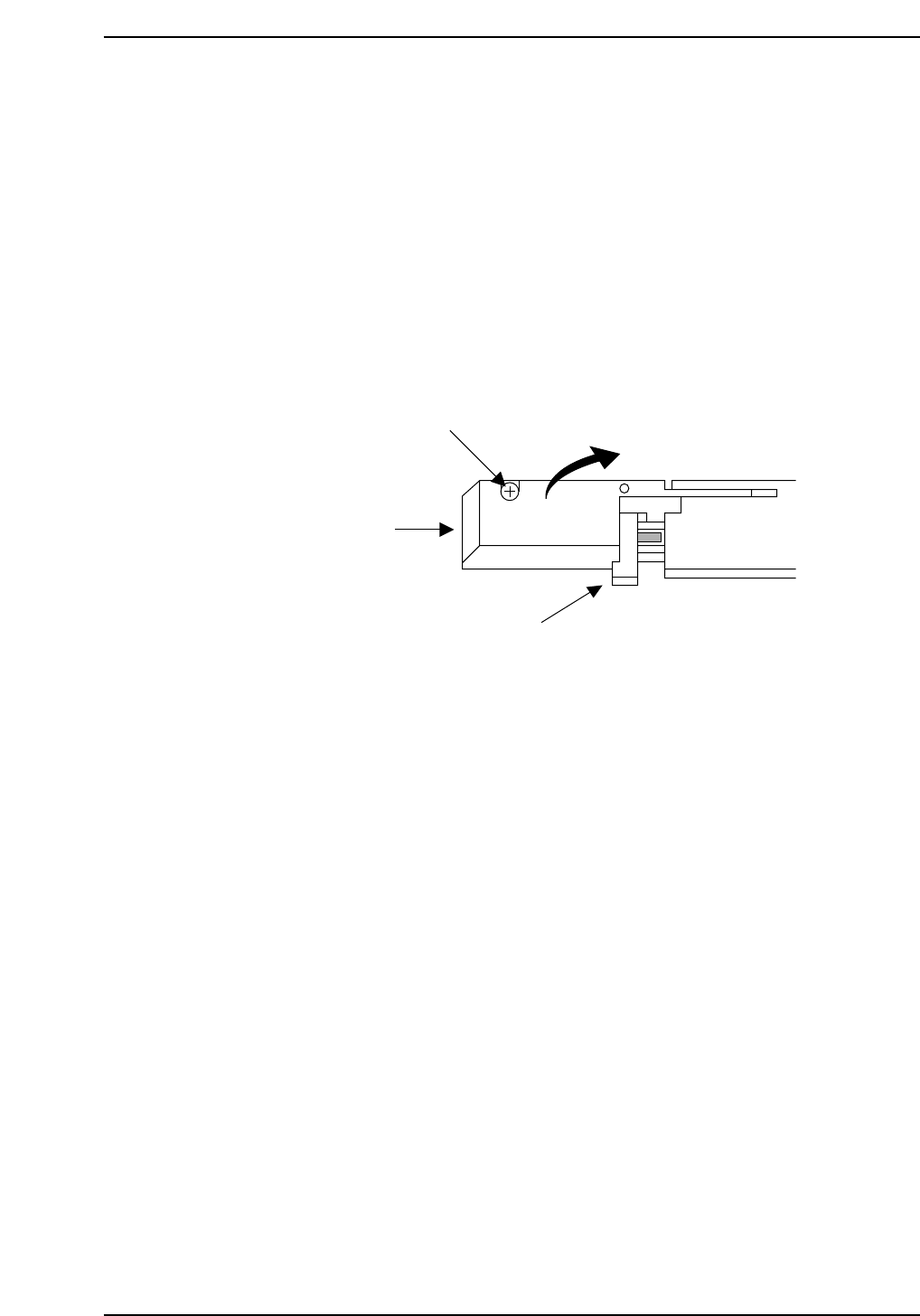
2. Remove the bolt that secures the pickup area cover on the front of the feeder, then
lift the cover open. If there is a chip attached to the magnetic lever, remove it.
3. Keeping the cover open, manually operate the feed lever and remove any parts
that are indexed forward on the belt.
4. When you are satisfied there are no more chips under the pickup area cover, close
the cover and secure it with the bolt. Be careful not to force the cover shut, or it
may be damaged.
Note: When replacing chips with parts made by a different manufacturer, make sure that all the
previous parts have been removed from the hopper, belt, and pickup area before supplying
new parts.
Lift open.
Cover
Cover bolt
Lever
BF004
Loading and Removing Parts
Version 3.0 3 CP-6 Bulk Feeder Instruction