TS580R-USER-GUIDE.pdf - 第6页
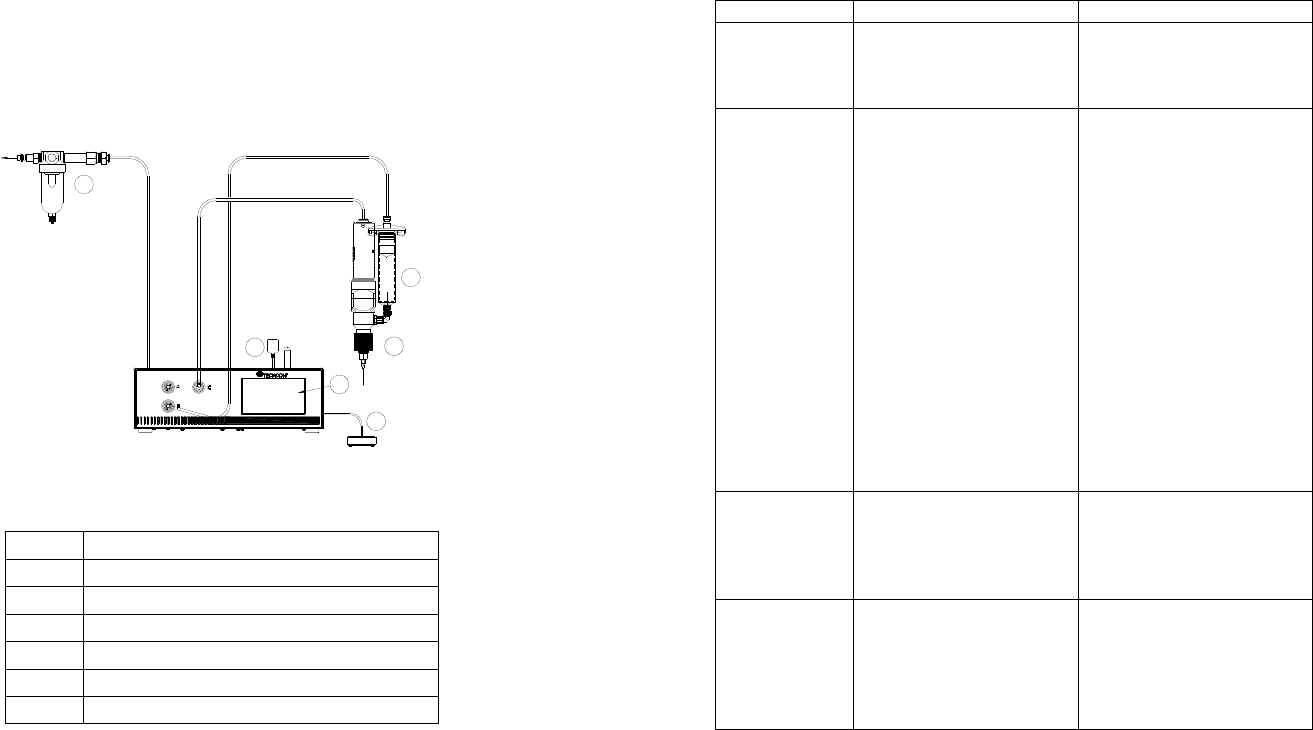
6 TS570R TO AIR SO URCE 1 5 2 6 4 3 5. TO CONTROL PC PUMP CAUTION: A 5-micron filter (TSD800-6) must be inst alled with the unit to ensure proper air filtration. Figure 2.0 5.1 Connecting the Unit: (Refer to Figure 1.0 a…
32
9. MAINTENANCE
The dispenser is designed and built to be relatively maintenance free. To assure
trouble free operation, please follow below steps:
1. Make certain air supply is clean and dry.
2. Avoid connecting the unit to excessive moisture or solvent saturation
3. Avoid connecting air supply exceeding 100 psi (6.9 bars)
4. Use only Amyl Alcohol to clean outside surface of the main housing
5. Use only soft cloth to clean the display screen
10. LIMITED WARRANTY
OK International warrants this product to the original purchaser for a period of 2
years from date of purchase to be free from material and workmanship defects
but not normal wear-and-tear, abuse and faulty installation. Defective product or
subassembly and components under warranty will be repaired or replaced (at OK
International's option) free of charge. Customer with defective product under
warranty must contact the nearest OK International office or distributor to secure
a return authorization prior to shipping the product to the assigned OK
International authorized service center. For nearest OK International office or
distributor contact information, please visit www.techconsystems.com. OK
International reserves the right to make engineering product changes without
notice.
All returns must be issued with a Returns Authorization number, prior to return.
Send warranty returns to:
Americas
OK International
10800 Valley View Street
Cypress, CA 90630
+1 714 230 2398
Europe
OK International
Eagle Close Chandler’s Ford Ind Est
Eastleigh, Hampshire
SO53 4NF
United Kingdom
+44 2380 489 100
Asia
Dover (Shenzhen) Industrial
Equipment Manufacturing Co., LTD.
4th Floor East, Electronic Building
Yanxiang Industrial Zone, High Tech Road
Guangmin New District
Shenzhen, P.R.C
+86 21 64952662
www.techconsystems.com
5
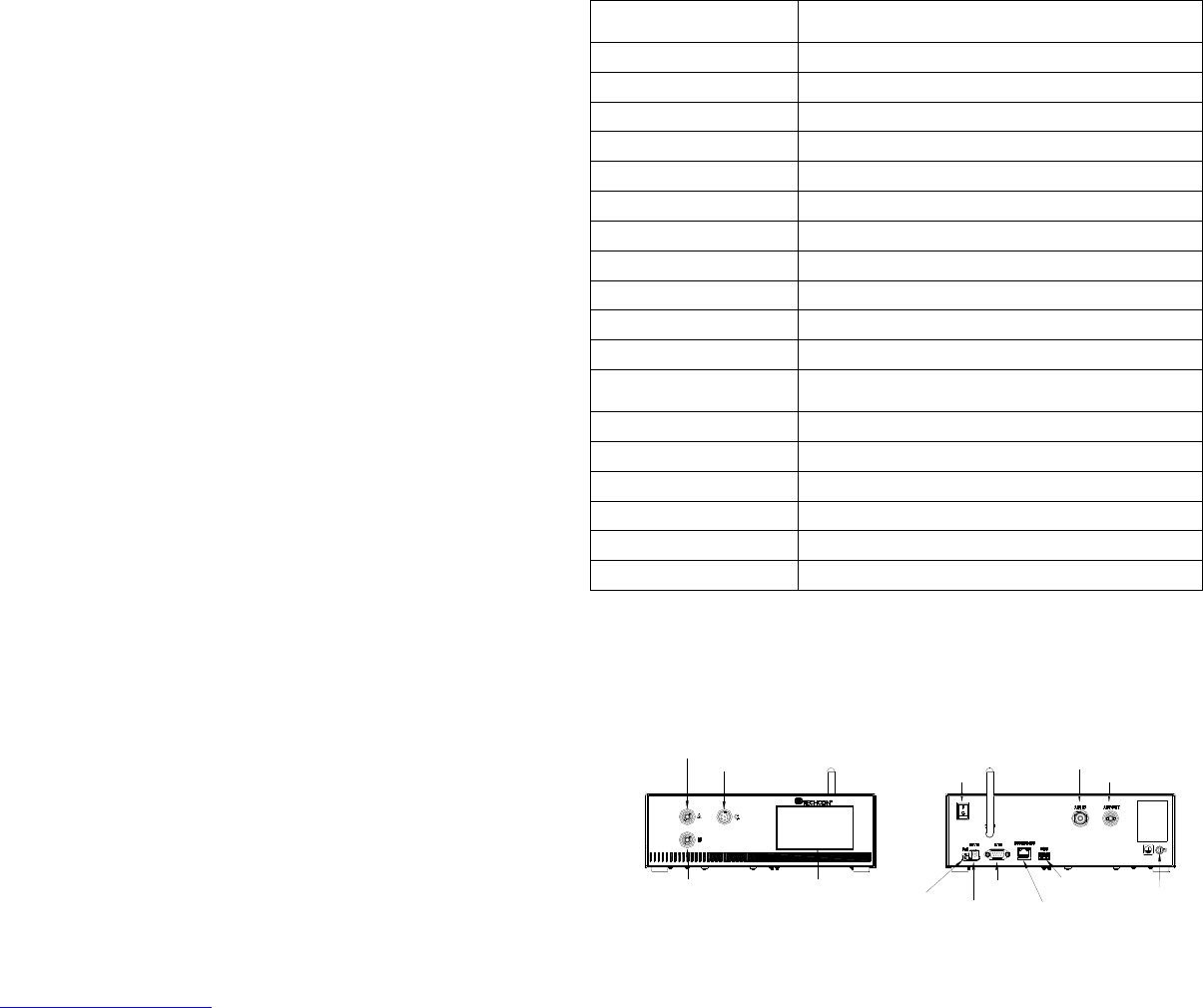
TOUCH
SCREEN
AIR OUTPUT B
AIR
OUTPUT A
WIFI ANTENNA
POWER
SWITCH
AIR INLET
AIR OUTLET
UNREGULATED
FOOT
SWITCH
PORT
POWER
INLET
IO PORT
INTERNET
PORT
USB PORT
GROUNDING
TS570R
MOTOR PORT
3. SPECIFICATIONS
4. FEATURES
Figure 1.0
Size
290mm x 212mm x 98mm
(11.4” X 8.3” X 3.9”)
Weight 3.1 kg (6.8lbs)
Input Voltage 24VDC
Output Voltage Range 0-24 VDC
Rated Power 15W
Air Input 100 psi (6.9 bars) Max.
Air Output 0-99.9 Psi (6.9 bar)
Pollution Degree II
Installation Category I
Indoor Use Altitude up to 2,000m (6,562ft)
Operating Temperature 0˚C to 50˚C (32˚F to 122˚F)
Storage Temperature -10˚C to 60˚C (14˚F to 140˚F)
Max. Relative Humidity
80% for temperature up to 31˚C (87.8˚F) Decreasing
linearl
y
to 50% relative humidit
y
at 40˚C
(
104˚F
)
Timer 0.008-99.99 seconds
Cycle Mode Timed, Interrupt, Teach, Purge
Timing Repeat Tolerance +/- 0.001%
Cycle Rate 900 cycles/min
Display Touch Screen, Resitive
Meets or exceed CE, TUV and NRTL
6
TS570R
TO AIR SOURCE
1
5
2
6
4
3
5.
TO CONTROL PC PUMP
CAUTION: A 5-micron filter (TSD800-6) must be installed with the unit to ensure proper
air filtration.
Figure 2.0
5.1 Connecting the Unit: (Refer to Figure 1.0 and 2.0)
1. Connect the power cord, foot switch to the back of the unit.
2. Connect Valve air hose to either Port A or Port B.
3. Press the Power switch to turn on the unit.
Items Description
1 Air Filter
2 Valve (not included)
3 Syringe of material (not included)
4 Display
5 Power Adapter
6 Foot Switch
31
8. TROUBLESHOOTING
PROBLEM POSSIBLE CAUSE CORRECTION
Display does
not light up
No power inputs
Check power cord
connections
Turn on power
System will not
actuate
Supplied pressure
dropped below “Low
Pressure” setting
Foot switch not plugged
in or improperly
plugged in
Defective foot switch
Broken wire or loose
connection inside unit
Defective solenoid
Defective PC board
The valve motor draws
over 400 mA
Increase supplied
pressure
Check foot switch
connection
Foot switch needs to be
repaired or replaced
Unplug power cord and
disconnect air supply.
Remove cover and check
for broken wires or loose
connections
Replace solenoid
Replace PC board
Check valve (see section
5.6)
System will not
pressurize
Insufficient air pressure
Air hoses not plugged
in
Re
g
ulator defective
Increase air supply
pressure
Check connection
Re
p
lace re
g
ulato
r
Inconsistent
dispense
Air bubbles in material
Dispense time is too
low
Needle clogged
Motor started to burn
out
De-air material
Increase dispense time
Replace needle
Re
p
lace moto
r
30
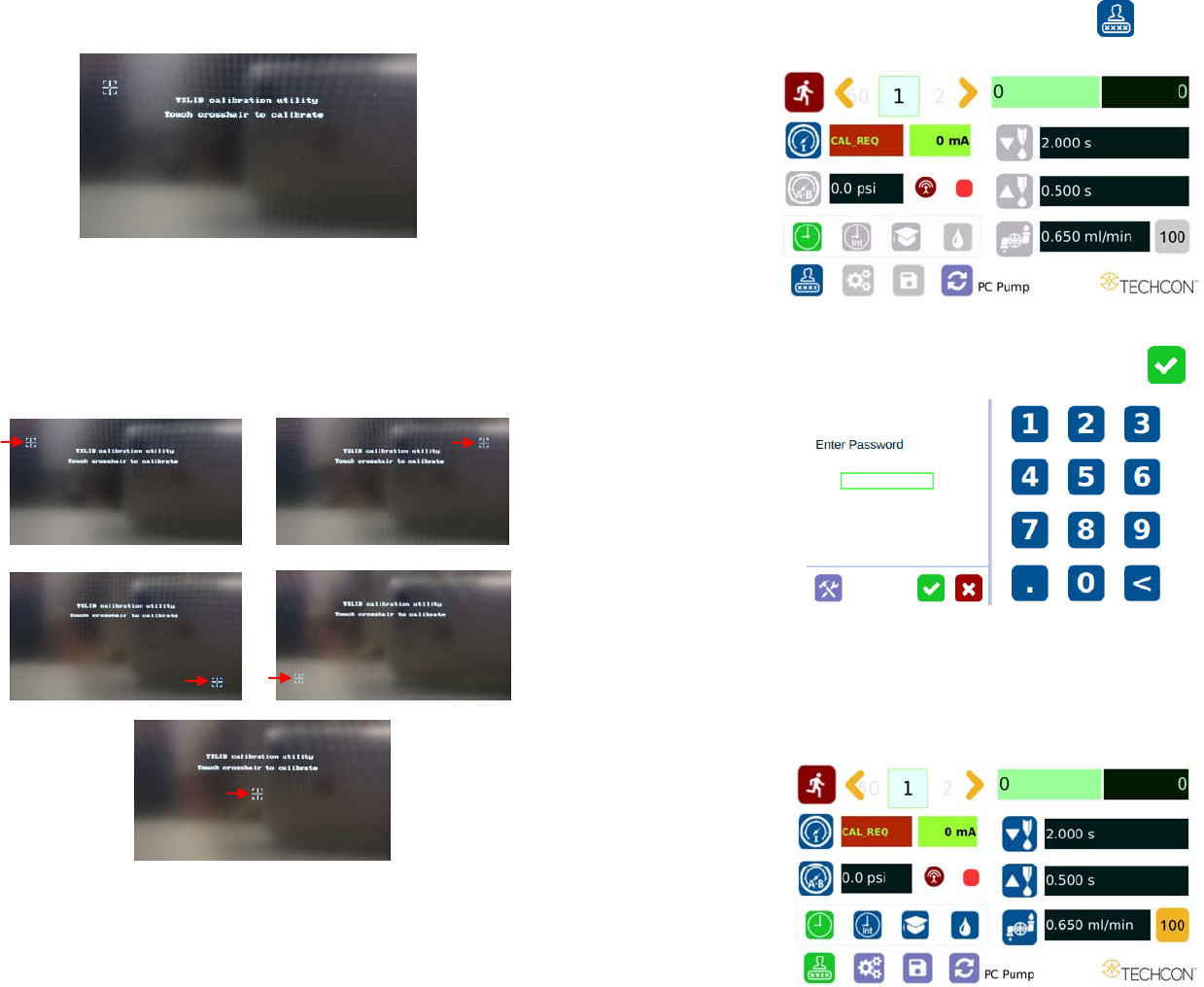
6. Wait until the system completes the software update from the USB drive
and the first touch-screen calibration is displayed
7. Remove the USB drive from the USB port before proceeding to the next
step
8. Follow the instructions on the display to calibrate the touch screen by
touching the crosshair at five different points. Note: In order to
accurately calibrate the touch screen, it’s recommended that the stylus
pen is used
9. Wait until the system completes the rebooting sequence and the home
screen is displayed
10. Repeat sections 5.1.1 and 5.1.2 to re-calibrate the air pressure
7
5.1.1 Login
1. Touch the Login icon to enter login screen
2. Enter “0000” in Password window
3. Touch the green check mark Icon to save and exit
5.1.2 Pressure Calibration
Note: Pressure calibration must be performed when the unit is activated for
the first time.