00197793-03_VD_Support_Media_2.3_EN.pdf - 第13页
Support Media 2. 3 / Software Version Description 05/2016 Edition 13 3.3 Compatibilit y Table 3-4: Compatibili ty of interoperable products
Support Media 2.3 / Software Version Description 05/2016 Edition
12
3.2 Products of Release 85 (R85)
Product Release 85
SIPLACE Board Gate Keeper 1.2 SP1
SIPLACE EDM 3.3
SIPLACE Explorer 3.3
SIPLACE Feeder Manager 3.0 SP1
SIPLACE LED Pairing Controller 1.0 SP2
SIPLACE License Manager 4.1
SIPLACE Line Monitor 4.1
SIPLACE Material Manager 2.3
SIPLACE OIB 4.3
SIPLACE OIS/SIS 13.1
SIPLACE Order Manager 1.2
SIPLACE Performance Monitor 1.5 SP1
SIPLACE Pro 13.1
SIPLACE Setup Center 8.1
SIPLACE Station Software 709.1
SIPLACE Support Media 2.3
SIPLACE Traceability 5.1
Table 3-3: Products of Release 85 (R85)
Support Media 2.3 / Software Version Description 05/2016 Edition
13
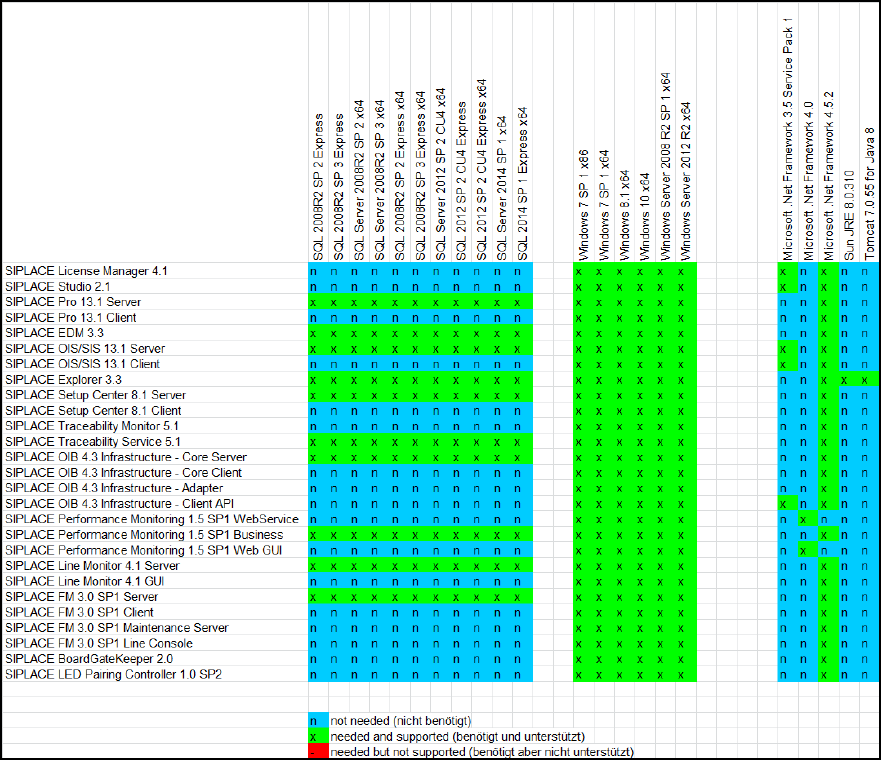
3.3 Compatibility
Table 3-4: Compatibility of interoperable products
Support Media 2.3 / Software Version Description 05/2016 Edition
14
4 Functionality
SIPLACE Net Support Media is intended to help you preparing your computer automatically for
the usage and proper operation of SIPLACE line software products. The Support Media checks the
necessary system requirements of your system and installs them.
When you insert the Support Media, the Software Launcher is started.
From this window you have access to the following tasks.
● The Prerequisite Analyzer prepares your software environment for the SIPLACE software
products.
● The Runtime Analyzer analyzes your software environment in which SIPLACE software
products have already been installed and identifies and fixes the most common problems.
● With the SIPLACE Products installer you can directly install or use infrastructure products.
● You can install tools manually from the Third Party Tools directory.
● You can update your software environment manually from the Updates directory.
● You can install and update the drivers of your SIPLACE computer manually from the Drivers
directory.
● View Support Media documentation via links.
● Maintain your system and database application by using the Operation Manager.
Detailed information can be found in the Support Media Administration Manual,
item no: [00197794-xx].
4.1 Changes
The following changes have been made:
● Profiles for Release 85
● Microsoft Windows 10 supported
● SQL 2012 SP 3 Upgrade Item Detection
● Full Customer Version now also includes SQL 2012 related packages
● SQL 2012 Shared Management Objects included
● Updates of Error Reporter, Operation Manager, YATS, SIPLACE Studio and more
● Minor improvements and corrections