00197793-03_VD_Support_Media_2.3_EN.pdf - 第18页
Support Media 2. 3 / Software Version Description 05/2016 Edition 18 Select Password policy You have to select, if you want to apply previous (simpl e) passwords or more co mplex password s to created account s to meet p…
Support Media 2.3 / Software Version Description 05/2016 Edition
17
6 Troubleshooting
This chapter describes known issues and general problems and questions. If applicable,
troubleshooting is provided to help you working with Support Media.
6.1 Known Issues
Removed "outdated" Installation packages (since V1.11)
Some installation packages (like Microsoft SQL 2008 SP1 Express - see Table 2-1) have been
removed from the media to save space for easier distribution of Support Media.
The Prerequisite Analyzer will detect, if required Prerequisites are missing on the media and show
you options how to retrieve the missing packages.
Microsoft SQL Server/Express 64 Bit
If you have installed a 32-bit Microsoft SQL Edition on your 64-bit OS and want to use the 64-bit
Edition, you have to uninstall the Edition before.
Microsoft SQL Server
If you plan to install Microsoft SQL Server Edition, please see the Navigation Guide documents
regarding manual SQL installation to ensure that you use the correct installation options.
The Prerequisite Analyzer now also includes profiles (in SIPLACE Net) helping to prepare your
computer for Microsoft SQL Server installations.
After installation, you may (re-)run the Prerequisite Analyzer to apply possibly required updates and
install all other required prerequisites. Additionally, the Prerequisite Analyzer will warn you if it finds
known conflicting settings.
OS Setting - Language for Non-Unicode programs
This Support Media build *should* work independent of the setting "Language for Non-Unicode
programs" (this setting may cause problems on Chinese systems).
Now, all Script files (*.VBS;*.HTA;*.HTML;*.HTM;*.CSS) are converted to Unicode during the
Support Media build (directories Scripts and SIPLACE Net on DVD1) and written log files use ANSI
characters.
However, there might still be cases, where problems occur – if you encounter problems please use
the language setting "English (United States)" for Non-Unicode programs.
Net Framework 4.0 may require a reboot before proceeding
New with Support Media 1.13: the Prerequisite Analyzer will be restarted automatically after reboot
and login with the same account.
Support Media 2.3 / Software Version Description 05/2016 Edition
18
Select Password policy
You have to select, if you want to apply previous (simple) passwords or more complex passwords
to created accounts to meet possibly existing password policy restrictions.
In specific configurations, the Prerequisite Analyzer may detect Windows Firewall being
active although it is currently not
This may happen when Microsoft Windows Firewall is configured by Group Policies to be disabled
in some situations instead of using the Control Panel settings.
Since Group Policies are most likely to be applied in Domain environments only and the
Prerequisite Analyzer automatically deselects the Windows Firewall Disable script in domain
environments and hints the user to check for proper configuration, this should not be a problem.
Furthermore, if the user explicitly selects the Windows Firewall Disable script to be executed, the
Microsoft Firewall will be disabled for all conditions (=network locations) ensuring proper function of
the SIPLACE products (although this is not recommended in domain environments for security
reasons).
Missing association with file extension .HTA
There might be constellations in which the association with .HTA files is missing in the operating
system. This can happen by accident or be caused by an installation.
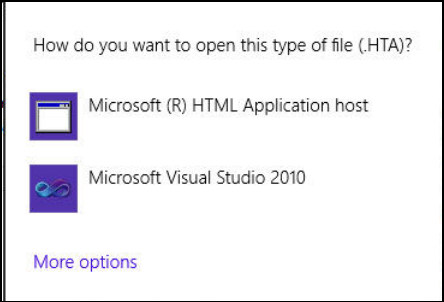
In the following example, you see the message on Windows 8.1 that is displayed when you try to
start using the Support Media Software Launcher but the .HTA extension is not associated.
Figure 6-1: .HTA extenstion not associated
► In this case, close this window by clicking anywhere outside of the window.
The .HTA extension has to be associated.
Support Media provides .reg files for Windows installations installed on their default location
(C:\Windows) to solve this problem.
Support Media 2.3 / Software Version Description 05/2016 Edition
19
On a default Windows installation, the problem can be solved as follows:
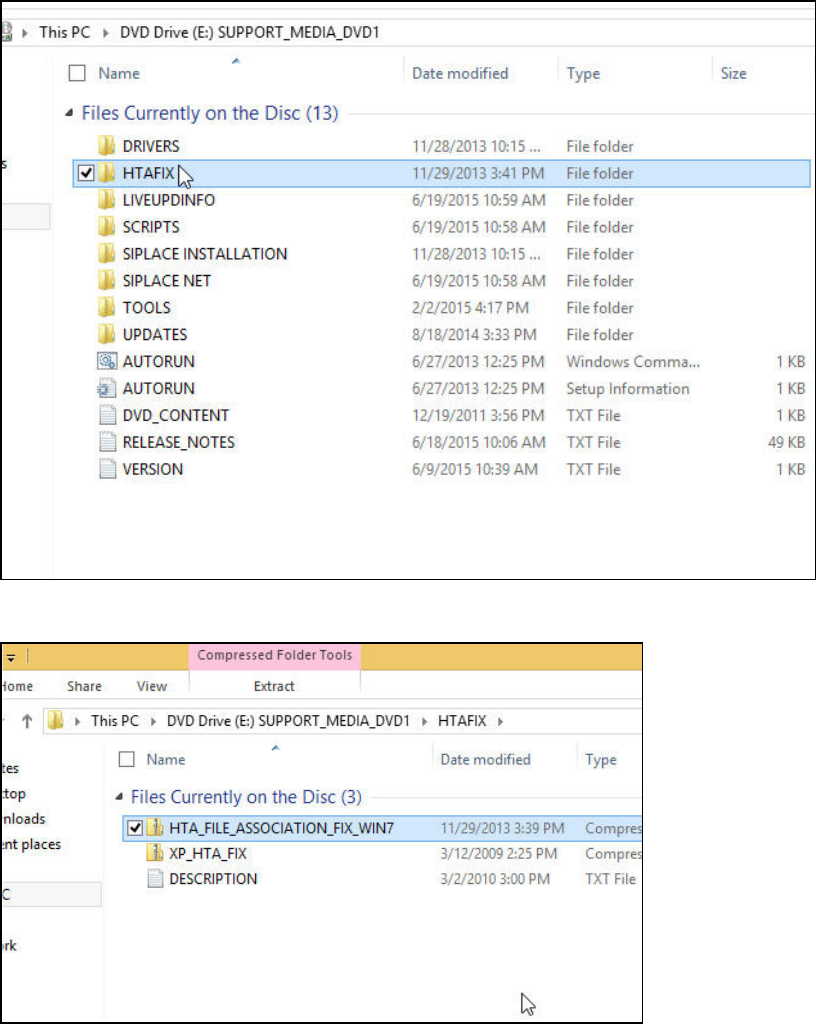
► Browse on the Support Media through the HTAFIX directory and select the
HTA_FILE_ASSOCIATION_FIX_WIN7 ZIP file.
Figure 6-2: HTAFIX directory
Figure 6-3 . HTA zip file
► Double-click the ZIP file to open it.