00198168-02_Technical_Training_TX-Series_EN.pdf - 第243页
10 Station Software Overviews 10.7 Maintenance GUI Technical Training SIPLACE TX-Series 10/2016 243 General function: 1. Select Head, Location, Gantry 2. Comments field for reports 3. Show the result of each function 4. …
10 Station Software Overviews
10.7 Maintenance GUI
242 Technical Training SIPLACE TX-Series 10/2016
10.7 Maintenance GUI
10.7.1 General Maintenance GUI
The Maintenance GUI contains 3 maintenance functions: preventive maintenance, predictive
maintenance and verification. The maintenance GUI is structured to allow quick and easy carrying
out of maintenance, troubleshooting and verification tasks.
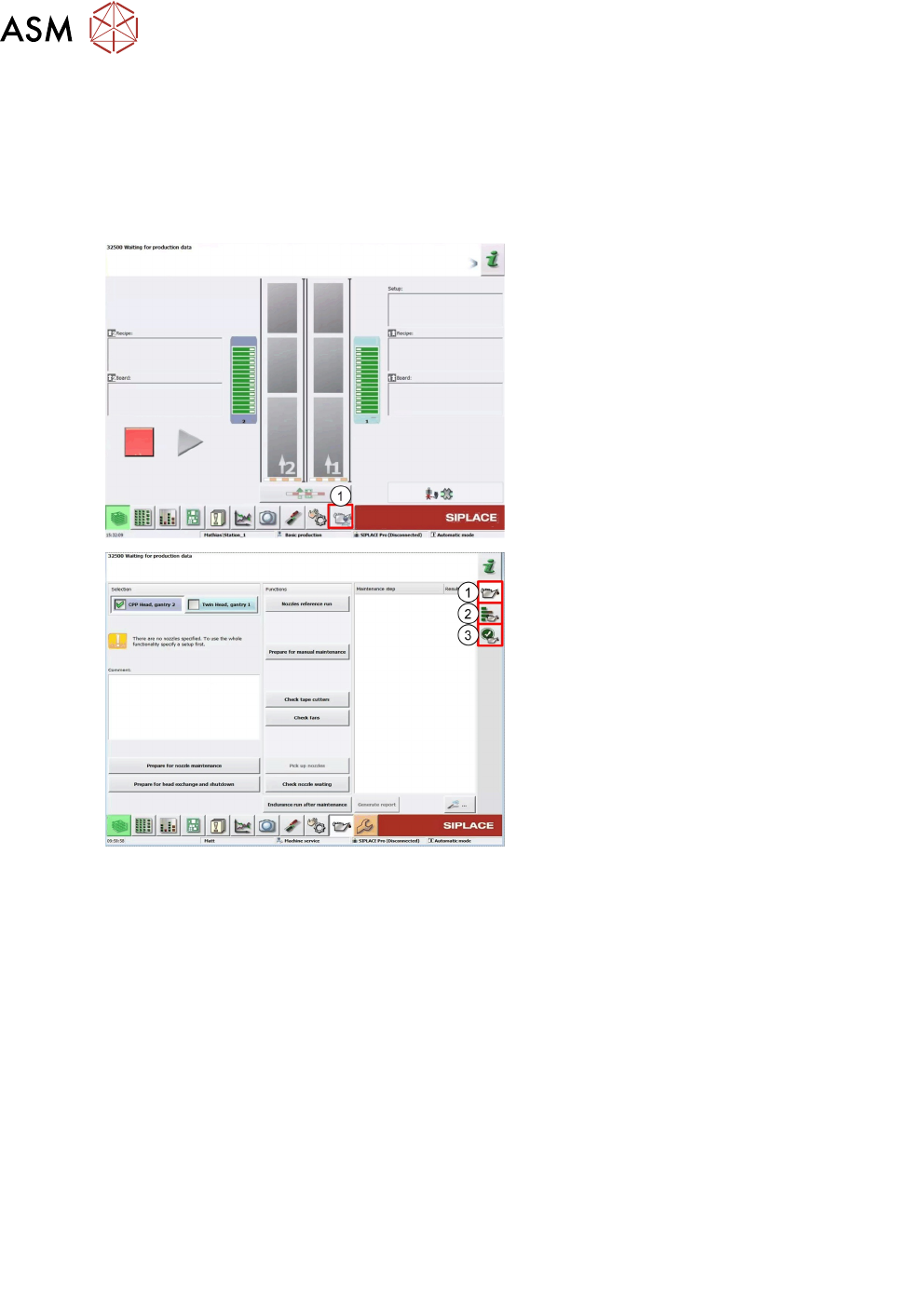
1. Access Maintenance GUI
1. Preventive
2. Predictive
3. Verification
User Level:
1. "Operator"
2. "Machine Service"
3. "Advanced production"
10.7.2 Preventive Maintenance
In order to perform maintenance efficiently four maintenance workflows have been defined
combining the individual steps to form an efficient sequences of tasks to be performed.
Maintenance workflows
Each workflow is supported with a document (Job Card), which guides you efficiently through the
maintenance work. Each task is explained in detail and illustrated with clear diagrams and the
maintenance GUI supports the workflows.
●
Workflow 1: Weekly maintenance tasks.
●
Workflow 2: Combination of weekly and 3-monthly maintenance tasks.
●
Workflow 3: Combination of weekly and 6-monthly maintenance tasks.
●
Workflow 4: Combination of weekly and 12-monthly maintenance tasks.
Planning workflows
Example for the frequency of individual workflows over a period of one year.
●
Workflow 1: 45 times / year
●
Workflow 3: 2 times / year
●
Workflow 2: 4 times / year
●
Workflow 4: 1 time / year
10 Station Software Overviews
10.7 Maintenance GUI
Technical Training SIPLACE TX-Series 10/2016 243
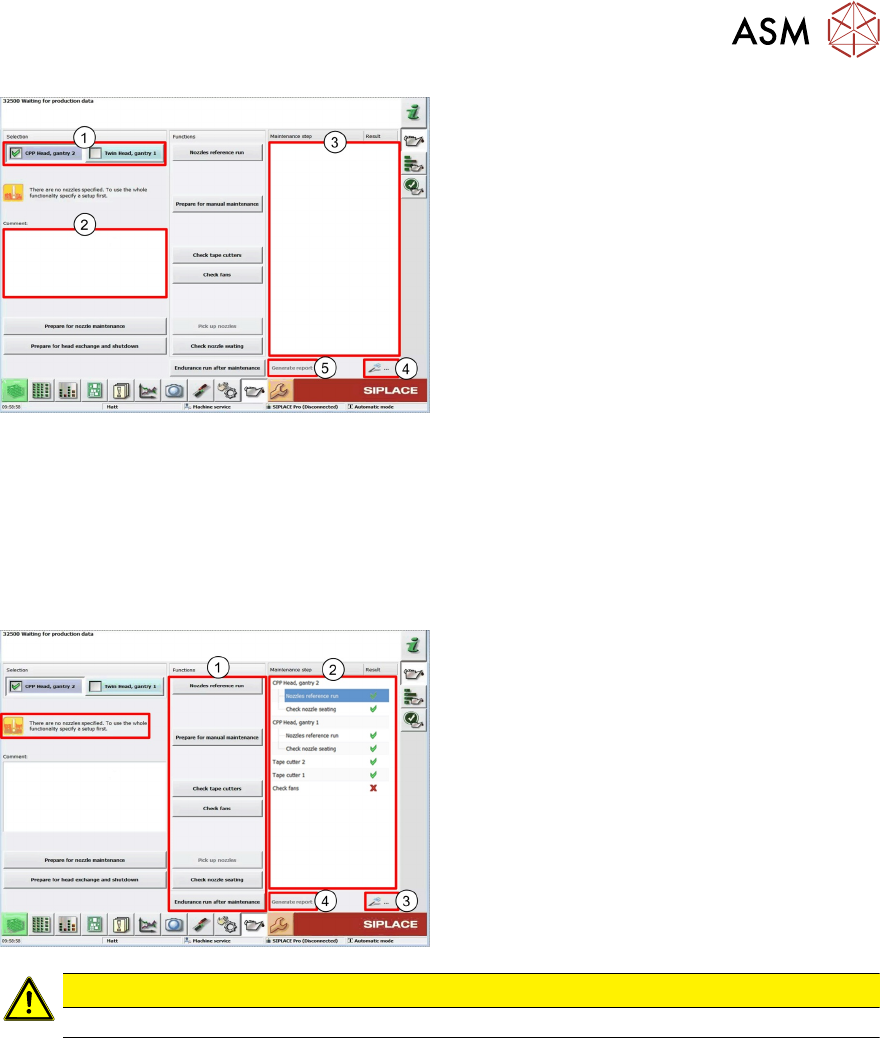
General function:
1. Select Head, Location, Gantry
2. Comments field for reports
3. Show the result of each function
4. Show the details for the selected function
in the result window
5. Report* with results and details of the
function which was carried out
* The Reports will be save on the station computer and transfer via the SW Line diagnostic to the
SIPLACE Pro computer.
Storage Location
Station: C:\Sirio\Work\MaintenanceReports
SIPLACE Pro: C:\MaintenanceReports
User Level "Operator"
1. Maintenance machine functions
2. Shows the result of each function
3. If an error occurs, the detail button shows
more information
4. The report shows all results with details
CAUTION
The machine required a recipe to carry out the preventive maintenance steps.
10 Station Software Overviews
10.7 Maintenance GUI
244 Technical Training SIPLACE TX-Series 10/2016
Content Preventive Maintenance page
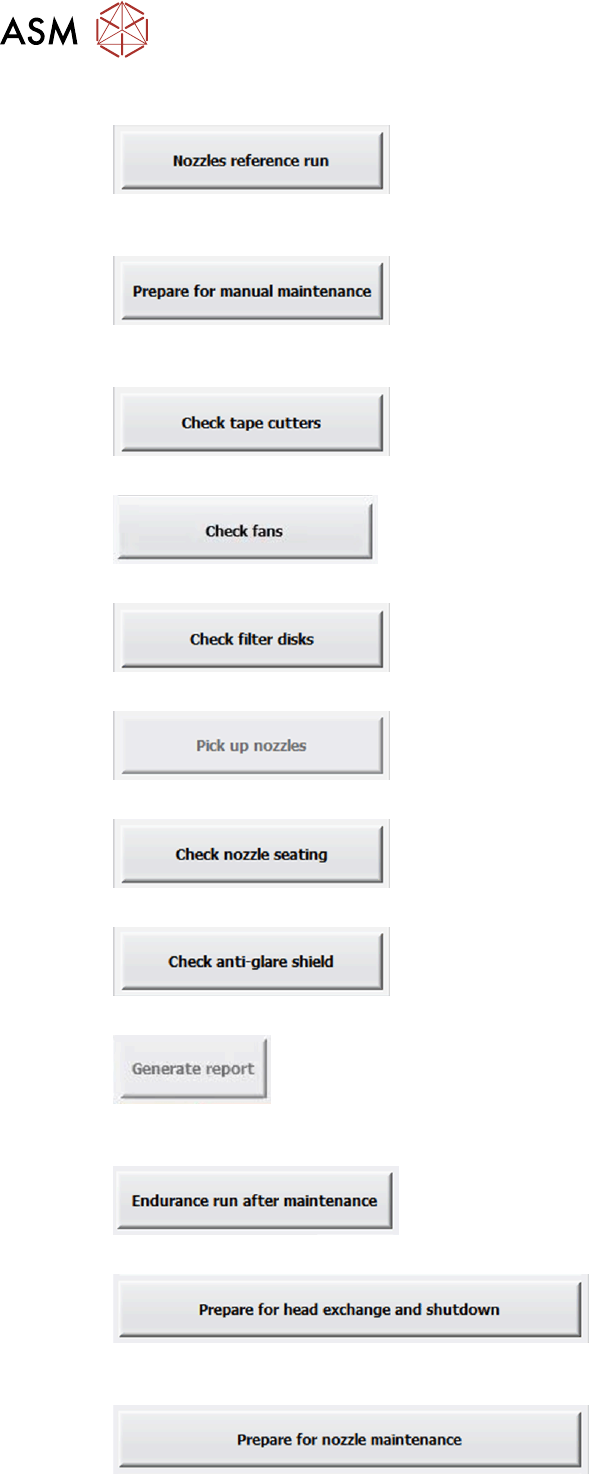
Status overview of Vacuum-, height- and scan values with the production nozzles shows the
disabled DP´s and EXIT Button back to Maintenance GUI.
Return nozzle in the nozzle changer., Gantry moves in the Setup position and remove all tables if
possible (SX). Machine is ON.
Two cuts for selected tape cutter to check the blades and cycle time.
Check and show the Fan monitoring. (SIPLACE TX).
Check the filter disk via the component sensor on C&P20 Heads.
Pick up production nozzles to verify this nozzles with the next steps.
Check the seat of the nozzles on the DP´s. (all CPx Heads).
Check the anti glare shield by turning the DP and the component sensor. (C&P20 A/M Heads only).
Report for the maintenance staff. Shows the results of all tests which was carried out and the
comments.
Endurance run with all main axes and head axes and a complete reference run 3 cycles.
Return production nozzle (pick up calibration nozzle if available), Gantry in Setup position and
remove all table if possible (SX). Machine shut down.
Return all nozzle in the nozzle changer to remove the hole magazine and clean the nozzle.